
Handbrake - video converter
Convert videos from nearly any format to a selection of modern, widely supported codecs.
As of June 2026, Handbrake - video converter has 2,000 users and a 5.00/5 rating from 3 reviews in the Productivity category.
Usersno change0%
2.0K
2,000
Ratingno change0%
5.00
3 reviews
Reviewsup 50.0 percent+50.0%
3
Version
1.1.6
Manifest V3
History
2 snapshotsTracking since Apr 16, 2026.
View as table
| Date | Users | Rating | Reviews | Version |
|---|---|---|---|---|
| Apr 16, 2026 | 2.0K | 5.00 | 2 | 1.1.6 |
| Apr 26, 2026 | 2.0K | 5.00 | 3 | 1.1.6 |
| Now | 2.0K | 5.00 | 3 | 1.1.6 |
Permissions & access
- Permissions
- storage
- Host access
- None declared
Screenshots

About
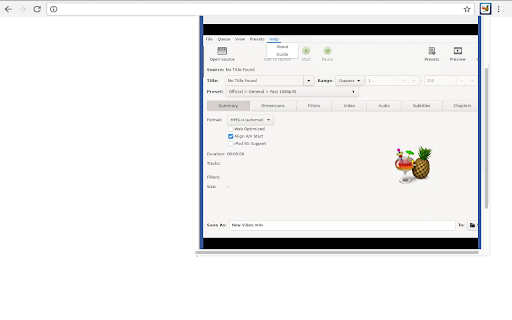
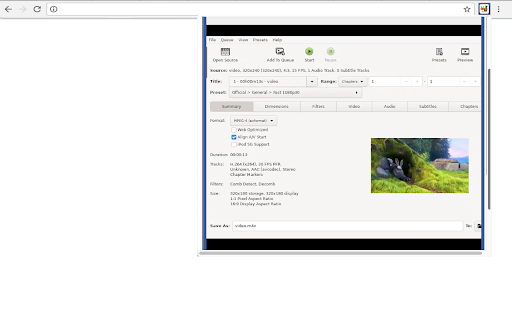
This extension allows users to use the Handbrake software program. Handbrake is a program for converting video from nearly any format to a selection of modern, widely supported codecs. HandBrake works with most common video files and formats, including ones created by consumer and professional video cameras. HandBrake leverages tools such as FFmpeg, x264, and x265 to create new MP4 or MKV video files from these Sources.

With loads of pre-set formats available for almost any standard: Android, Apple, Playstation, Vimeo, YouTube, Windows, and Matroska, among others, this app is capable of reworking videos at up to 4K resolution and almost any aspect ratio you need.

•	Frequent questions:

-	How do I add subtitles in HandBrake? To add subtitles in HandBrake, you will first need to open the video you want to play. Once opened, click on settings > subtitles > import. Select the subtitle document you want to sync and finally click on 'start decoding'.

-	What output codecs are supported in HandBrake? HandBrake supports the most popular audio and video codecs, including those belonging to MP4, MOV, AVI and so on.

Supported Input Sources: Handbrake can process most common multimedia files and any DVD or BluRay sources that do not contain any kind of copy protection.

•	Supported Outputs:

-	File Containers like .MP4, .MKV and WebM
-	Video Encoders like AV1, H.265, …
-	Optional Hardware accelerated video encoding
-	Audio Encoders like AAC, MP3, …
-	Audio Pass-thru like FLAC, DTS, Opus, …

•	More features:

-	Title / chapter and range selection
-	Batch Scan and Queueing of encodes
-	Chapter Markers
-	Subtitles like VobSub or Closed Captions.
-	Constant Quality or Average Bitrate Video Encoding
-	Support for VFR and CFR
-	Video Filters: Deinterlacing, Decomb, Denoise and scaling
-	Live Static and Video Preview

This extension also includes access to a file manager to upload and download videos managed by the app.

This extension is the Handbrake online distribution so it is compliant with the Handbrake GPL.
Technical
- Version
- 1.1.6
- Manifest
- V3
- Size
- 546KiB
- Min Chrome
- 88
- Languages
- 18
- Featured
- No
Metadata
- ID
- gmdmkobghhnhmipbpplibkgekdfaacjp
- Developer ID
- u6ddc90d29a0127b06317fe7c1d4380ac
- Developer Email
- [email protected]
- Created
- Feb 28, 2024
- Last Updated (Store)
- Mar 2, 2026
- Last Scraped
- Jun 10, 2026
- Website
- runapps.org
- Support URL
- https://www.runapps.org/contact-us/
- Privacy Policy
- https://www.runapps.org/privacy-policy/
Similar extensions
Alternatives to Handbrake - video converter, ranked by description similarity.

Kdenlive video editor
Create and edit videos with multi-track video editing and any audio / video format
1.0K
★ 2.3

Video Converter
Convert any video file to selected formats (i.e. mp4) inside your browser!
9.0K
★ 3.0
Blender 3D creation suite
Create animated films, visual effects, motion graphics, interactive 3D applications, virtual reality & video games.
10.0K
★ 2.9

Video Downloader - MPMux
A professional online video downloader for saving videos such as mp4,m3u8,hls,live.
200.0K
★ 4.9

Format Factory online
Multimedia converter for video, audio, picture files, ripping DVDs & CDs, and create .iso images.
4.0K
★ 3.4

Subtitle Extractor
Extract soft-coded subtitles from local video files as SRT files, no upload required.
2.0K
★ 2.9

MKV to MP4
Quickly convert mkv to mp4 with our extension. Easily change mkv to mp4 in seconds using this reliable converter to mp4.
9.0K
★ 4.4

Easy Video Splitter
Split videos directly in your browser
136
Data sourced from the Chrome Web Store · last verified Jun 10, 2026.