
Video Converter
Convert any video file to selected formats (i.e. mp4) inside your browser!
As of May 2026, Video Converter has 9,000 users and a 3.00/5 rating from 6 reviews in the Productivity category.
Usersup 12.5 percent+12.5%
9.0K
9,000
Ratingno change0%
3.00
6 reviews
Reviewsno change0%
6
Version
0.1.6
Manifest V3
90-day change · In the last 90 days this extension gained 1.0K users.
History
1 snapshotsTracking since Apr 28, 2026.
View as table
| Date | Users | Rating | Reviews | Version |
|---|---|---|---|---|
| Apr 28, 2026 | 8.0K | 3.00 | 6 | 0.1.6 |
| Now | 9.0K | 3.00 | 6 | 0.1.6 |
Permissions & access
- Permissions
- storagecontextMenus
- Host access
- None declared
Screenshots

About
Video Converter extension helps you easily convert any video format to another (for example, WEBM to MP4). It uses the FFmpeg library which is compiled from C/C++ language to JavaScript with Emscripten compiler. Emscripten is a source-to-source compiler that can compile native C/C++ codes to JavaScript language. Please read this Wikipedia page to get more info about the Emscripten compiler.

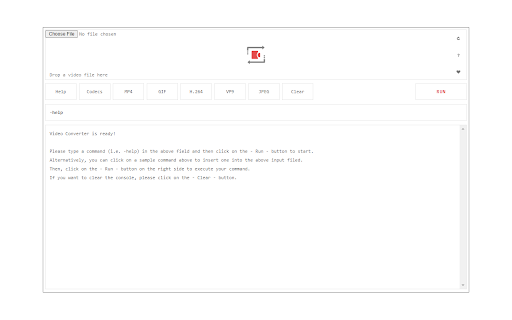
To work with this add-on, just open the app UI and drag a video file to the designated area in the app. Then, type your FFmpeg command in the input file and press the - Run - button. Once the conversion is done, the link to download the video file will be available at the bottom of the UI. Please note that conversion may take some time depending on the video size and also the type of conversion that you choose. There are some sample commands available in the app UI (as buttons) which you can use to start working with this add-on.

Note: Since this add-on runs FFmpeg in the browser, it runs slower than the native FFmpeg applications/library. However, using the add-on is very easy. Simply add it to your browser and it starts to work without any additional plugins. It is only suitable for simple conversions and has a limited number of codecs.

Note: This add-on is specifically designed for "video" conversion. If you want to convert an "audio" file, please use my other add-on Audio Converter (https://chrome.google.com/webstore/detail/audio-converter/ahmgleafdlnihcbfdifidfdanbfhnjhc).

If you have a feature request or found a bug to report, please fill the bug report form on the add-on's homepage (https://mybrowseraddon.com/video-converter.html).
Technical
- Version
- 0.1.6
- Manifest
- V3
- Size
- 9.81MiB
- Min Chrome
- 88
- Languages
- 1
- Featured
- Yes
Metadata
- ID
- icmgolelmdmakliojggoobcjdbdkpipd
- Developer ID
- u71792319a8099b50ea26847bc7c06a55
- Developer Email
- [email protected]
- Created
- Jul 17, 2018
- Last Updated (Store)
- Feb 6, 2025
- Last Scraped
- May 25, 2026
- Website
- —
- Privacy Policy
- —
Similar extensions
Alternatives to Video Converter, ranked by description similarity.

Audio Converter
Convert any audio file to selected formats (i.e. mp3) inside your browser!
10.0K
★ 3.3

Video Resizer
Easily resize video files right in your browser!
1.0K

Video & Audio Muxer
Mux video and audio files from selected formats inside your browser!
625
★ 4.0

WEBM to MP4 converter: WebCodecs and FFmpeg support
🎬 Convert WEBM to MP4 instantly and securely. No server uploads, unlimited file conversions, works locally in your browser.
4.0K
★ 4.3

All Video Converter
Convert video and audio files right from your browser without any uploading
32

Offline Video Converter for Chrome
Convert video and audio files locally in Chrome. Fast offline converter for MP4, WebM, MOV, MP3 and more.
163
★ 5.0

Video Recorder
Easily record video & audio from your computer's camera!
20.0K
★ 2.1

WEBM to MP4
Easily convert WEBM to MP4! Fast and simple solution for transforming webm format to mp4.
4.0K
★ 4.7
Data sourced from the Chrome Web Store · last verified May 25, 2026.