
Save Gmails as PDF
Convert your emails to PDF format on local (most secure and private) to backup your emails
As of June 2026, Save Gmails as PDF has 85 users and a 3.86/5 rating from 7 reviews in the Productivity category.
Usersup 1.2 percent+1.2%
85
85
Ratingno change0%
3.86
7 reviews
Reviewsno change0%
7
Version
1.0.1
Manifest V3
History
3 snapshotsTracking since Apr 1, 2026.
View as table
| Date | Users | Rating | Reviews | Version |
|---|---|---|---|---|
| Apr 1, 2026 | 84 | 3.86 | 7 | 1.0.1 |
| May 3, 2026 | 81 | 3.86 | 7 | 1.0.1 |
| Jun 2, 2026 | 95 | 3.86 | 7 | 1.0.1 |
| Now | 85 | 3.86 | 7 | 1.0.1 |
Permissions & access
- Permissions
- scriptingidentitystoragewindows
- Host access
- https://mail.google.com/*
Screenshots
About
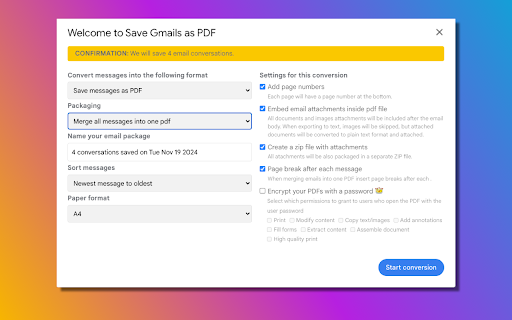
**Introducing *Save Emails as PDF* - The Most Secure Gmail™ PDF Archiving Tool** Our *Save Emails as PDF* Chrome extension allows you to securely save, convert, and organize your Gmail emails into PDF files with just a few clicks. **Prioritizing user privacy, all data processing occurs locally on your device**—no data is transferred externally—ensuring the highest level of security available in any similar tool. ### Why We Need Gmail API Authorization I would like to clarify that our "Save Gmails as PDF" extension operates completely locally. The email access permissions we request are solely for reading your email content to convert it to PDF format. All processing happens directly on your own computer, and no data is ever sent to our servers or any third-party servers. These permissions are necessary because: 1. Local Processing Requirement: To convert your emails to PDF, our extension needs to access the email content directly on your device 2. Gmail's Security Model: Gmail's security architecture requires explicit authorization for any application to read email content, even when processing happens locally 3. Privacy Protection: By processing everything locally, we ensure your sensitive email data never leaves your computer 4. No Server Storage: Unlike other solutions, we never store your emails or credentials on any external servers ### Key Features: ✔️ Back up individual emails or entire conversations for quick reference ✔️ Merge multiple emails into a single PDF for easy organization ✔️ Save each email as a separate PDF or focus on saving only attachments as PDFs ### Designed for Professionals and Individuals: 1. **Real Estate Agents** 🏡 Archive client communications and transaction history in one PDF, ready to upload into CRMs like SkySlope. 2. **Lawyers and Legal Professionals** ⚖️ Organize all case-related email threads into a single, encrypted PDF for court submissions or client records. 3. **Project Managers and Team Leads** 🚧 Archive and organize project communication in one file, or back up Gmail labels to Google Drive for team sharing. 4. **Business Owners** 💼 Save receipts and customer emails by date or client name, creating a searchable PDF record. 5. **Freelancers and Contractors** 👩💻 Archive all client communications in one place, ensuring easy reference and secure storage. 6. **Anyone Looking to Organize Important Conversations** 🕵️👨⚖️👨💼 Ideal for organizing, securing, and storing essential communications efficiently and privately. --- ### Save Emails as PDF: Comprehensive Capabilities **Flexible Saving Options:** - Save single messages, entire conversations, or even specific Gmail labels - Archive emails matching specific filters or save your entire Gmail account **Export to Preferred Locations:** - Download PDFs directly to your local drive - Sync with cloud storage: Google Drive, Dropbox, Box, Egnyte, or OneDrive **Additional Features for Ultimate Control:** - Include or exclude attachments - Save only attachments as PDFs - Add page numbers and choose between condensed or full formats - Adjust page size for easy printing - Encrypt files with passwords for added security - Forward converted PDFs directly from Gmail - Choose between a single merged PDF or individual PDFs for each message - Save conversations as TXT or HTML documents - Share PDFs securely with custom links Our *Save Emails as PDF* extension is designed to offer maximum flexibility and privacy for users of all needs, from professionals to personal users. Rest assured, this extension prioritizes your privacy and data security, making it the safest choice on the market.
Technical
- Version
- 1.0.1
- Manifest
- V3
- Size
- 1.15MiB
- Min Chrome
- 88
- Languages
- 2
- Featured
- No
Metadata
- ID
- glcbedjkndjllnkojmkdmhgplkfjckdo
- Developer ID
- u9a8e76e38d3e7070a26415f28c2cf90b
- Developer Email
- [email protected]
- Created
- Jan 1, 2025
- Last Updated (Store)
- Mar 12, 2025
- Last Scraped
- Jun 2, 2026
- Website
- —
- Privacy Policy
- https://goodsoftwarehome.com/privacy-policy/
Similar extensions
Alternatives to Save Gmails as PDF, ranked by description similarity.

Gmail to PDF Converter
Convert Gmail emails to PDF with one click. Seamlessly integrates with Gmail's interface for easy email-to-PDF conversion.
42
★ 5.0

Email to PDF - Privacy First
Save multiple Gmail emails as text-based PDFs with one click. Images included. No need to grant access to your entire Gmail account.
19
★ 1.0

Gmail to PDF
Export Gmail emails to PDF
6

PDFMailer – Send to Gmail
Convert any webpage to PDF and send via Gmail in one click.
10

ThreadPDF for Gmail - Export Gmail Threads to PDF Instantly
Quickly export Gmail emails & threads to PDF for easy archiving, backups, AI analysis, and legal compliance.
141
★ 3.9
Snap Email to Sheets
Seamlessly save google email content to sheets and pdf with a single click
138
★ 5.0

Save Bulk Gmail Attachments to Drive & ZIP
Download all attachments from multiple Gmail emails at once — save to Drive or ZIP, sorted into folders automatically.
1.0K
★ 4.3

Ultimate PDF: All-in-One Editor
Convert, merge, split, rotate, compress PDFs and more. 100% local and private.
48
Data sourced from the Chrome Web Store · last verified Jun 2, 2026.