
Ultimate PDF: All-in-One Editor
Convert, merge, split, rotate, compress PDFs and more. 100% local and private.
As of June 2026, Ultimate PDF: All-in-One Editor has 48 users in the Productivity category.
Usersup 45.5 percent+45.5%
48
48
Ratingno change0%
—
— reviews
Reviewsno change0%
—
Version
1.3.0
Manifest V3
History
8 snapshotsTracking since Apr 3, 2026.
View as table
| Date | Users | Rating | Reviews | Version |
|---|---|---|---|---|
| Apr 3, 2026 | 33 | — | — | 1.3.0 |
| Apr 17, 2026 | 31 | — | — | 1.3.0 |
| Apr 27, 2026 | 34 | — | — | 1.3.0 |
| May 7, 2026 | 36 | — | — | 1.3.0 |
| May 14, 2026 | 42 | — | — | 1.3.0 |
| May 23, 2026 | 44 | — | — | 1.3.0 |
| Jun 2, 2026 | 42 | — | — | 1.3.0 |
| Jun 10, 2026 | 52 | — | — | 1.3.0 |
| Now | 48 | — | — | 1.3.0 |
Permissions & access
- Permissions
- sidePanelstoragescriptingactiveTabtabs
- Host access
- <all_urls>
Screenshots
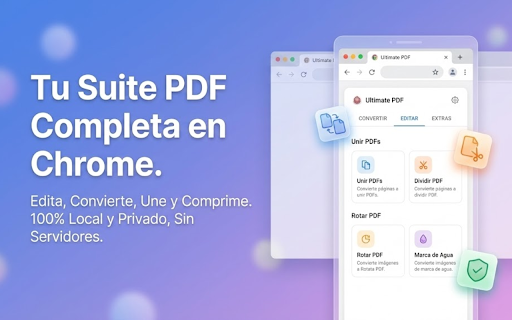


About
🚀 ULTIMATE PDF: YOUR ALL-IN-ONE PDF SUITE - 100% PRIVATE & FREE

Tired of uploading your confidential documents to unknown servers just to make a simple edit? Ultimate PDF: All-in-One Editor is the secure solution you've been waiting for. Perform all your PDF editing, converting, and management tasks directly inside your browser.

🔒 TOTAL PRIVACY: YOUR FILES, YOUR CONTROL
Unlike other extensions, Ultimate PDF processes everything LOCALLY on your device.
• Your files are NEVER uploaded to the cloud.
• Your documents NEVER leave your computer.
• Works OFFLINE once installed.

Perfect for lawyers, accountants, students, and businesses handling sensitive data.

🔥 KEY FEATURES (ALL-IN-ONE):

📂 CONVERT PDF (High Quality)
• PDF to Word (DOCX): Extract text and keep formatting to edit in Microsoft Word or Google Docs.
• PDF to Image (JPG/PNG): Convert pages into sharp, high-quality images.
• Image to PDF: Create PDF documents from your photos (JPG, PNG).
• Web to PDF: Capture and save any full web page as a PDF without losing layout.

🛠️ EDIT & ORGANIZE
• Merge PDF: Combine multiple files into a single, organized document.
• Split PDF: Extract specific pages or separate a large file into smaller ones.
• Rotate PDF: Fix document orientation (90°, 180°).
• Compress PDF: Reduce file size for email attachments without losing quality.
• Watermark: Protect your intellectual property by adding text or image stamps.

🌟 WHY CHOOSE ULTIMATE PDF?
✅ No daily limits (100% Free).
✅ No sign-up or registration required.
✅ Modern, fast interface in the Chrome Side Panel.
✅ Supports 14 languages.
✅ Built with secure Manifest V3 technology.

📱 COMMON USE CASES:
• Students: Merge class notes or convert PDFs to Word for assignments.
• Professionals: Compress heavy reports to send via email instantly.
• Business: Save web invoices to PDF with a single click.

This extension is a secure, local alternative to services like Adobe Acrobat, SmallPDF, or iLovePDF.

👇 Install Ultimate PDF now and take full control of your documents with maximum security!

---
Privacy Note: This extension operates under a strict "No Data" policy. We do not collect, store, or sell your information. All processing happens on your machine.
Technical
- Version
- 1.3.0
- Manifest
- V3
- Size
- 855KiB
- Min Chrome
- 88
- Languages
- 14
- Featured
- No
Metadata
- ID
- ckjladbkijmikikikhlhimhpbdhejpda
- Developer ID
- u6e7a799ce9bd3a0419b9b06dbdd67026
- Developer Email
- [email protected]
- Created
- Dec 5, 2025
- Last Updated (Store)
- Jan 5, 2026
- Last Scraped
- Jun 10, 2026
- Website
- —
- Support URL
- —
Similar extensions
Alternatives to Ultimate PDF: All-in-One Editor, ranked by description similarity.

PDF Total Privacy
Advanced tool to manage, modify, and process PDF files quickly.
9

PDF Master Pro
Complete PDF toolkit - Merge, Split, Compress, Convert & more. All locally processed for maximum privacy.
15
★ 5.0

Smart PDF - Professional Tools
Premium PDF Tools: Merge (Grid), Watermark, Page Numbers, Convert, Edit.
35
★ 5.0

PDF Document Merger
Combine your PDF files quickly and securely, right in Chrome. All processing happens locally.
271
★ 5.0

Offline PDF Tools
100% offline PDF modification tools - merge, split, extract, rotate, delete pages. No uploads, complete privacy.
62
★ 4.0

PDF Utility Extension
A Chrome extension for various PDF utilities like split, extract, merge, and more.
2

PDF Manager Simple
Organize PDFs directly in your browser. Simple and fast.
114
★ 1.0

PDFuse – Effortless PDF Splitting, Merging & Page Removal
A user-friendly Chrome extension for splitting, merging, and removing pages from PDF files directly in your browser.
9
Data sourced from the Chrome Web Store · last verified Jun 10, 2026.