Splashtop Classroom
Now view and control the teachers PC/Mac directly on your Chromebook or using your Chrome Browser
As of June 2026, Splashtop Classroom has 20,000 users and a 3.54/5 rating from 48 reviews.
Usersdown 50.0 percent−50.0%
20.0K
20,000
Ratingno change0%
3.54
48 reviews
Reviewsno change0%
48
Version
1.3.6.11
Manifest V2
90-day change · In the last 90 days this extension lost 20.0K users.
History
2 snapshotsTracking since May 3, 2026.
View as table
| Date | Users | Rating | Reviews | Version |
|---|---|---|---|---|
| May 3, 2026 | 40.0K | 3.54 | 48 | 1.3.6.11 |
| Jun 2, 2026 | — | 3.54 | 48 | 1.3.6.11 |
| Now | 20.0K | 3.54 | 48 | 1.3.6.11 |
Permissions & access
- Permissions
- storagepower
- Host access
- http://*/
Screenshots


About
*** #1 Education App Developer – Over 1 million teachers are using Splashtop Remote Desktop, Whiteboard & Classroom products to improve the teaching and learning experience

*** Please visit http://education.splashtop.com to start a free trial.

NEW!!  NOW WITH CHROME ANNOTATION. STUDENTS AND TEACHERS CAN NOW ANNOTATE TOGETHER USING CHROMEBOOKS (iPads, Android, Macs and PCs also supported).

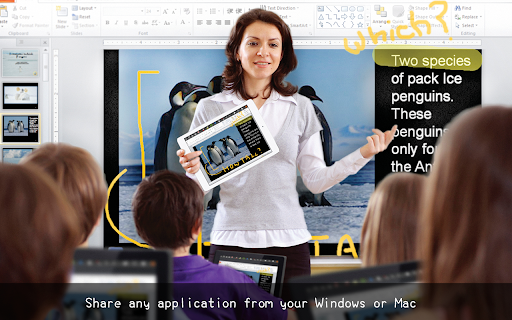
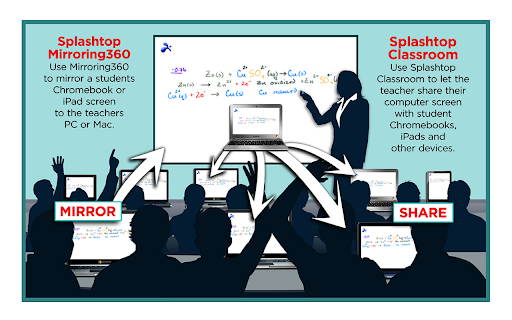
Splashtop Classroom allows teachers to control, annotate then share their desktop and applications with students. Once connected, students can view, control and annotate over lesson content directly from their own devices. Splashtop Classroom is perfect for teachers and instructors who want to engage and motivate the entire room!  Teach from all four corners of the room. Turn your mobile device into an interactive whiteboard. Share anything instantly and in real time. Even the most demanding multi-media applications can be shared instantly and with a great user experience. Splashtop is perfect for 1:1 and BYOD initiatives too!

TEACHERS CAN:

+ Teach from all four corners of the classroom - Connect to the class PC/Mac from your mobile device.
Get out from behind your desk and improve classroom management and student attention.
+ Turn your mobile device into an interactive whiteboard - Use the toolbar to draw, highlight or write over any content. Draw over flipchart backgrounds – or include your own worksheets. Use the spotlight and screen shade tools to keep students focused.
+ Share anything. Instantly. In real time - Share ANY application – even streaming/Flash video. No need to reformat content for mobile devices. No need to upload documents ahead of time.

***** Read how our educators love using Splashtop *****

“Splashtop Classroom allows our teachers to increase student engagement with or without a projector - also allowing students to take control and present their ideas from their own device.  Splashtop also has the added benefit of allowing teachers and administrators to access their files and information from anywhere without having to return to the office and be chained to their desk”. Darrin Tingey, Technology Director, Fremont Re-2 School District.

“One of our teachers teaches severely handicapped students that are wheelchair-bound.  They could not get to the smart board to participate in the class.  With Splashtop Classroom, students can now draw or turn a page without moving from their seat - pretty impressive!!!” Sandy Sundine, Technology Coordinator, Grandview High School.

SYSTEM REQUIREMENTS:

Splashtop Classroom supports any combination of computers and mobile devices supporting these operating systems:

iOS (iPad only), Android v4.0 and up, Chromebook / Chrome Browser, Windows 8, 7, Vista, XP, Mac OS X 10.7 through 10.9

Please visit http://education.splashtop.com  for more details.
Technical
- Version
- 1.3.6.11
- Manifest
- V2
- Size
- 3.96MiB
- Min Chrome
- 28
- Languages
- 4
- Featured
- No
Metadata
- ID
- gkmieojiabdhoinofaheljgfdpgoldck
- Developer ID
- u7156f4c2593b318a77bf5ee92cdedd47
- Developer Email
- [email protected]
- Created
- May 9, 2014
- Last Updated (Store)
- Jun 28, 2019
- Last Scraped
- Jun 2, 2026
- Website
- —
- Support URL
- —
- Privacy Policy
- —
Similar extensions
Alternatives to Splashtop Classroom, ranked by description similarity.
classroom.cloud Student
classroom.cloud delivers a set of stress-free, simple yet effective cloud-based teaching, online safety/safeguarding and technician…
—
★ 1.5
NetSupport School Student
The #1 choice for IT educators worldwide, NetSupport School delivers the tools you need to help maximize the effectiveness of…
—
★ 3.2
NetSupport School Tutor
The #1 choice for IT educators worldwide, NetSupport School delivers the tools you need to help maximize the effectiveness of…
—
★ 4.7

ClassSpaces Extension
Easily manage your classrooms for a conducive learning environment with an intuitive solution developed together with teachers.
511
★ 1.0

ClassSend
AVer is Revolutionizing Education through Technology™ with its ClassSend Student Engagement App.
ClassSend lets students interact…
1.0K
★ 4.3

LanSchool Student
LanSchool Student application for Chromebook
—
★ 1.3

Splash Math - Kindergarten & Grades 1,2,3,4,5
Practice addition, multiplication, subtraction, division, place value, algebra, money, time etc. Common Core aligned content
—
★ 3.2

OKIOCAM Live
The perfect app for live presentations. Display your camera's image on a larger screen or share it through conferencing software.
10.0K
★ 5.0
Data sourced from the Chrome Web Store · last verified Jun 2, 2026.