
UX Teardown
Quickly and easily provide and store UX, copy or design website feedback
As of June 2026, UX Teardown has 238 users in the Workflow & Planning category.
Usersup 16.7 percent+16.7%
238
238
Ratingno change0%
—
— reviews
Reviewsno change0%
—
Version
0.1.20
Manifest V3
History
3 snapshotsTracking since Apr 1, 2026.
View as table
| Date | Users | Rating | Reviews | Version |
|---|---|---|---|---|
| Apr 1, 2026 | 204 | — | — | 0.1.20 |
| May 3, 2026 | 207 | — | — | 0.1.20 |
| Jun 3, 2026 | 253 | — | — | 0.1.20 |
| Now | 238 | — | — | 0.1.20 |
Permissions & access
- Permissions
- activeTabstorageunlimitedStorage
- Host access
- <all_urls>
Screenshots



About
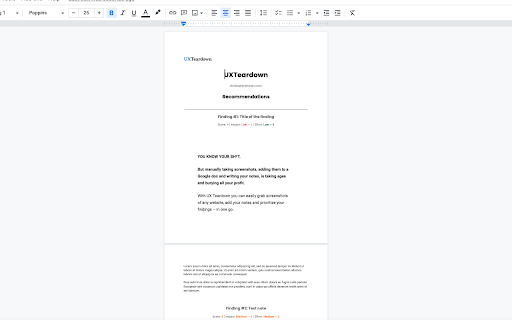
With UX Teardown you can easily grab screenshots of any website, add your notes and prioritize your findings – in one go. Go from screenshots to final report in minutes.
Technical
- Version
- 0.1.20
- Manifest
- V3
- Size
- 1.59MiB
- Min Chrome
- 88
- Languages
- 1
- Featured
- Yes
Metadata
- ID
- gihaehbodmfmnecopfehjikbfbikjjbk
- Developer ID
- u37863c191b04e277b4e3a85035d55bc8
- Developer Email
- [email protected]
- Created
- Apr 15, 2022
- Last Updated (Store)
- May 2, 2022
- Last Scraped
- Jun 3, 2026
- Website
- —
- Support URL
- https://christophersilvestri.com/uxt/
- Privacy Policy
- —
Similar extensions
Alternatives to UX Teardown, ranked by description similarity.

ViewAll - Screenshots, Comments, Team & AI Sharing with Ease
Encrypted web feedback tool for teams. Capture screenshots, code, and accessibility data. Share securely and export for AI.
7
★ 5.0

Moqups
Capture screenshots, and create projects with Moqups
10.0K
★ 5.0

Screen Capture - A Review and Feedback Tool
Extension to aid the process of reviews and audits
88
★ 5.0
UI Feedback
A tool that lets you select html and copy screenshot to clipboard.
18

WebNote
Create full-page annotate-able screenshots
—
★ 5.0

nootiz. The fastest visual feedback tool
Save time and money with nootiz, the go-to tool for gathering and managing visual feedback on any website
63
★ 5.0

Glean.ly - Quick Fact
Browser Tool for quick adding facts to you Glean.ly experiments.
132

QuickShot - Screenshot & Upload
Take screenshots with hotkey, auto-upload and copy link to clipboard
4
★ 5.0
Data sourced from the Chrome Web Store · last verified Jun 3, 2026.