
AudioPick
Pick a preferred audio output device for HTML5 audio and video elements
As of May 2026, AudioPick has 100,000 users and a 3.90/5 rating from 544 reviews in the Accessibility category.
Usersno change0%
100.0K
100,000
Ratingno change0%
3.90
544 reviews
Reviewsup 0.6 percent+0.6%
544
Version
0.3.10
Manifest V3
History
2 snapshotsTracking since May 1, 2026.
View as table
| Date | Users | Rating | Reviews | Version |
|---|---|---|---|---|
| May 1, 2026 | 100.0K | 3.90 | 541 | 0.3.10 |
| May 31, 2026 | 100.0K | 3.90 | 543 | 0.3.10 |
| Now | 100.0K | 3.90 | 544 | 0.3.10 |
Permissions & access
- Permissions
- contentSettingsstoragescriptingactiveTabfavicon
- Host access
- https://*/*
Screenshots

About
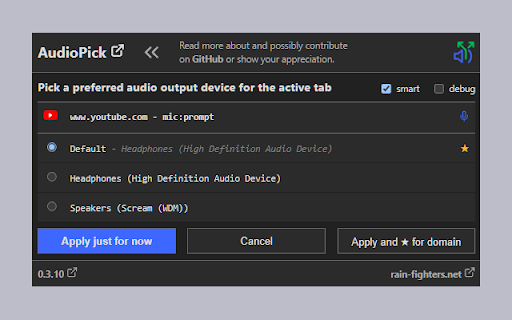
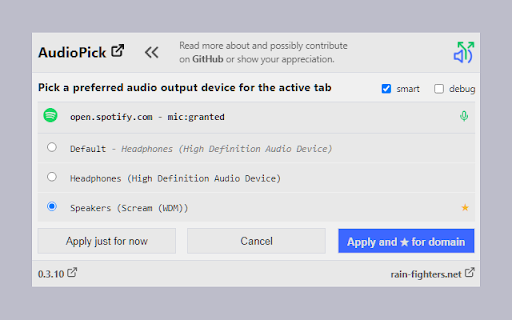
AudioPick allows to pick a preferred audio output device that is used when a chrome tab is playing HTML5 audio or video over HTTPS.

The extension finds HTML5 audio and video elements within the document tree and manipulates the "sinkId"` in order to switch to the preferred audio output device. Since version 0.3.8 it also finds Audio, Video and AudioContext objects that have not been inserted into the document tree, e. g. Spotify and SoundCloud should now work with the extension, too.

Since it's now possible to store/remember a preferred audio output device per domain, the extension's option panel and hence the option to set a global preferred device (for the browser) has been removed.

Note that the "Media Capture and Streams API" requires media (microphone) permissions to be granted to every site with audio sinks that need to be manipulated, which - as a result - allows those sites to access your microphone. Hence AudioPick only acquires permission when the user actually picks a non-default device for a site and restores permissions when the user reverts back to using the default. Since version 0.3.10 a "smartMicAccess" mode can be activated in the UI which further reduces the number of microphone permissions granted by the extension.
Technical
- Version
- 0.3.10
- Manifest
- V3
- Size
- 36.38KiB
- Min Chrome
- 88
- Languages
- 1
- Featured
- Yes
Metadata
- ID
- gfhcppdamigjkficnjnhmnljljhagaha
- Developer ID
- uae2f2a9783bf1e180c3c935395b72940
- Developer Email
- [email protected]
- Created
- May 16, 2016
- Last Updated (Store)
- Jan 26, 2024
- Last Scraped
- May 31, 2026
- Website
- rain-fighters.net
- Privacy Policy
- https://rain-fighters.github.io/AudioPick/
Similar extensions
Alternatives to AudioPick, ranked by description similarity.

Audio Master
Take full control of your browser tab's audio with a volume booster, equalizer, and more.
1.0K
★ 4.8

Auto Pan by Window Position
This extension enables audio panning to the left or right based on the window's position relative to the display center.
458
★ 4.7

Volume Control: Persistent Per-Site Sound
Persistent per-site volume control. Won't lag CPU or break fullscreen. Set custom audio levels for any domain automatically.
51
★ 5.0

Chrome Audio Capture
Free audio recorder extension for Chrome — capture tab audio in one click, save MP3 or WAV, and edit in the built-in audio editor.
20.0K
★ 3.8

Chrome Audio Booster
Amplifies and equalizes any media played in the browser.
18
★ 5.0

SoundLift – Volume Booster & Audio Enhancer (Up to 600%)
Boost volume up to 600% with advanced EQ, reverb, compressor, and spatial audio controls.
139

Sound Booster
Boost the audio volume of web pages with advanced controls.
—

Volume Master 4 You
Volume booster up to 600% with fine-grained control for any tab
13
Data sourced from the Chrome Web Store · last verified May 31, 2026.