
Auto Pan by Window Position
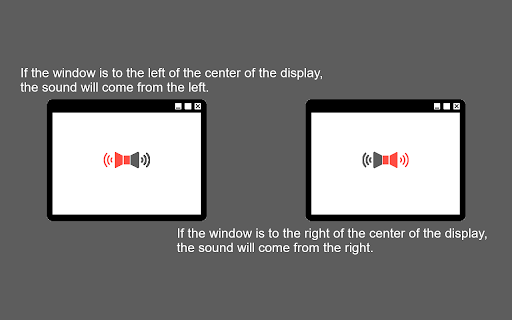
This extension enables audio panning to the left or right based on the window's position relative to the display center.
As of June 2026, Auto Pan by Window Position has 458 users and a 4.71/5 rating from 7 reviews in the Accessibility category.
Usersup 2.5 percent+2.5%
458
458
Ratingup 0.9 percent+0.9%
4.71
7 reviews
Reviewsup 16.7 percent+16.7%
7
Version
1.14.5
Manifest V3
History
11 snapshotsTracking since Apr 1, 2026.
View as table
| Date | Users | Rating | Reviews | Version |
|---|---|---|---|---|
| Apr 1, 2026 | 447 | 4.67 | 6 | 1.14.5 |
| Apr 10, 2026 | 441 | 4.67 | 6 | 1.14.5 |
| Apr 20, 2026 | 442 | 4.67 | 6 | 1.14.5 |
| Apr 25, 2026 | 460 | 4.67 | 6 | 1.14.5 |
| May 2, 2026 | 460 | 4.67 | 6 | 1.14.5 |
| May 9, 2026 | 457 | 4.67 | 6 | 1.14.5 |
| May 14, 2026 | 484 | 4.67 | 6 | 1.14.5 |
| May 20, 2026 | 472 | 4.67 | 6 | 1.14.5 |
| May 26, 2026 | 451 | 4.67 | 6 | 1.14.5 |
| Jun 2, 2026 | 452 | 4.67 | 6 | 1.14.5 |
| Jun 8, 2026 | 457 | 4.67 | 6 | 1.14.5 |
| Now | 458 | 4.71 | 7 | 1.14.5 |
Permissions & access
- Permissions
- storagesystem.display
- Host access
- None declared
Screenshots

About
This Chrome extension automatically pans the audio of media elements (`<video>` and `<audio>`) to the left or right channels based on the horizontal position of the browser window relative to the center of the display.

## Features

- Automatic Audio Panning: Hear audio from the direction where your browser window is located. If the window is on the left side of the screen, the audio will pan to the left speaker/headphone, and vice versa.
- Adjustable Pan Rate: Control the intensity of the panning effect.
- Vertical Panning Support (PannerNode): By default, it uses standard stereo panning. You can enable vertical panning to also affect audio based on vertical window position and simulate distance.
- Multi-Monitor Support: You can configure the panning to be calculated relative to:
  - The single display the window is currently on.
  - The primary display (if you use multiple monitors).
  - The aggregate center of all connected displays.

## Usage

Once installed, the extension works automatically in the background. It will attach to any `<video>` and `<audio>` tags on the web pages you visit and adjust the audio panning based on the window's position.

### Settings

Click on the extension icon in the toolbar to open the popup and configure:
- Enable/Disable: Toggle the auto-pan functionality.
- Pan Rate: Increase or decrease how strongly the audio leans to one side.
- Vertical Panning (PannerNode): Use an advanced vertical spatialization model instead of simple stereo panning.
- Multi-Monitor: Calculate pan position relative to the primary display.
- Multi-Monitor (All): Calculate pan position relative to the entire bounds of all combined displays.
Technical
- Version
- 1.14.5
- Manifest
- V3
- Size
- 21.49KiB
- Min Chrome
- 88
- Languages
- 2
- Featured
- No
Metadata
- ID
- endjnlmjnfebiajbcibmldiemeakmodf
- Developer ID
- u700dd87d8c1f06687ab335d70f91d481
- Developer Email
- [email protected]
- Created
- Feb 21, 2023
- Last Updated (Store)
- Mar 19, 2026
- Last Scraped
- Jun 8, 2026
- Privacy Policy
- —
Similar extensions
Alternatives to Auto Pan by Window Position, ranked by description similarity.

Audio Master
Take full control of your browser tab's audio with a volume booster, equalizer, and more.
1.0K
★ 4.8

Volume Control: Persistent Per-Site Sound
Persistent per-site volume control. Won't lag CPU or break fullscreen. Set custom audio levels for any domain automatically.
51
★ 5.0

Braidata Media Controller
Toggle media playback across tabs using a single shortcut.
11
★ 5.0

Youtube Stereo
Allows the user to add stereo sound to a given Youtube tab; i.e. if the video is moved to the left, the sound comes from the left.
141
★ 3.0

Audio Analyser Extension
Analyses the audio of the current tab and draws the audio frequencies on a canvas.
3.0K
★ 4.8

Volume & Bass Booster – Amplify Audio in Chrome
Chrome volume booster & bass enhancer: amplify up to 500% per tab on YouTube, Twitch, Spotify, Netflix & more.
40.0K
★ 4.6

Volume Master 4 You
Volume booster up to 600% with fine-grained control for any tab
13

AudioPick
Pick a preferred audio output device for HTML5 audio and video elements
100.0K
★ 3.9
Data sourced from the Chrome Web Store · last verified Jun 8, 2026.