
Speed Dial World
A beautiful, easy-to-use speed dial that gives you immediate access to your favorite websites!
As of May 2026, Speed Dial World has 135 users and a 5.00/5 rating from 6 reviews in the Workflow & Planning category.
Usersup 12.5 percent+12.5%
135
135
Ratingno change0%
5.00
6 reviews
Reviewsno change0%
6
Version
0.1
Manifest V3
History
3 snapshotsTracking since Apr 1, 2026.
View as table
| Date | Users | Rating | Reviews | Version |
|---|---|---|---|---|
| Apr 1, 2026 | 120 | 5.00 | 6 | 0.1 |
| May 1, 2026 | 116 | 5.00 | 6 | 0.1 |
| May 30, 2026 | 131 | 5.00 | 6 | 0.1 |
| Now | 135 | 5.00 | 6 | 0.1 |
Permissions & access
- Permissions
- storagecontextMenus
- Host access
- <all_urls>
Screenshots
About
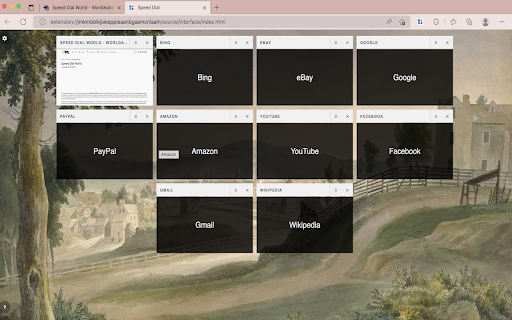
To help you access your favorite websites much faster, "Speed Dial World" is an add-on.

On any page, simply right-click and then pick Add to Speed Dial. You may also right-click on the toolbar button and choose Add to Speed Dial from there. A screenshot of the website will be added to the speed dial page. To access your speed dial, click on the toolbar symbol. Within the UI of speed dial, there is a settings sidebar that allows you to change certain aesthetic preferences. There are several background pictures included (open sidebar for alternate options). Please keep in mind that all preferences are auto-saved in memory.

Note 1: When you first install the plugin, few websites are added to your speed dial automatically from your history (most visited sites). These websites do not have a screenshot.

Note 2: A user might drag and drop any of the speed dial UI's cells to a new position. Simply drag and drop the cell to your preferred location; all cells will be reordered automatically, and you'll be able to store them to memory.

Note 3: The "Speed Dial World" add-on does not alter the appearance of the new tab in your browser. It just creates a stand-alone page using Speed Dial UI.

Note 4: To add desired pages to the speed dial, use the keyboard command (Alt + Shift + A).

Note 5: To add the current tab or, if you want, all tabs to your speed dial, go to the extension's context menu and select "Add this tab or all tabs to my speed dial." If you choose all tabs, the extension will require broad host access.
Technical
- Version
- 0.1
- Manifest
- V3
- Size
- 15.53MiB
- Min Chrome
- 88
- Languages
- 1
- Featured
- No
Metadata
- ID
- gcgifffidchbnbnlpbkccdghhoekkcdj
- Developer ID
- ud550bad50604ca0f1e9762c04e6d0e74
- Developer Email
- [email protected]
- Created
- Jun 26, 2022
- Last Updated (Store)
- Jun 26, 2022
- Last Scraped
- May 30, 2026
- Website
- —
- Support URL
- https://worldaddons.com/contact/
- Privacy Policy
- https://worldaddons.com/privacy-policy/
Similar extensions
Alternatives to Speed Dial World, ranked by description similarity.
SpeedDialer
This extension bookmarks your pages so that the same could be synced across multiple chrome browsers
185
★ 4.0

Speed Dial
Speed Dial changes standard page to the new tab page with your saved bookmarks.
200.0K
★ 4.7

Speed dial 2.0 - New Tab, Bookmarks, History
Customizable dashboard every time you click a new tab that will help you organize your favorite sites, bookmarks, history, etc.!
590
★ 4.5

Speed Dial New Tab
Organize Speed Dial New Tab with websites and quickly access your favorite sites from a new tab in Chrome with easy setup
72

Group Speed Dial
Speed Dial [Group Speed Dial] is the most advanced start page! It's like a visual bookmarks, plus many more tools for professionals!
50.0K
★ 4.5

Speed Dial New tab
Speed Dial is an easy-to-use extension that lets you save and organize your most visited websites and customize your new tab page.
10.0K
★ 3.9
Nice Speed Dials
Nice and Simple Speed dials Extension for Chrome
1.0K
★ 4.6

Metro Speed Dial - Modern New Tab page
A modern, highly customizable speed dial that replaces the new tab page. Organize pages in groups, take notes and try new themes.
3.0K
★ 4.5
Data sourced from the Chrome Web Store · last verified May 30, 2026.