
Tab Manager
Easily organize all your open tabs in multiple windows from toolbar popup!
As of May 2026, Tab Manager has 1,000 users and a 3.57/5 rating from 14 reviews in the Productivity category.
Usersno change0%
1.0K
1,000
Ratingno change0%
3.57
14 reviews
Reviewsno change0%
14
Version
0.1.5
Manifest V3
History
1 snapshotsTracking since Apr 21, 2026.
View as table
| Date | Users | Rating | Reviews | Version |
|---|---|---|---|---|
| Apr 21, 2026 | 1.0K | 3.57 | 14 | 0.1.5 |
| Now | 1.0K | 3.57 | 14 | 0.1.5 |
Permissions & access
- Permissions
- tabsstoragecontextMenus
- Host access
- None declared
Screenshots


About
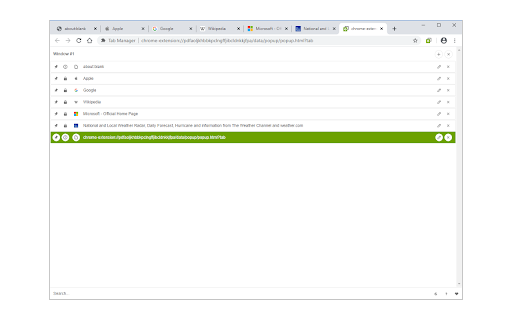
This extension is designed to organize tabs from the toolbar popup. The UI for the extension can also be opened in a standalone popup window or a new tab (choose an item from the toolbar button context-menu). Tab Manager add-on supports multi-window and incognito mode.

To work with this addon, just open the extension UI and start managing your tabs. Within the UI you can see a search bar at the bottom. Above that, there is the list of open tabs for window #1 (a new section is added for each new window). Within each row (tab item) in the list, there are several buttons. The first is the pin button which can be used to pin a desired tab(s). Next is the HTTP/HTTPS sign which shows if a website supports SSL protocol or not. The third icon is the tab icon which updates automatically depending on the tab URL. You can see the tab title right after the tab icon. There are also two buttons on the right side for editing or removing the current item. Please note that within the extension interface, all tab items are draggable. Once you drag an item, the actual tab will be re-positioned as well.

Note: The extension interface supports dark mode. To switch the interface theme to dark, please press the moon icon in the bottom-right toolbar.

To report bugs, please fill out the bug report form on the addon's homepage (https://mybrowseraddon.com/tab-manager.html).
Technical
- Version
- 0.1.5
- Manifest
- V3
- Size
- 70.0KiB
- Min Chrome
- 88
- Languages
- 1
- Featured
- Yes
Metadata
- ID
- dklidlbmompnpdclmhaaemodlkpddaga
- Developer ID
- u5f4ced533d80f19d9c18dea3723e99b9
- Developer Email
- [email protected]
- Created
- Nov 11, 2017
- Last Updated (Store)
- Aug 6, 2025
- Last Scraped
- May 31, 2026
- Website
- —
- Support URL
- https://mybrowseraddon.com/tab-manager.html
- Privacy Policy
- —
Similar extensions
Alternatives to Tab Manager, ranked by description similarity.

Save Tabs
Save and restore all tabs from toolbar popup!
7.0K
★ 2.8

Copy Tab
View, save, and update tab info, cookie, and localStorage via the toolbar popup.
169

Undo Closed Tabs Button
Easily undo closed tabs via your browser's toolbar popup!
30.0K
★ 4.4

uTabManager - Your tab manager
Easily view all open tabs and efficiently perform batch operations on multiple tabs.
185
★ 3.0

Tab Manager
Tab manager, close & save tabs by a click to save memory. Tab manager can backup tabs, restore tabs. Easy search tab by tab manager.
20
★ 5.0

Tab Manager
Manage and filter tabs with group support
1
★ 3.0

Site Group
Group and organize your browser tabs by website for better productivity
4

Tabnify
Intelligently organize,manage and optimize your browser tabs with automatic grouping, session management,focus mode and analytics.
11
Data sourced from the Chrome Web Store · last verified May 31, 2026.