
YouTube Quick Hover Player
Transform your YouTube experience – hover and enjoy videos instantly!
As of May 2026, YouTube Quick Hover Player has 21 users and a 5.00/5 rating from 1 reviews in the Productivity category.
Usersdown 8.7 percent−8.7%
21
21
Ratingno change0%
5.00
1 reviews
Reviewsno change0%
1
Version
1.1
Manifest V3
History
2 snapshotsTracking since Apr 25, 2026.
View as table
| Date | Users | Rating | Reviews | Version |
|---|---|---|---|---|
| Apr 25, 2026 | 23 | 5.00 | 1 | 1.1 |
| May 22, 2026 | 24 | 5.00 | 1 | 1.1 |
| Now | 21 | 5.00 | 1 | 1.1 |
Permissions & access
- Permissions
- storagetabs
- Host access
- *://*.youtube.com/*, *://*.youtube-nocookie.com/*, *://*.googlevideo.com/*
Screenshots



About
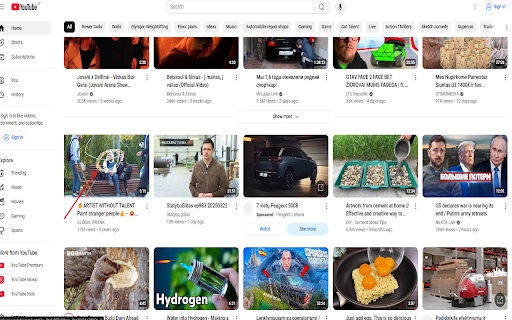
Think the standard YouTube experience is good enough? Try „YouTube Quick Hover Player“ and discover a game-changing way to explore video content! Simply hover your mouse over any thumbnail, and in moments, the full video comes to life right before your eyes – but that’s just the start. Our cutting-edge player lets you watch while keeping the entire thumbnail grid in view, allowing you to listen, watch, and browse nearby videos for your next discovery, all at once.
Give it a few days to get hooked, and you’ll realize the old way of navigating YouTube can’t compare to this seamless, fast, and pure viewing experience. „YouTube Quick Hover Player“ isn’t just an extension – it’s a revolutionary approach to enjoying and exploring YouTube like never before.
Key Features:
Instant Playback: Hover over a thumbnail, and the video starts playing in no time – no clicks, no delays.

Watch and Browse Together: See the full thumbnail screen while watching – find new content without losing your flow.

Full Control: Once the video appears, take charge with the YouTube player controls – pause, adjust volume, or scrub through.

Easy Exit: Close the video with a single „Esc“ press or a click on the „X“ button in the top-right corner.

Broad Compatibility: Works seamlessly across all YouTube pages – homepage, search results, playlists, and even Shorts.

How It Works:
Hover your mouse over a YouTube thumbnail, and soon the video springs to life. Enjoy your content while exploring other thumbnails – listen to music, scout for inspiration, or uncover new favorites, all without missing a beat. When you’re ready, close it with a single move and keep exploring. After just a few days, you’ll wonder why you ever settled for the standard way – it’s that simple, that powerful, that new!
Why Try „YouTube Quick Hover Player“?
Next-Level Standards: See what YouTube should be – fast, fluid, and free of obstacles.

Explore Differently: Listen or watch while discovering other videos in real-time.

Unmatched Experience: Pure content enjoyment with no unnecessary interruptions – just you and your videos.

Sleek Design: Smooth transitions and an intuitive interface that will captivate you.

Ready to take your YouTube browsing to the next level? Install „YouTube Hover Player“ now and see why this innovative player is rewriting the rules. After a few days, you’ll get it – this isn’t just an extension, it’s the future of YouTube in your hands!
Notes:
Works exclusively on YouTube pages, leaving other websites untouched.

Some features (e.g., „Esc“ after heavy interaction) are still being refined – we’re committed to perfecting your experience!

Privacy:
„YouTube Hover Player“ runs locally in your browser and collects no personal data – it’s a pure tool for your YouTube adventures.
Don’t miss out – install now and feel the difference!
Technical
- Version
- 1.1
- Manifest
- V3
- Size
- 3.4MiB
- Min Chrome
- 88
- Languages
- 1
- Featured
- No
Metadata
- ID
- fmlecaooeeloohdkagobaegklcjelepp
- Developer ID
- u7ac18abe13dba4decdeeae79d9765e71
- Developer Email
- [email protected]
- Created
- Mar 20, 2025
- Last Updated (Store)
- Mar 24, 2025
- Last Scraped
- May 22, 2026
- Website
- —
- Support URL
- —
Similar extensions
Alternatives to YouTube Quick Hover Player, ranked by description similarity.

YouTube Hover Player
Plays YouTube videos in a popup when hovering over their thumbnails in Google serach or Image Search.
17
★ 5.0

YouTube Auto Hover
Auto hover on YouTube video thumbnails
11

YouTube Multi-Tool: Skip Sponsors, Screenshot, Popout, Speed & More
Skip sponsors, take screenshots, pop out videos, control speed, jump time, auto quality & hide clutter — all in one click! 🚀
116
★ 4.5

YouTube Booster
Adds 10-second skip back and forward buttons to YouTube videos
13

Enhancer for YouTube™
Take control of YouTube and boost your user experience!
1.0M
★ 4.7

YouTube Audio Stop
Mutes auto-play audio on YouTube homepage hover previews.
33
★ 3.7

YouTube AutoPlay on Hover
Hover to autoplay YouTube videos with instant toggle, delay, preview, whitelist, and blacklist options.
76
★ 5.0

'Improve YouTube!' 🎧 (for YouTube & Videos)
YouTube, tidy & smart? Supercharge YouTube! Give it strong features, filter only the videos you want & exactly the look you like
400.0K
★ 4.5
Data sourced from the Chrome Web Store · last verified May 22, 2026.