
YouTube AutoPlay on Hover
Hover to autoplay YouTube videos with instant toggle, delay, preview, whitelist, and blacklist options.
As of May 2026, YouTube AutoPlay on Hover has 76 users and a 5.00/5 rating from 2 reviews in the Productivity category.
Usersup 16.9 percent+16.9%
76
76
Ratingno change0%
5.00
2 reviews
Reviewsno change0%
2
Version
2.1.0
Manifest V3
History
5 snapshotsTracking since Apr 1, 2026.
View as table
| Date | Users | Rating | Reviews | Version |
|---|---|---|---|---|
| Apr 1, 2026 | 65 | 5.00 | 2 | 2.1.0 |
| Apr 21, 2026 | 63 | 5.00 | 2 | 2.1.0 |
| May 6, 2026 | 77 | 5.00 | 2 | 2.1.0 |
| May 18, 2026 | 78 | 5.00 | 2 | 2.1.0 |
| May 31, 2026 | 79 | 5.00 | 2 | 2.1.0 |
| Now | 76 | 5.00 | 2 | 2.1.0 |
Permissions & access
- Permissions
- storagetabs
- Host access
- *://www.youtube.com/*
Screenshots

About
Transform how you watch YouTube videos while multitasking! AutoPlay on Hover is an easy-to-use browser extension that brings videos to life the moment you hover over them. As soon as your mouse touches a YouTube video, it will automatically start playing—no need to click or press any buttons. When you move your mouse away, the video stops on its own, so you’re always in control without any extra effort.

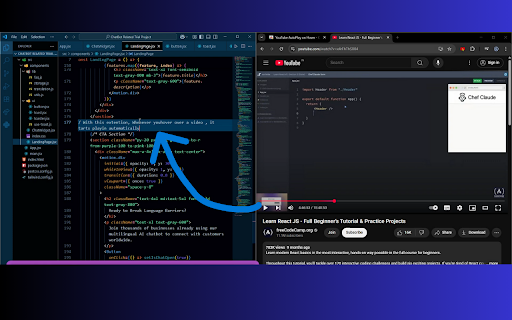
This extension is perfect for students, young professionals, or anyone who likes to learn and work at the same time. Imagine watching a coding tutorial or a how-to guide on YouTube while writing code in your favorite text editor. With AutoPlay on Hover, you can learn new skills or follow step-by-step instructions without having to switch windows or pause the action manually. It’s all about making your experience smoother and more efficient.

Whether you’re doing schoolwork, coding your next big project, or just looking for a fun way to learn something new, AutoPlay on Hover makes it simple. It saves you time and keeps your focus on what matters. Multitasking has never been this seamless! Enjoy the best of both worlds—effortless video playback and hands-free pausing—right from your browser.
Technical
- Version
- 2.1.0
- Manifest
- V3
- Size
- 14.97KiB
- Min Chrome
- 88
- Languages
- 1
- Featured
- No
Metadata
- ID
- bcfkgmbapddmkhpdmfojiaoimliaphlh
- Developer ID
- u9109b1df5483d5d2ccbdd8aff8d50656
- Developer Email
- [email protected]
- Created
- Nov 4, 2024
- Last Updated (Store)
- Sep 7, 2025
- Last Scraped
- May 31, 2026
- Website
- —
- Support URL
- —
- Privacy Policy
- https://youtube-autoplay.netlify.app/
Similar extensions
Alternatives to YouTube AutoPlay on Hover, ranked by description similarity.

YouTube Auto Hover
Auto hover on YouTube video thumbnails
11

Tubepause
Automatically plays YouTube videos when active and pauses when switching tabs or apps. Enhances multitasking and saves resources.
5
★ 5.0

YouTube Auto Pause
YouTube Auto Pause – Smart Video Control! ⏸️🎬
Tired of missing important moments when stepping away from YouTube? YouTube Auto…
31
★ 5.0

Youtube Pip Picture in Picture & Floating Video Player
Youtube Pip Picture in Picture & Floating Video Player. Open active video in Picture-in-Picture
149

YouTube Popout Player
Watch YouTube in a floating popout window — always on top, resizable, and perfect for multitasking.
3.0K
★ 5.0

Picture in Picture for Chrome
Use this extension to watch videos on a floating mini player while browsing other tabs.
10

Video Floating
Keep videos playing in a floating window while you browse or work. Boost productivity with seamless video playback and multitasking.
86

YouTube Quick Hover Player
Transform your YouTube experience – hover and enjoy videos instantly!
21
★ 5.0
Data sourced from the Chrome Web Store · last verified May 31, 2026.