
Sidenote2Obsidian
Quickly record ideas to Obsidian from Chrome Side Panel
As of June 2026, Sidenote2Obsidian has 125 users in the Productivity category.
Usersup 1.6 percent+1.6%
125
125
Ratingno change0%
—
— reviews
Reviewsno change0%
—
Version
2.2.0
Manifest V3
History
7 snapshotsTracking since Apr 1, 2026.
View as table
| Date | Users | Rating | Reviews | Version |
|---|---|---|---|---|
| Apr 1, 2026 | 123 | — | — | 2.2.0 |
| Apr 19, 2026 | 119 | — | — | 2.2.0 |
| Apr 29, 2026 | 126 | — | — | 2.2.0 |
| May 8, 2026 | 122 | — | — | 2.2.0 |
| May 16, 2026 | 123 | — | — | 2.2.0 |
| May 25, 2026 | 128 | — | — | 2.2.0 |
| Jun 4, 2026 | 129 | — | — | 2.2.0 |
| Now | 125 | — | — | 2.2.0 |
Permissions & access
- Permissions
- storagesidePaneltabs
- Host access
- <all_urls>
Screenshots
About
Sidenote2Obsidian Extension

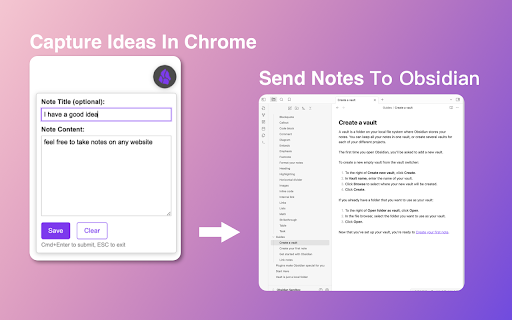
This Chrome extension allows you to quickly capture ideas from any webpage and sync them to your Obsidian notes using the Chrome Side Panel. It seamlessly integrates with your browsing workflow, allowing you to manage drafts and customize note formats before syncing. It relies on the community plugin Obsidian Local REST API for secure communication.

Key Features:

1. Side Panel Integration: Conveniently write notes alongside your web content without switching windows.
2. Draft Management: Save multiple ideas locally as drafts and sync them individually or in bulk when you’re ready.
3. Customizable Templates: Define how your notes are formatted and named using flexible templates (supports placeholders like {{title}}, {{url}}).
4. Efficient Workflow: Support for custom keyboard shortcuts to open the panel or create notes quickly.
5. Secure Sync: Automatically sends notes to Obsidian via the Local REST API.

Usage Instructions:
1. In Obsidian, install and enable the Local REST API plugin.
2. Install this extension and open the Chrome Side Panel (usually by clicking the “Side Panel” icon in the Chrome toolbar and selecting Sidenote2Obsidian).
3. Go to the extension’s Settings, and enter the API Key from the Local REST API plugin in Obsidian.
(Optional) Configure your note save path, templates, and shortcuts.
4. Start capturing ideas! You can save them as drafts or click sync to send them to Obsidian immediately.
Technical
- Version
- 2.2.0
- Manifest
- V3
- Size
- 188KiB
- Min Chrome
- 88
- Languages
- 4
- Featured
- No
Metadata
- ID
- flohnmomnafamkgbjonnjcjggkhiokkn
- Developer ID
- ue845211d2a6c303046181d6d29d0269e
- Developer Email
- [email protected]
- Created
- Jul 29, 2024
- Last Updated (Store)
- Dec 22, 2025
- Last Scraped
- Jun 4, 2026
- Website
- —
- Support URL
- —
- Privacy Policy
- https://sob.ezho.top/privacy.html
Similar extensions
Alternatives to Sidenote2Obsidian, ranked by description similarity.

Notepad
Simple note for sidebar from Nyx.
83

obsidianCaptureTool
Quick Capture for Obsidian
4

Sidebar Notepads PRO
Side Panel Notepad lets you jot down notes as you browse. Opens in your sidebar to write and access while working on any page.
63
★ 4.8

SideNote - Quick save notes in Sidepanel
# SideNote - Your Smart Note-Taking Assistant
## Description
SideNote is a powerful Chrome extension that helps you save and…
48
★ 5.0

Obsidian Notes
Extensão que ajuda a organizar as notas do Obsidian com vídeos e conteúdos da internet
—

boltnote.ai - Chrome Extension
A chrome extension for boltnote.ai - enter entries directly from the chrome browser
9

SideDraft
A lightweight sidebar writing pad for quick notes and drafts. Keep your thoughts organized while you browse.
5

OneDayNote
OneDayNote
327
★ 5.0
Data sourced from the Chrome Web Store · last verified Jun 4, 2026.