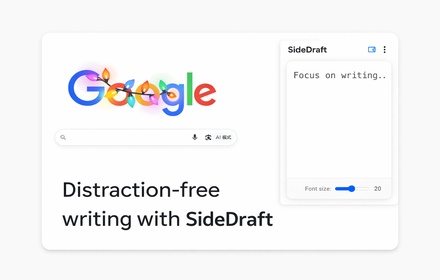
SideDraft
A lightweight sidebar writing pad for quick notes and drafts. Keep your thoughts organized while you browse.
As of June 2026, SideDraft has 5 users in the Productivity category.
Usersup 25.0 percent+25.0%
5
5
Ratingno change0%
—
— reviews
Reviewsno change0%
—
Version
0.2.3
Manifest V3
History
2 snapshotsTracking since Apr 18, 2026.
View as table
| Date | Users | Rating | Reviews | Version |
|---|---|---|---|---|
| Apr 18, 2026 | 4 | — | — | 0.2.3 |
| Jun 3, 2026 | 3 | — | — | 0.2.3 |
| Now | 5 | — | — | 0.2.3 |
Permissions & access
- Permissions
- storagesidePanel
- Host access
- None declared
Screenshots


About
SideDraft: Write where you browse.

Stop interrupting your workflow to jot things down. SideDraft utilizes Chrome's native Side Panel technology to give you a persistent, non-intrusive writing space that stays with you as you navigate the web.

Why install SideDraft?

Seamless Side-by-Side Experience: Take notes, save snippets, or draft content directly on the right side of your browser. No more constant tab-switching.
Instant Real-time Sync: What you type in the Popup window is instantly available in the Side Panel, and vice-versa.
Distraction-Free Minimalist UI: No ads, no unnecessary links, and no cluttered formatting. Just a clean space built for focused writing.
Local & Secure: Your drafts are stored locally in your browser’s storage. Your data stays private and is never uploaded to any external servers.
Customizable Viewing: Includes a real-time font size slider to ensure the best readability for any screen size.
Perfect For:

Research: Summarize articles or copy key points while you read.
Content Creation: Draft your social posts or emails right next to your source material.
Quick Code Snippets: Save useful code blocks or terminal commands temporarily.
Daily Checklists: Keep your to-do list visible while you work.
SideDraft is the essential productivity companion for students, researchers, and professional creators.
Technical
- Version
- 0.2.3
- Manifest
- V3
- Size
- 22.92KiB
- Min Chrome
- 88
- Languages
- 1
- Featured
- No
Metadata
- ID
- okopeogachljlcijbaflplbcgfplhdlo
- Developer ID
- uea2cae9d382c96849dd76686580c74b3
- Developer Email
- [email protected]
- Created
- Dec 26, 2025
- Last Updated (Store)
- Dec 26, 2025
- Last Scraped
- Jun 3, 2026
- Website
- wordpad-online.com
- Support URL
- —
- Privacy Policy
- https://wordpad-online.com/extension-privacy-policy
Similar extensions
Alternatives to SideDraft, ranked by description similarity.

SideWrite Notepad
Designed for those who don't like losing flow — or losing ideas. Now with smart form filling and cloud sync!
7

SideDraft
AI Writer & Document Editor for ChatGPT, Grok, Gemini, & Claude. Write and edit content while working directly inside AI chats.
36
★ 5.0

Digital Napkin Side Panel
A quick note-taking extension for your side panel.
30

Scriblet: Side Note Taker
Rich text & Markdown notes in Chrome side panel. Auto-save, tags, search, images, export PDF/DOCX/TXT.
104
★ 5.0

Minimalist Side Note – Quick Notes Sidebar
Beautiful side panel notes with tags (#), daily notes, autosave, templates, formatting (bold/highlight), and optional PIN lock.
31

SidePad for Notion - Auto-save Note
A simple markdown notepad in the side panel. Auto-saves and opens Notion with one click.
5

Drafty - AI Writer & Digest
Enhance your writing and extract key info instantly without leaving the page.
3

Side Stash
Save selected text or links to a persistent side panel list.
4
Data sourced from the Chrome Web Store · last verified Jun 3, 2026.