ChatGPT UI Settings
Chrome extensions for configuring and improving the usability of the ChatGPT user interface.
As of May 2026, ChatGPT UI Settings has 92 users and a 5.00/5 rating from 3 reviews in the Workflow & Planning category.
Usersdown 1.1 percent−1.1%
92
92
Ratingno change0%
5.00
3 reviews
Reviewsno change0%
3
Version
1.0.3
Manifest V3
History
2 snapshotsTracking since Apr 26, 2026.
View as table
| Date | Users | Rating | Reviews | Version |
|---|---|---|---|---|
| Apr 26, 2026 | 93 | 5.00 | 3 | 1.0.3 |
| May 23, 2026 | 98 | 5.00 | 3 | 1.0.3 |
| Now | 92 | 5.00 | 3 | 1.0.3 |
Permissions & access
- Permissions
- storagescriptingtabs
- Host access
- https://chat.openai.com/*
Screenshots

About
Description:

This is a Chrome browser extension, crafted with the aim to enhance user experience on the ChatGPT website (https://chat.openai.com). It empowers users to tailor the site's interface elements to their liking and provides rapid access to vital information about the current chat and the deployed GPT model. This application aspires to elevate your comfort when interacting with ChatGPT, diminish visual strain, and imbue the interface with a more minimalist aesthetic. Enjoy a refined and engaging user experience like never before.

Functionality:

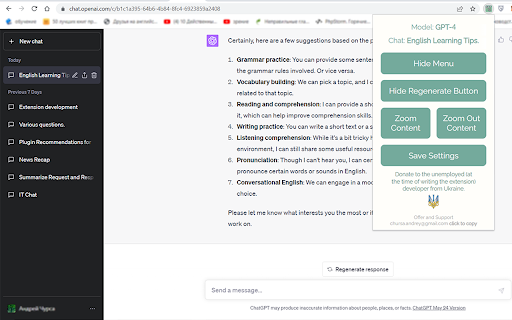
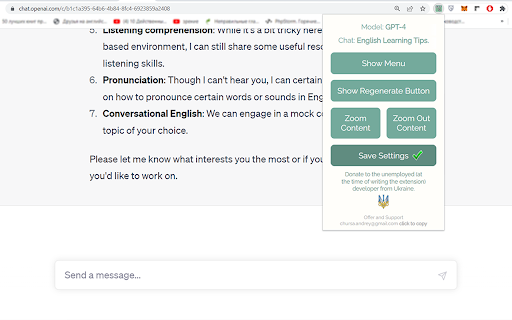
1. Model Information: This information is located at the top of the extension popup window and displays the current GPT model in use (GPT-4 or Default (GPT-3.5) and other potential future versions). This information is available only to ChatGPT Plus subscribers who have access to different models. The information is presented as "Model: GPT-4". For users with a free subscription, this information is not accessible due to the lack of required data on the chat page.
2. Current Chat Display: Positioned right beneath the 'Model Information' is the title of your current chat, displayed in the format 'Chat: My new chat'. This feature is especially handy when the side menu is hidden.
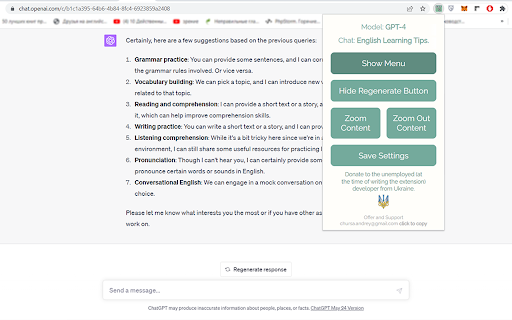
3. "Hide Menu" Button - Menu Visibility Control: The "Hide Menu" button allows you to hide the side menu of the site. When clicked, the button's label changes to "Show Menu", facilitating an easy reversal of this action.
4. "Hide Regenerate Button" - 'Regenerate response' Button Visibility Control: The "Hide Regenerate Button" allows you to conceal the 'Regenerate response' button and the information line beneath the input field. After clicking, the button text changes to "Show Regenerate Button", making it easy to reinstate these elements.
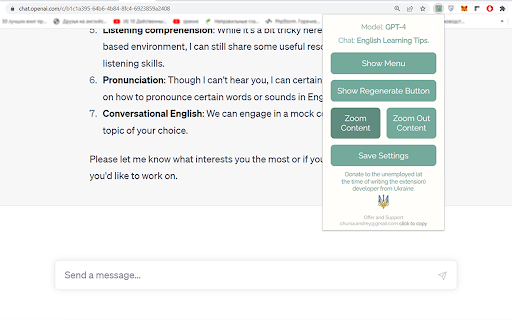
5. "Zoom Content" and "Zoom Out Content" Buttons - Content Scaling Control: The two buttons, "Zoom Content" and "Zoom Out Content", provide control over the page content's scale. The maximum zoom scale is 175%, and the minimum is 100%.
6. "Save Settings" Button - Settings Preservation: The "Save Settings" button enables the preservation of selected site display settings. The data is stored in the browser's localStorage.
7. Feedback: At the end of the popup window, there's a section titled "Offer and Support" where an email address for suggestions and support is provided.

Instructions for Use:

Install the application and drag its icon to the applications panel as demonstrated in the video. For convenience, it's recommended to position it at the beginning of the list. Clicking on the icon will open a pop-up window featuring all available functionalities.

Support and Feedback:

If you have any suggestions or questions, feel free to reach out to me at [email protected].

Donations:

If you appreciate my application, you can support me by making a donation. The donation link can be found at the bottom of the app's pop-up window.

Privacy:

This application does not copy or ask for any information, does not install cookies, and does not share information with third parties.

Conclusion:

My goal is to make your interaction with ChatGPT as comfortable and productive as possible. I'm confident that my application will help you focus on communicating with AI by minimizing distractions and making the content more comfortable to read. I look forward to your feedback and suggestions!
Technical
- Version
- 1.0.3
- Manifest
- V3
- Size
- 101KiB
- Min Chrome
- 88
- Languages
- 1
- Featured
- Yes
Metadata
- ID
- fjeaiokjbnimgnjmdgkoafippjanblij
- Developer ID
- uabb993f170673956c26cc7e8cc370865
- Developer Email
- [email protected]
- Created
- Jun 15, 2023
- Last Updated (Store)
- Jun 15, 2023
- Last Scraped
- May 23, 2026
- Website
- —
- Support URL
- —
Similar extensions
Alternatives to ChatGPT UI Settings, ranked by description similarity.

ChatGPT in Side Panel
Access ChatGPT directly in Chrome's side panel with seamless login and chat history synchronization.
165
★ 5.0
ChatGPT Optimizer - Boost Your AI Workflow
Enhance the Chat GPT interface and bring GPT trough all the web!
20.0K
★ 3.9

ChatGPT Auto-Continue & Token Counter
Experience ChatGPT like never before with these features: Auto Full Mode, Automated 'Continue Generating', and Token Counter.
2.0K
★ 3.7

Hide ChatGPT Sidebar
Automatically hides the sidebar on ChatGPT.
313
★ 5.0

ChatGPT Helper - GPTab
Supercharge your ChatGPT experience with the ChatGPT Helper - GPTab Chrome Extension!
28
★ 5.0

Ask Chat GPT Extension
Ask Chat GPT about highlighted text
88

ChatGPT Assistant Plus
Maximize Your ChatGPT: Search Integration, Run from the Context Menu, Talk with LLM in the Popup
30.0K
★ 4.3

ChatGPT Assistant For Reddit™
This is an Open-AI ChatGPT powerful tool to give you the AI magic on Reddit™ for marketing promotion.
3.0K
★ 4.2
Data sourced from the Chrome Web Store · last verified May 23, 2026.