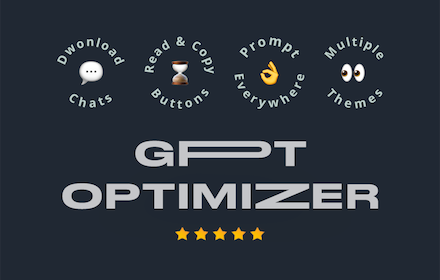
ChatGPT Optimizer - Boost Your AI Workflow
Enhance the Chat GPT interface and bring GPT trough all the web!
As of May 2026, ChatGPT Optimizer - Boost Your AI Workflow has 20,000 users and a 3.87/5 rating from 39 reviews in the Workflow & Planning category.
Usersno change0%
20.0K
20,000
Ratingno change0%
3.87
39 reviews
Reviewsno change0%
39
Version
1.9.3
Manifest V3
History
1 snapshotsTracking since Apr 25, 2026.
View as table
| Date | Users | Rating | Reviews | Version |
|---|---|---|---|---|
| Apr 25, 2026 | 20.0K | 3.87 | 39 | 1.9.3 |
| Now | 20.0K | 3.87 | 39 | 1.9.3 |
Permissions & access
- Permissions
- storagetabscontextMenusscripting
- Host access
- <all_urls>
Screenshots



About
The ultimate productivity tool for ChatGPT. Enhances the interface and adds new features. Improve your workflow with a simple installation.
======
🚀 Click "support" to send feature requests
✨ 50+ Features ✨
✨ Consistent Updates ✨
✨ Fast Support ✨
✨ Fermium ✨
💬 Messages
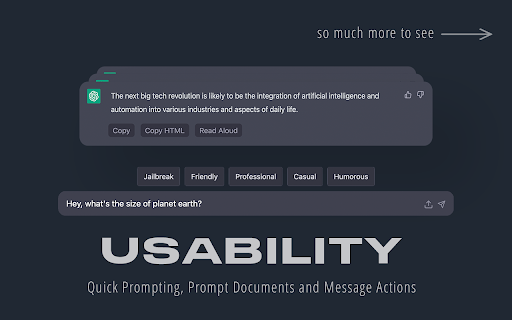
- Copy buttons (Plain & HTML)
- "Scroll to Latest" Button
- "Read Aloud" Button
- Stop Reading Button
- Play/Pause Read Aloud
- 30+ Voices
- Persitente Voice Setting
- Chars and word counter
- Copy the latest message via the shortcut
- Windows/Linux/ChromeOS: Ctrl+C
- Mac: Command+C
- Stop and Regenerate the Answer via the shortcut
- Stop: Ctrl+Escape
- Regenerate: Ctrl+Backspace
- Copy clean text without style of selection
- Delete Messages
💪 Prompt Everywhere
- Prompt Selection via Context Menu
- Prompt Page via Context Menu
- Prompt from Search Bar
- Type in "gpt" and click tab key to prompt
- New chat via command
- Windows/Linux/ChromeOS: Ctrl+Shift+O
- Mac: Command+Shift+O
- Access ChatGPT from extension popup
✍️ Prompting
- Prompt input max chars warning
- Quick Prompt to rewrite message
- Jailbreak with DAN Model button
- Prompt URLs
📤 Export/Import
- Export
- Export Image
- Export CSV
- Export JSON
- Import
- Import PDF
- Import HTML, CSS, JS
- Import TXT
🤝 Usage
- Prompt History
- Navigate trough prompt history by clicking up and down arrow on prompt text area
- Get Insights and Charts
- Pass "GPT On Capacity" Page
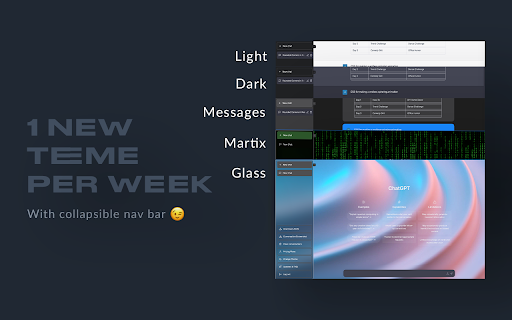
👀 Themes (Weekly Themes)
- 'Apple Messaging' Theme
- 'Matrix' Theme
- 'Glass Morph' Theme
👀 Interface
- Collapsible Navigation Bar
- Shortcut: Spacebar
- Open chats scrolled to the bottom
- Less prominent plan upgrade button
- Direct chat deletion with shortcut
- All Platforms: Control / Command or Shift + Delete Icon
- Direct focus on the text area to directly start typing
- Horizontal word break for too long messages in width
- Adjustable message width for large screens
- Blur chats on sidebar for presentation
- Expand/collapse button for prompt field
- United Settings Popup
✅ Secure Code
- Compatible with ChatGPT Plus
- Compatible with ChatGPT Normal
- Compatible with AIRMP
======
🧑💻 Next Features
- Improve "Read Aloud"
- Read faster
- Prompt Generator
- Promp on Page Popup
======
📆 Planned Features
- Multi Delete Chats
- Search in Chats
- GPT in Search Engines
- Google
- Bing
- DuckDuck Go
- Brave Search
- GPT in GMail
- GPT in LinkedIn
- Generate Post Content
- Improve Post Content
- Based on User Pages
- GPT in YouTube
- Video summarizer based on title and subtitles
- Enable / Disable Features
- Website about Extension
- Version Features
- FAQ & Help
- Contact
- More Information
- Quick Feature / Support Requests (For Extension)
======
💡 Description
Introducing the ultimate productivity booster for the official Chat GPT website - the ChatGPT Optimizer! This powerful tool will improve the way you use the website, by adding a host of new features that will boost your productivity and streamline your workflow.
The extension also offers a variety of other features that will make it easier for you to use GPT everywhere. This means you can use GPT's capabilities to improve your search results, compose better emails, and even enhance your LinkedIn profile.
With its user-friendly interface and powerful features, the GPT Extension is the perfect tool for anyone who wants to get the most out of GPT. So why wait? Download the GPT Extension now and start seeing the benefits for yourself!
Important: This extension isn't developed by Open AI or the Chat GPT team.Technical
- Version
- 1.9.3
- Manifest
- V3
- Size
- 168KiB
- Min Chrome
- 88
- Languages
- 1
- Featured
- Yes
Metadata
- ID
- fmnbpdmndaabkihejhgdpdpjihokbhlb
- Developer ID
- ucdfc77102ec00d3b336ccbb702716bde
- Developer Email
- [email protected]
- Created
- Jan 12, 2023
- Last Updated (Store)
- Apr 3, 2023
- Last Scraped
- May 22, 2026
- Website
- productivity.rocks
- Privacy Policy
- —
Similar extensions
Alternatives to ChatGPT Optimizer - Boost Your AI Workflow, ranked by description similarity.
ChatGPT Helper
Boost productivity with new workflow & easy access to frequent prompts using our innovative ChatGPT extension.
532
★ 5.0

ChatGPT Assistant Plus
Maximize Your ChatGPT: Search Integration, Run from the Context Menu, Talk with LLM in the Popup
30.0K
★ 4.3

ChatGPT Optimizer
Optimize your ChatGPT experience
377
★ 3.0

FrogGPT
Connect to your openai.com account and use ChatGPT on any webpage.
26

Elite ChatGPT Maximizer-Boost Your Efficiency
Empower ChatGPT with Elite ChatGPT Maximizer to enhance its value, elevate personal efficiency, and professional expertise.
45
★ 5.0

ChatGPT in Side Panel
Access ChatGPT directly in Chrome's side panel with seamless login and chat history synchronization.
165
★ 5.0

ChatGPT Auto-Continue & Token Counter
Experience ChatGPT like never before with these features: Auto Full Mode, Automated 'Continue Generating', and Token Counter.
2.0K
★ 3.7

Improvise GPT
AI-based email and message improvisation using ChatGPT - A powerful and user-friendly solution for written communication.
62
★ 4.8
Data sourced from the Chrome Web Store · last verified May 22, 2026.