
Hide ChatGPT Sidebar
Automatically hides the sidebar on ChatGPT.
As of June 2026, Hide ChatGPT Sidebar has 313 users and a 5.00/5 rating from 2 reviews in the Workflow & Planning category.
Usersup 4.0 percent+4.0%
313
313
Ratingno change0%
5.00
2 reviews
Reviewsno change0%
2
Version
1.2
Manifest V3
History
3 snapshotsTracking since Apr 1, 2026.
View as table
| Date | Users | Rating | Reviews | Version |
|---|---|---|---|---|
| Apr 1, 2026 | 301 | 5.00 | 2 | 1.2 |
| May 3, 2026 | 303 | 5.00 | 2 | 1.2 |
| Jun 2, 2026 | 320 | 5.00 | 2 | 1.2 |
| Now | 313 | 5.00 | 2 | 1.2 |
Permissions & access
- Permissions
- activeTab
- Host access
- None declared
Screenshots
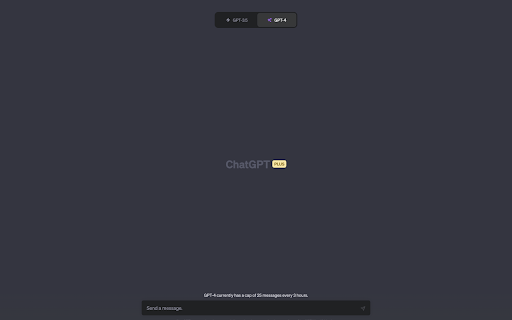
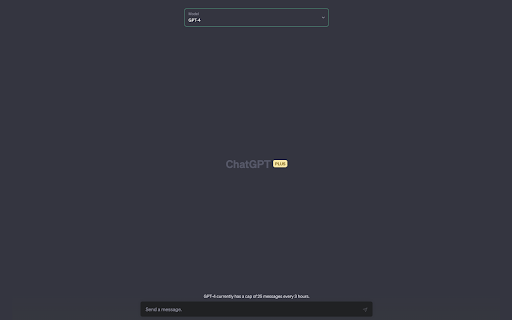
About
Hide ChatGPT Sidebar is a simple, yet powerful Chrome extension designed to help you focus on what matters the most – your conversation with ChatGPT. This extension effortlessly hides the distracting sidebar on the ChatGPT website, providing you with a clean and clutter-free interface.

Main Features:

1. Instantly hide the ChatGPT sidebar: Automatically hides the distracting sidebar, leaving you free to work as soon as the page loads. You can click on the extension icon to toggle the sidebar if you want to see it.

2. Auto-select GPT-4: For ChatGPT Plus users, the extension selects GPT-4 model as soon as the site loads so you can get the best answers.

2. Easy-to-use toggle: The extension features a user-friendly toggle button, allowing you to quickly switch between hiding and displaying the sidebar as per your preference.

3. Lightweight and efficient: Hide ChatGPT Sidebar is designed to consume minimal resources, ensuring that it doesn't slow down your browsing experience.

4. Automatic updates: Stay up-to-date with the latest features and improvements as we continue to enhance the extension.

5. Privacy-focused: We value your privacy, and that's why Hide ChatGPT Sidebar doesn't require any unnecessary permissions. The extension solely interacts with the ChatGPT website to provide a seamless experience.

Enhance your ChatGPT experience with Hide ChatGPT Sidebar and say goodbye to distractions! Install now and enjoy a focused and streamlined AI conversation.
Technical
- Version
- 1.2
- Manifest
- V3
- Size
- 24.0KiB
- Min Chrome
- 88
- Languages
- 1
- Featured
- Yes
Metadata
- ID
- jaklicmecioibaalhgiagacghdjeelhk
- Developer ID
- u7abb9f027a04a5de8104ae57e3d27a36
- Developer Email
- [email protected]
- Created
- May 11, 2023
- Last Updated (Store)
- May 16, 2023
- Last Scraped
- Jun 2, 2026
- Website
- —
- Support URL
- —
- Privacy Policy
- —
Similar extensions
Alternatives to Hide ChatGPT Sidebar, ranked by description similarity.

ChatGPT Privacy Slider
Enhance your privacy on chat.openai.com by easily hiding/unhiding chat titles in the sidebar. Perfect for public or shared spaces.
57

ChatGPT in Side Panel
Access ChatGPT directly in Chrome's side panel with seamless login and chat history synchronization.
165
★ 5.0

ChatGPT Extention for Chrome
Interact with ChatGPT in Google Search results page
637
★ 2.0

ChatGPT Helper - GPTab
Supercharge your ChatGPT experience with the ChatGPT Helper - GPTab Chrome Extension!
28
★ 5.0

AI Sidebar Extension (All Models)
Sidebar to toggle between Gemini, ChatGPT, Perplexity, Grok, and DeepSeek.
100
★ 1.0
ChatGPT UI Settings
Chrome extensions for configuring and improving the usability of the ChatGPT user interface.
92
★ 5.0

ChatGPT Assistant Plus
Maximize Your ChatGPT: Search Integration, Run from the Context Menu, Talk with LLM in the Popup
30.0K
★ 4.3

styleGPT - The Best Customizer for ChatGPT
🤖🧩 styleGPT is an extension that change style from chatGPT web 🐦🌈
146
★ 3.7
Data sourced from the Chrome Web Store · last verified Jun 2, 2026.