
Pixelate
Toggle pixel-perfect image rendering on webpages and files
As of May 2026, Pixelate has 672 users and a 4.57/5 rating from 7 reviews in the Workflow & Planning category.
Usersup 0.7 percent+0.7%
672
672
Ratingno change0%
4.57
7 reviews
Reviewsno change0%
7
Version
1.0.3
Manifest V3
History
2 snapshotsTracking since Apr 25, 2026.
View as table
| Date | Users | Rating | Reviews | Version |
|---|---|---|---|---|
| Apr 25, 2026 | 667 | 4.57 | 7 | 1.0.3 |
| May 21, 2026 | 654 | 4.57 | 7 | 1.0.3 |
| Now | 672 | 4.57 | 7 | 1.0.3 |
Permissions & access
- Permissions
- activeTabstoragescriptingdeclarativeContent
- Host access
- None declared
Screenshots
About
----------------------------------------------------------------------------------------

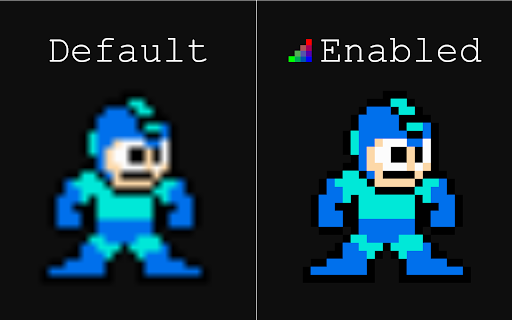
Have you ever zoomed in on pixel art in Chrome, only to find it extremely blurry?

This extension offers the ability to quickly enable or disable pixel-perfect image rendering to maintain sharp pixels when zooming in. It is comparable to the nearest-neighbor interpolation option in most graphics programs.

Supports images on websites and individual image files opened in Chrome (local and web).

To enable for local files, activate the "Allow access to file URLs" option in the extension settings.

*Note: Not supported for images on the Chrome Web Store or in Chrome settings menus.
Technical
- Version
- 1.0.3
- Manifest
- V3
- Size
- 8.63KiB
- Min Chrome
- 88
- Languages
- 1
- Featured
- Yes
Metadata
- ID
- ffmgnhmbppbhmhnehfjelgnbcbaehofe
- Developer ID
- udad42e282238abe2ca4a063b901bce99
- Developer Email
- [email protected]
- Created
- Dec 27, 2019
- Last Updated (Store)
- Aug 15, 2024
- Last Scraped
- May 21, 2026
- Website
- —
- Support URL
- —
- Privacy Policy
- —
Similar extensions
Alternatives to Pixelate, ranked by description similarity.

BigJPG AI For Chrome
Upload and upscale images using BigJPG AI
53

Image Zoom
Image Zoom – Simple, Fast, No-Nonsense Zooming
2.0K
★ 3.8

ImgCompressor
Effortlessly compress images to reduce file sizes while preserving quality.
18
★ 5.0

Magnifying Glass for Google Chrome™
FREE! The magnifying glass displays the zoomed area on the web page, making the selected area visible in detail.
20.0K
★ 4.0

OpenBlur
Hide and blur sensitive information on any webpage. Blur your secrets such as personal emails, public IP addresses, and more.
280
★ 5.0

Simple Image Editor
A Simple Image Editor. You can convert your browser into a full featured image editor
86

Image to Vector Converter
Convert images png, jpg to vector graphics.
304

Image Resizer For Chrome Dev
Upload and upscale images using Image Resizer
16
Data sourced from the Chrome Web Store · last verified May 21, 2026.