
AlgoExpertHub
A Google Chrome Extension for AlgoExpert, Push Question Descriptions, ScrathPad and Solutions into Github When Submit Code
As of June 2026, AlgoExpertHub has 34 users and a 4.00/5 rating from 4 reviews in the Developer Tools category.
Usersdown 26.1 percent−26.1%
34
34
Ratingno change0%
4.00
4 reviews
Reviewsno change0%
4
Version
1.3.6
Manifest V3
History
3 snapshotsTracking since Apr 1, 2026.
View as table
| Date | Users | Rating | Reviews | Version |
|---|---|---|---|---|
| Apr 1, 2026 | 46 | 4.00 | 4 | 1.3.6 |
| May 3, 2026 | 36 | 4.00 | 4 | 1.3.6 |
| Jun 2, 2026 | 39 | 4.00 | 4 | 1.3.6 |
| Now | 34 | 4.00 | 4 | 1.3.6 |
Permissions & access
- Permissions
- storagetabsscriptingalarmsidle
- Host access
- https://www.algoexpert.io/*, https://github.com/*
Screenshots



About
This Google Chrom Extension helps Algoexpert users to automatically push their solutions, questions and scratchpad into Github

Steps:
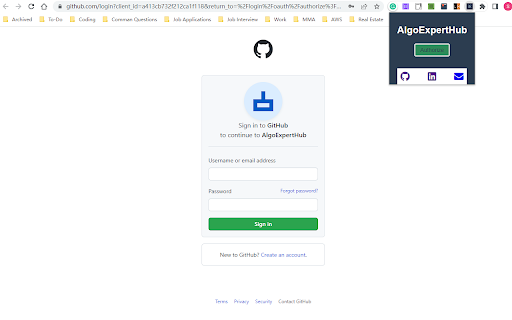
1. Authorize AlgoExpertHub to access your Github Read and Write Rights by click Authorize Button

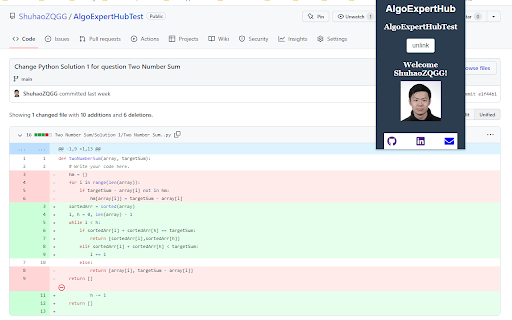
2. After successful authorization, create a new repository and link an existing repository by entering repository name into the input field and click "link". Click “unlink" button if you want to unlink the repository

3. Now, solve more questions on https://www.algoexpert.io; code will be automatically commited when you click "Submit Code" button on AlgoExpert if the solution is correct; enjoy more commits show up on your Github and track your progress!

If the extension stops working, please refresh your algoexpert tab or refresh this extension. Chrome background worker will stop working after a long time of inactivity and when reload the extension.

This is an open source project, to view the source, please visit: https://github.com/ShuhaoZQGG/AlgoExpertHub.

This extension doesn't collect any of your personal information, it only requires your Github authorization and Algoexpert content for its functionality. All the information is stored on your own browser.

Version Updates:
1.3.0: now support push scratchpad into github: take a record of your thought process; move business logic away from service worker because sevice worker often stops before the request sent

1.3.1: Fix bugs on content script - background workers connection
1.3.2: Fix bugs on scratch pad content
1.3.3: Fix bugs when user doesn't authorize for a long time
Technical
- Version
- 1.3.6
- Manifest
- V3
- Size
- 30.67KiB
- Min Chrome
- 88
- Languages
- 1
- Featured
- Yes
Metadata
- ID
- ffcijfdchhielkpepbogbmmpekpcfnnb
- Developer ID
- u4b731d2e8584be61a01cbab08e64be0a
- Developer Email
- [email protected]
- Created
- Feb 15, 2023
- Last Updated (Store)
- Mar 26, 2025
- Last Scraped
- Jun 2, 2026
- Website
- —
- Support URL
- —
- Privacy Policy
- —
Similar extensions
Alternatives to AlgoExpertHub, ranked by description similarity.

CodeHub
Automatically pushes your Codewars submissions to GitHub
426
★ 4.9

Submission Saver - Save LeetCode solutions to GitHub
Automatically upload your LeetCode solutions to GitHub
71
★ 5.0

CodeHub
Automatically integrate your Leetcode & GeeksforGeeks submissions to GitHub
12
★ 5.0

LeetArchive
Automatically commit your LeetCode solutions to GitHub
52
★ 3.7
LeetCode Sync - Sync your Leetcode solutions to Github
Automatically sync your Leetcode solutions to a Github repository when you press submit
29

LeetSync - Leetcode to Github Synchronizer
LeetSync is a Chrome extension that enables you to sync your LeetCode problem submissions with a selected GitHub repository.
20.0K
★ 3.6

GfG to GitHub
Automatically pushes your GeeksForGeeks solution to a GitHub Repository of your choice within seconds on successful submission.
6.0K
★ 3.8

GitItDone
Automatically commit your LeetCode solutions to GitHub
1
Data sourced from the Chrome Web Store · last verified Jun 2, 2026.