
LeetSync - Leetcode to Github Synchronizer
LeetSync is a Chrome extension that enables you to sync your LeetCode problem submissions with a selected GitHub repository.
As of May 2026, LeetSync - Leetcode to Github Synchronizer has 20,000 users and a 3.61/5 rating from 67 reviews in the Developer Tools category.
Usersno change0%
20.0K
20,000
Ratingdown 3.7 percent−3.7%
3.61
67 reviews
Reviewsup 6.3 percent+6.3%
67
Version
0.0.5
Manifest V3
History
2 snapshotsTracking since Apr 25, 2026.
View as table
| Date | Users | Rating | Reviews | Version |
|---|---|---|---|---|
| Apr 25, 2026 | 20.0K | 3.75 | 63 | 0.0.5 |
| May 21, 2026 | 20.0K | 3.66 | 65 | 0.0.5 |
| Now | 20.0K | 3.61 | 67 | 0.0.5 |
Permissions & access
- Permissions
- tabsstoragecookiesunlimitedStoragewebRequest
- Host access
- https://leetcode.com/*
Screenshots




About
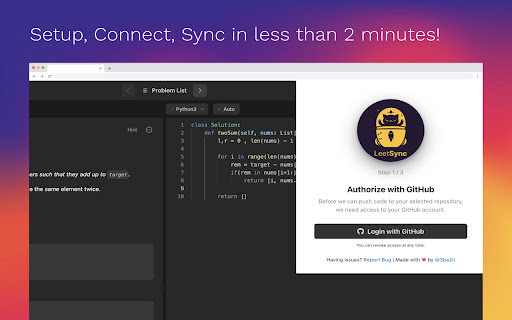
LeetSync is a Chrome extension that enables you to sync your LeetCode problem submissions with a selected GitHub repository. With this extension, you can easily track your coding progress and share your solutions with others on GitHub.

🤔 Why LeetSync?
1. LeetSync helps you save, review, and share your LeetCode solutions with others by submitting your solutions into your selected Github repository in a second.
2. LeetSync works on any LeetCode interface.
3. LeetSync help you motivate yourself by challenging yourself day after day
4. LeetSync saves a lot of time if you wanted to push your submissions manually to Github each time you solve an issue


⚙️ How it Works

LeetSync utilizes the LeetCode API to fetch your submission data and the GitHub API to create a new file or update an existing one in your selected repository with the option to specify different subdirectories for your solutions.


🚀 Get Started

To configure LeetSync, follow these steps:
1. Click on the extension icon in your Chrome toolbar.
2. In the popup window, Give Access via Github.
3. Login via LeetCode (Optional and might be automatically skipped if already logged in)
4. Select the repository you want to sync your submissions to.
5. Start solving some problems 🔥

🫶 Contributing
Contributions are welcome! If you want to contribute to the project, please follow the contributing guidelines using this link: https://github.com/3ba2ii/LeetSync/blob/main/CONTRIBUTING.md

⭐️ Star the project on Github and help us reach more and more people
https://github.com/3ba2ii/LeetSync
Technical
- Version
- 0.0.5
- Manifest
- V3
- Size
- 5.57MiB
- Min Chrome
- 88
- Languages
- 1
- Featured
- Yes
Metadata
- ID
- ppkbejeolfcbaomanmbpjdbkfcjfhjnd
- Developer ID
- u8ac49c72fb4e1b22bb4c52b93f3e2fde
- Developer Email
- [email protected]
- Created
- Mar 29, 2023
- Last Updated (Store)
- Feb 12, 2024
- Last Scraped
- May 21, 2026
- Website
- —
- Support URL
- https://github.com/3ba2ii/LeetSync/issues
- Privacy Policy
- —
Similar extensions
Alternatives to LeetSync - Leetcode to Github Synchronizer, ranked by description similarity.

LeetHub Sync
Automatically save your latest Leetcode submissions to your Github repository!
34
★ 3.0

SolveSync – Automate Your LeetCode Solutions to GitHub
Automate your LeetCode solution uploads to GitHub, organized by difficulty with auto-generated README files.
33
★ 5.0

LeetCode GitHub Sync
Automatically sync your LeetCode submissions to GitHub.
191
★ 5.0
LeetCode Sync - Sync your Leetcode solutions to Github
Automatically sync your Leetcode solutions to a Github repository when you press submit
29

CodeSyncer
This Chrome extension enables users to synchronize their LeetCode and GFG submissions to their GitHub repository effortlessly.
107
★ 4.5

LeetCommit
Automatically sync accepted LeetCode solutions to GitHub.
5
★ 5.0

LeetCode to GitHub Sync
Automatically push your LeetCode solutions to GitHub
47
★ 5.0

AlgoSync
AlgoSync Sync your coding solutions from LeetCode, GFG, and Codeforces to GitHub with ease. Perfect for competitive programmers.
6
Data sourced from the Chrome Web Store · last verified May 21, 2026.