
Delay
Delay is used to break habitual browsing, by having the moment to reflect you'll decide if you want to navigate to the website.
As of June 2026, Delay has 1,000 users and a 4.25/5 rating from 20 reviews in the Workflow & Planning category.
Usersno change0%
1.0K
1,000
Ratingno change0%
4.25
20 reviews
Reviewsno change0%
20
Version
0.3.4
Manifest V3
History
2 snapshotsTracking since Apr 19, 2026.
View as table
| Date | Users | Rating | Reviews | Version |
|---|---|---|---|---|
| Apr 19, 2026 | 1.0K | 4.25 | 20 | 0.3.4 |
| May 4, 2026 | 1.0K | 4.25 | 20 | 0.3.4 |
| Now | 1.0K | 4.25 | 20 | 0.3.4 |
Permissions & access
- Permissions
- webNavigationstoragetabs
- Host access
- None declared
Screenshots

About
Identify and remove the habits that have you unintentionally opening websites.

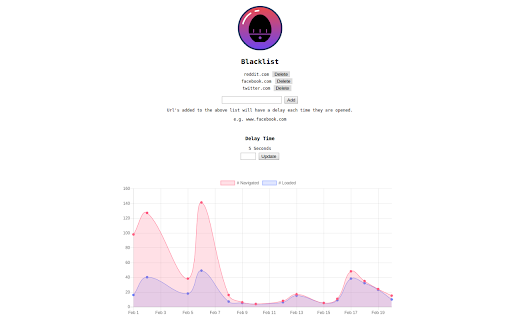
Create a list of URL's and they will have a delay before the websites displayed. The delay enables you to recognize you've opened a certain URL and gives you time to to acknowledge a typically unconscious decision.
Each time you both navigate to a blacklisted URL and wait for the delay to resolve it will save an event. These can be viewed in a chart which will compare how many times you navigated vs how many times you let the delay load. This way you can visualise how many times you halted that habit and delay rescued some time!

Updates
3.3
- Can now add a custom message thats displayed on the delay screen

3.2
- Issues with previous update and new pre render.

3.1
- Manifest update

3.0
- Delay Page will show the Desired URL appended at the back of its own URL
- You can enable Incrementing Delay Time. Each time you navigate to a Blacklisted page the Delay time will increase by 1 second. This resets every day.

Bug Fixes:
- Cursor behavior over buttons
- Some navigation events were not triggering the delay
- Depending on your timezone some events could be logged a day early or late
- Graph has been reduced to a max of 6 months.

2.4 Bulk Block, add a list of comma seperated URLS

2.3 Right clicking and selecting 'Open in new Tab' will now delay the tab. You will have to select it for the delay to initiate. Theres no max delay time you can set it as high as you'd like. Y-Axis will be a whole number, no more decimals.

2.2 When you navigate to a page but don't let it load for the first time within a day, loaded is given a initial value of 0 so it shows on the graph

2.1 - Tab has to be in focus for the countdown to continue, stops you opening multiple tabs

2.0 - The recent release removes all existing navigation events. But what it allows going foward is a much smaller data set this means we have been able to enable:
- synchronization across browsers once you login using your gmail
- ability to work in incognito as well

Feedback
If you have any feedback, comment on the following thread: https://github.com/richardroy/delay/issues/48
Technical
- Version
- 0.3.4
- Manifest
- V3
- Size
- 146KiB
- Min Chrome
- 88
- Languages
- 1
- Featured
- No
Metadata
- ID
- fbhbfbladmbgakfkccbfjpbabagjcmid
- Developer ID
- uec5584d6c94ba8f066abca26f1aa9f04
- Developer Email
- [email protected]
- Created
- Jan 6, 2018
- Last Updated (Store)
- Aug 5, 2025
- Last Scraped
- Jun 7, 2026
- Website
- —
- Support URL
- —
- Privacy Policy
- —
Similar extensions
Alternatives to Delay, ranked by description similarity.

Tab Timeout
Delays navigation to selected sites unless downtime is active.
18

Page Timer V3
How long have I been on this page?
183
★ 5.0

Bulk URL Opener
Browser addon to open multiple urls with one click. With many more tools to help you manage urls.
90.0K
★ 4.5

Open Selected Links Beta
Opens multiple links in the selected content in the current or new window or a tab group. BETA TESTING RELEASE
4

No Limits - Web Tracker and Personal Notebook
A simple and efficient Web Activity Tracker and personal notebook for your daily needs.
8

focusmode - Stay Focused, Be Present
Pause and decide mindfully how long you want to spend on distracting sites.
10.0K
★ 4.7

History Trends
Displays interactive charts and statistics of your entire browsing history.
20.0K
★ 4.6

Link Previewer
Quickly preview the content of a link by just hovering it.
1.0K
★ 4.0
Data sourced from the Chrome Web Store · last verified Jun 7, 2026.