
History Trends
Displays interactive charts and statistics of your entire browsing history.
As of May 2026, History Trends has 20,000 users and a 4.62/5 rating from 164 reviews in the Workflow & Planning category.
Usersno change0%
20.0K
20,000
Ratingno change0%
4.62
164 reviews
Reviewsdown 0.6 percent−0.6%
164
Version
1.5.5
Manifest V3
History
2 snapshotsTracking since Apr 29, 2026.
View as table
| Date | Users | Rating | Reviews | Version |
|---|---|---|---|---|
| Apr 29, 2026 | 20.0K | 4.62 | 165 | 1.5.5 |
| May 26, 2026 | 20.0K | 4.62 | 165 | 1.5.5 |
| Now | 20.0K | 4.62 | 164 | 1.5.5 |
Permissions & access
- Permissions
- history
- Host access
- None declared
Screenshots

About
History Trends analyzes your entire browsing history and displays a variety of charts and statistics.  It's interactive, too: just click a link or a chart to filter your history by different criteria.

Examples:
* Find your Top 10 most-used bookmarks:  Click the "auto_bookmark" pie slice on the Transition Type chart.
* View the Top 10 domains you've visited today:  Click the "Today" link in the "Daily Stats" section.
* Find out what URLs you visit at 3 in the morning:  On the "Time of Day" chart, click the bar (if it exists) for 3am, then click the URLs tab.

History Trends displays the following stats and charts:

* Total URLs visited and total number of visits
* Top 10 most visited domains
* Top 10 most visited URLs
* Top 10 busiest days (i.e., days with most visits)
* Daily Visit stats (e.g., average and median visits per day)
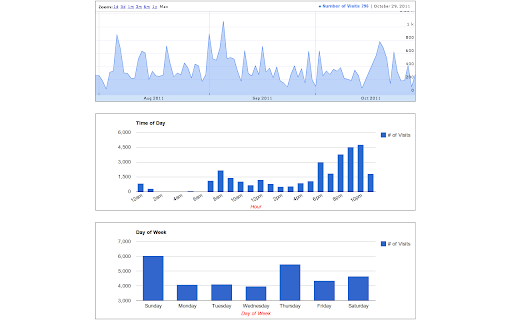
* Chart of visits per day as a time-series
* Chart of visits by hour of day
* Chart of visits by day of week
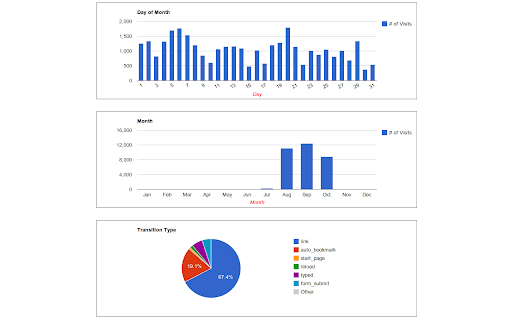
* Chart of visits by day of month
* Chart of visits by month
* Chart of transition type (e.g., link, bookmark, reload, etc)


Notes:
* Please be aware that clearing your history will reset all of your stats to zero!
* Chrome only allows access to the past 3 months of history.


Have feedback? Email me at [email protected]


Recent Changes
------------------------
1.5.5
- Upgraded to manifest v3
- Charts are now drawn with Apache eCharts
- Removed Google Analytics
- Fixed broken link to definition of transition types

1.5.4
- Removed the unnecessary "tabs" permission to comply with the Chrome Web Store guidelines

1.5.3
- The extension had stopped working due to a change in the Google charts URL. Updated the extension to use the new URL.

1.5.2
- CSS Changes
Technical
- Version
- 1.5.5
- Manifest
- V3
- Size
- 376KiB
- Min Chrome
- 88
- Languages
- 3
- Featured
- Yes
Metadata
- ID
- nangghhladpnhlllolmdbdgeggionole
- Developer ID
- u644ec4625735a8425dfb4d90f5c5b2b3
- Developer Email
- [email protected]
- Created
- Aug 10, 2010
- Last Updated (Store)
- Aug 13, 2022
- Last Scraped
- May 26, 2026
- Website
- —
- Support URL
- —
- Privacy Policy
- https://sites.google.com/site/historytrends/
Similar extensions
Alternatives to History Trends, ranked by description similarity.

History Trends Unlimited
Search and analyze your unlimited history.
60.0K
★ 4.5

Chrome History Analysis to CSV
Easily export your Chrome browsing history analysis to CSV
931
★ 5.0

History by Date
Browse your history by date, instead of infinite scroll. This extension is open source. It respects your privacy, and doesn't track…
20.0K
★ 4.3

Check History
A check look at your browsing history. The best searching, the sharpest interface, and the most useful filters - for your history.
72

History Analyst
Review your yearly, monthly or weekly browsing history with AI insights.
16

History Manager
Analyzes chrome history usage.
20

Extended History | 90+ days of history
Unlimited history retention, session management, time tracking, bookmarks, multi-device.
43
★ 5.0

View Chrome History
See your View Chrome History and export it in a readable format as a CSV, JSON file or XLSX file.
48
Data sourced from the Chrome Web Store · last verified May 26, 2026.