
DGText2Area
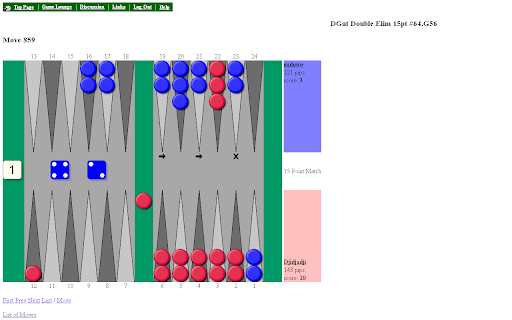
DailyGammon: Replace Text Line inputs with Area inputs. Replace board with scalable version. Save reminders for a match.
As of May 2026, DGText2Area has 154 users and a 5.00/5 rating from 10 reviews in the Accessibility category.
Usersup 2.7 percent+2.7%
154
154
Ratingno change0%
5.00
10 reviews
Reviewsno change0%
10
Version
2.1.0
Manifest V3
History
3 snapshotsTracking since Apr 1, 2026.
View as table
| Date | Users | Rating | Reviews | Version |
|---|---|---|---|---|
| Apr 1, 2026 | 150 | 5.00 | 10 | 2.1.0 |
| Apr 30, 2026 | 158 | 5.00 | 10 | 2.1.0 |
| May 29, 2026 | 155 | 5.00 | 10 | 2.1.0 |
| Now | 154 | 5.00 | 10 | 2.1.0 |
Permissions & access
- Permissions
- storage
- Host access
- None declared
Screenshots


About
At DailyGammon.com you are able to send other players a Quick Message.
It only allows messages of maximum 80 characters.
This extension replaces the single input line to a multi line input area.
It is then possible to send a few lines of text as a Quick Message.
If you receive a Quick Message the reply is filled in with the previous text where each line is prefixed with a few characters. This prefix can be changed on the option page.

On the options page you can select to replace the original board with a scalable vector version. Enter a value for the "Scale board" option. Vales > 0 will replace the board.

You can now set and remove a reminder text for a certain match. Like "Double the cube". These reminders are stored in the browser LocalStorage for the site. One reminder line for a match.
Technical
- Version
- 2.1.0
- Manifest
- V3
- Size
- 22.75KiB
- Min Chrome
- 130
- Languages
- 1
- Featured
- No
Metadata
- ID
- falmnkmhomkpphcpkdflemlahipdnemp
- Developer ID
- u8f29ab41b2a4810856f56ee2e324fb99
- Developer Email
- [email protected]
- Created
- Feb 21, 2010
- Last Updated (Store)
- Jan 20, 2025
- Last Scraped
- May 29, 2026
- Website
- —
- Support URL
- —
- Privacy Policy
- —
Similar extensions
Alternatives to DGText2Area, ranked by description similarity.

Chess.com Voice Input
Enable square clicks on chess.com via speech recognition or form input. Uses a simple double-digit coordinate system for the moves.
329
★ 1.6

Speak to Lichess
Use voice control to play Lichess games!
736
★ 4.0

Dictate Chess
Play chess with your voice. Talk using proper chess notation and this extention will move a piece for you!
228
★ 3.3

BBO Visual Assist
BBO Visual Assist
187
★ 5.0

Chess.com Keyboard
This browser extension allows you to make moves on Chess.com using your keyboard
7.0K
★ 4.2

Text Expander
Shorthand abbreviations expand to full text.
99
★ 3.5

Speechess
Speech to Chess • Play chess with your voice
158
★ 3.2

ChatGPT Full Width
Increase the chat size to match the screen size in ChatGPT, instead of the default narrow chat bubbles.
1.0K
★ 4.3
Data sourced from the Chrome Web Store · last verified May 29, 2026.