
Text Expander
Shorthand abbreviations expand to full text.
As of May 2026, Text Expander has 99 users and a 3.50/5 rating from 2 reviews in the Accessibility category.
Usersdown 1.0 percent−1.0%
99
99
Ratingno change0%
3.50
2 reviews
Reviewsno change0%
2
Version
1.1.0
Manifest V3
History
2 snapshotsTracking since Apr 1, 2026.
View as table
| Date | Users | Rating | Reviews | Version |
|---|---|---|---|---|
| Apr 1, 2026 | 100 | 3.50 | 2 | 1.1.0 |
| Apr 30, 2026 | 106 | 3.50 | 2 | 1.1.0 |
| Now | 99 | 3.50 | 2 | 1.1.0 |
Permissions & access
- Permissions
- storageactiveTabscripting
- Host access
- None declared
Screenshots
About
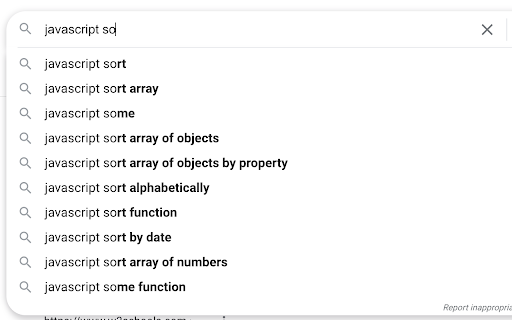
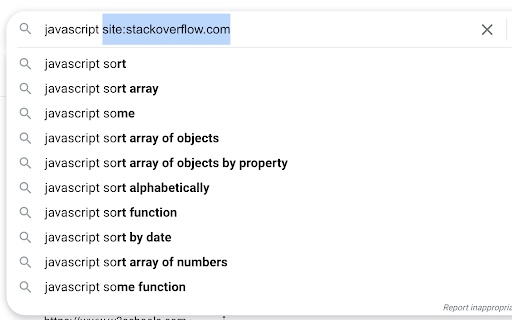
Expand a snippet of text to a longer form, using a hotkey (e.g., "so" → "site:stackoverflow.com"). Works in most text inputs, such as search boxes and multi-line comment fields.

Adding a text snippet:
• Click/open the extension.
• In the first box: enter the abbreviated text, without spaces, to be replaced a longer form in the second text box.
• In the second box: enter the expanded form, replacing the "prefix" text from the first box.

To use a saved snippet:
• In any input box, type your prefix text and use the assigned shortcut (default is "Ctrl+Shift+G".
• For the expansion to work, the prefix text must be separated from other words by a space.
• The caret (blinking text cursor) must be on or around the prefix word. For example, lets say the pipe character (|) is your caret placement:

how to exit vim? so|  (valid)
how to exit vim? s|o  (valid)
how to exit vim? |so  (valid)
how to exit vim?| so  (invalid)

To remove a text snippet:
• Click/open the extension.
• Check any boxes you'd like removed.
• Click the "Remove" button and reopen the extension.

Notes and limitations:
• Expansion won't work in some input fields.
• Expansion won't work in the Omnibox (Chrome's address bar/search bar).
• Expansion won't work in the startup page search bar.
• The prefix text doesn't need to be highlighted.
• The prefix-expansion pair is saved locally on your browser.

Change Notes:
[1.1.0]
• Changes: 2nd input box now changed to <pre> to allow multi-line expansions.
• Bug fix: Long expansions in the extension are now scrollable.
• Bug fix: Removing local storage items doesn't refresh list.

Check the source code on GitHub:
https://github.com/ssmooncoder/text-expander
Technical
- Version
- 1.1.0
- Manifest
- V3
- Size
- 7.0KiB
- Min Chrome
- 88
- Languages
- 1
- Featured
- No
Metadata
- ID
- nkmhjacokhapaecpbcbddhjjpajddamf
- Developer ID
- ud25b66652ba99bca405596516a4442ce
- Developer Email
- [email protected]
- Created
- Jun 13, 2021
- Last Updated (Store)
- Jun 15, 2021
- Last Scraped
- May 27, 2026
- Website
- —
- Support URL
- —
- Privacy Policy
- —
Similar extensions
Alternatives to Text Expander, ranked by description similarity.

Input Macros
A CSE 590a Final Project
54

Super Snippets Dan
A powerful snippet manager with instant expansion and clipboard integration
10
★ 5.0

f-to-pay-a-visit
Follow links and click buttons using the keyboard.
Click the "f" key to activate the plugin, click "Esc" to deactivate.
When…
2

GrayTTS
(Beta) v1.0 2023-08 - Literally my first ever published chrome extension. Cross your fingers.
A free simple straight forward TTS…
3

Weighted Read Assist
Aims to improve readability by modifying text on the page.
—

Text Tailor - by Bliink
Replace, Remove, Blur or Highlight words across the web
13

CoTS: Copy on Text Selection
Copy on text selection in current page automatically. Double-click to select and copy text automatically. Ctrl + click to paste.
686
★ 3.0

Shorto - URL Shorter
Create a small URL
132
★ 5.0
Data sourced from the Chrome Web Store · last verified May 27, 2026.