
Chess.com Voice Input
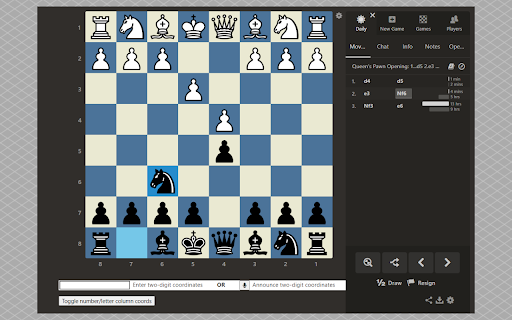
Enable square clicks on chess.com via speech recognition or form input. Uses a simple double-digit coordinate system for the moves.
As of May 2026, Chess.com Voice Input has 329 users and a 1.60/5 rating from 5 reviews in the Accessibility category.
Usersup 11.1 percent+11.1%
329
329
Ratingno change0%
1.60
5 reviews
Reviewsno change0%
5
Version
2.0.0
Manifest V3
History
3 snapshotsTracking since Apr 1, 2026.
View as table
| Date | Users | Rating | Reviews | Version |
|---|---|---|---|---|
| Apr 1, 2026 | 296 | 1.60 | 5 | 2.0.0 |
| Apr 30, 2026 | 294 | 1.60 | 5 | 2.0.0 |
| May 29, 2026 | 294 | 1.60 | 5 | 2.0.0 |
| Now | 329 | 1.60 | 5 | 2.0.0 |
Permissions & access
- Permissions
- None declared
- Host access
- None declared
Screenshots

About
This Google Chrome extension increases accessibility on the chess.com site by enabling you to click a board square via your browser's speech recognition or your keyboard. A two-digit coordinate system is used for the move input (a1 = 11, b3 = 23, c5 = 35, etc.), which is straightforward for speech recognition to pickup.

Special notes:

- If you display the inside or outside board coordinates using chess.com's board settings, you can then click the extension's "Toggle number/letter" button to switch the column coordinate letters to numbers. This will help you quickly see which two-digit coordinates correspond to which squares. You can always toggle back to letters with the same button.
- To simulate a mouse click on a board square, you have two options: 1) announce the double-digit coordinates after clicking the mic icon button (you only have to do this once, click it again to turn it off), or 2) use your keyboard (or your operating system's speech recognition) to enter the double-digit coordinates into the form input field. You can still use your mouse like normal whenever you want.
- The board square will look like a mouse clicked on it if you announce a valid coordinate. Anything invalid that is announced or entered will simply be ignored.
- If using the form input field, note that the moment two non-whitespace characters are entered into it, the field will automatically clear itself.

The extension will load directly underneath the board when playing live or daily games, as well as for live and daily post-game analysis. This applies to URLs that begin with one of the following:

https://www.chess.com/analysis/game/live/
https://www.chess.com/game/live/
https://www.chess.com/analysis/game/daily/
https://www.chess.com/game/daily/

Chess.com Voice Input is open-source:
https://github.com/parsec209/chess.com-voice-input

CHANGELOG:

2.0.0
- Extension loads directly underneath the chessboard.
- Chrome speech recognition added.
- Board column coordinates can be toggled between numbers and letters.
- Able to use during live and daily games, as well as for post-game analysis.
Technical
- Version
- 2.0.0
- Manifest
- V3
- Size
- 557KiB
- Min Chrome
- 88
- Languages
- 1
- Featured
- Yes
Metadata
- ID
- lllmgdbbioiendadepmdamgpdddllhmf
- Developer ID
- u463a107f1da89edeea262bc9158be9bd
- Developer Email
- [email protected]
- Created
- Nov 15, 2021
- Last Updated (Store)
- Mar 15, 2023
- Last Scraped
- May 29, 2026
- Website
- —
- Support URL
- —
Similar extensions
Alternatives to Chess.com Voice Input, ranked by description similarity.

Speechess
Speech to Chess • Play chess with your voice
158
★ 3.2

Speak to Lichess
Use voice control to play Lichess games!
736
★ 4.0

Dictate Chess
Play chess with your voice. Talk using proper chess notation and this extention will move a piece for you!
228
★ 3.3

Voice Chess Control Chess.com
Control your chess pieces by voice on Chess.com.
28
★ 3.5

Chess.com Moves Announcer
Announces chess moves on chess.com.
299

BBO Visual Assist
BBO Visual Assist
187
★ 5.0

Chess.com Keyboard
This browser extension allows you to make moves on Chess.com using your keyboard
7.0K
★ 4.2

Speak to Chess.com (Standard Notation)
Move your pieces with voice commands (like "Queen D4"). Play hands-free using standard chess notation.
45
★ 1.0
Data sourced from the Chrome Web Store · last verified May 29, 2026.