
I don't wanna know
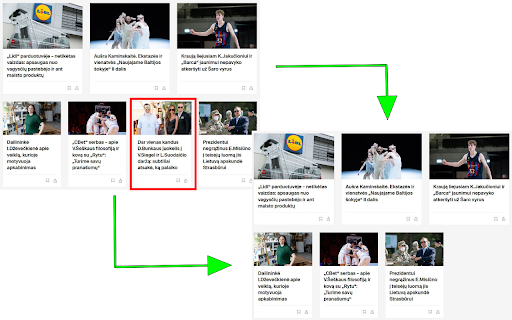
Customize your browsing experience. 'I Don't Wanna Know' hides unwanted content based on your keywords. Stay focused, stay informed.
As of May 2026, I don't wanna know has 23 users and a 5.00/5 rating from 1 reviews in the Workflow & Planning category.
Usersdown 8.0 percent−8.0%
23
23
Ratingno change0%
5.00
1 reviews
Reviewsno change0%
1
Version
0.3
Manifest V3
History
3 snapshotsTracking since Apr 1, 2026.
View as table
| Date | Users | Rating | Reviews | Version |
|---|---|---|---|---|
| Apr 1, 2026 | 25 | 5.00 | 1 | 0.3 |
| Apr 29, 2026 | 23 | 5.00 | 1 | 0.3 |
| May 26, 2026 | 21 | 5.00 | 1 | 0.3 |
| Now | 23 | 5.00 | 1 | 0.3 |
Permissions & access
- Permissions
- activeTabstorage
- Host access
- None declared
Screenshots
About
This handy tool helps you personalize your web browsing experience by removing posts containing certain keywords. It's simple, efficient, and easy to use. Follow these steps to get started:

Installation: After installing our extension from the Chrome Web Store, you'll see a small icon appear in the top-right corner of your browser. This is your gateway to a more customized browsing experience.

Customize your Experience: Click on the extension's icon and a small window will pop up. Here you'll find a text field awaiting your input. You can enter any keywords that you'd like to avoid seeing in posts. For instance, if you prefer not to see posts containing the words "Siegel" and "Suodaitis", just type in "Siegel,Suodaitis". Once you're done, click the "Submit" button and our extension will take care of the rest.

Updating your Preferences: Changing your mind or want to add new keywords? Easy! Just click on our extension's icon, enter your new keywords into the text field, and click "Submit". Our extension will update immediately and start screening posts based on your new keywords.

Enjoy Your Browsing: Now, you're all set! Continue browsing as you normally would. Our extension works silently in the background, filtering out any posts that contain the keywords you've entered. Every time you scroll, the extension keeps checking for new posts and filtering them based on your preferences.

A little tip: When you open our extension's pop-up window, you might see "Siegel,Suodaitis" already present in the text field. These are just default keywords and you're free to replace them with your own.

Happy browsing! Enjoy a personalized web experience tailored just for you.
Technical
- Version
- 0.3
- Manifest
- V3
- Size
- 15.54KiB
- Min Chrome
- 88
- Languages
- 1
- Featured
- Yes
Metadata
- ID
- elieibodbbpgnpgpgnfndglcafkcjmak
- Developer ID
- u08dc4b23f238704174b592c0205e9e72
- Developer Email
- [email protected]
- Created
- May 26, 2023
- Last Updated (Store)
- Jun 13, 2023
- Last Scraped
- May 26, 2026
- Website
- —
- Support URL
- —
Similar extensions
Alternatives to I don't wanna know, ranked by description similarity.

News Guardian
Block news articles containing specified keywords.
17
★ 5.0

LI Block
Block unwanted content from LinkedIn feed based on keywords
122
★ 4.5
Filter Anything Everywhere
Filter feeds, lists and comment sections on all websites at the same time with this universal keyword blocker.
5.0K
★ 4.4

keywords blocker
Block content related to specified keywords so you will never see them again
145

DeTrumper
Content filter that removes posts containing specified keywords from Reddit, YouTube, and LinkedIn to curate your online experience.
—

Website blocker
You can block websites you don't want to access.
79
★ 5.0

Retrospective History
Retrospective History indexes and allows you to search the full text content of your web history. Never lose track of a page again.
58
★ 5.0

YETI: Remove Google™ Search AI
Customize your browsing by removing unwanted AI search results on Google™ and applying your own custom CSS to any webpage.
292
★ 3.7
Data sourced from the Chrome Web Store · last verified May 26, 2026.