Filter Anything Everywhere
Filter feeds, lists and comment sections on all websites at the same time with this universal keyword blocker.
As of June 2026, Filter Anything Everywhere has 5,000 users and a 4.44/5 rating from 84 reviews in the Workflow & Planning category.
Usersno change0%
5.0K
5,000
Ratingup 0.2 percent+0.2%
4.44
84 reviews
Reviewsup 2.4 percent+2.4%
84
Version
1.3.2
Manifest V3
History
3 snapshotsTracking since Apr 23, 2026.
View as table
| Date | Users | Rating | Reviews | Version |
|---|---|---|---|---|
| Apr 23, 2026 | 5.0K | 4.43 | 82 | 1.3.2 |
| May 12, 2026 | 4.0K | 4.43 | 83 | 1.3.2 |
| Jun 7, 2026 | 5.0K | 4.39 | 83 | 1.3.2 |
| Now | 5.0K | 4.44 | 84 | 1.3.2 |
Permissions & access
- Permissions
- activeTabscriptingstorage
- Host access
- https://*/*, http://*/*
Screenshots


About
Tired of information overload? Take control of your browsing experience with this powerful Chrome extension! It filters out unwanted content from Facebook, Google News, Reddit, Twitter, YouTube, and more, all in one place.

Key features:
- One-click access to filter settings.
- Block unwanted topics, clickbait, and spam.
- Customize settings for each website.

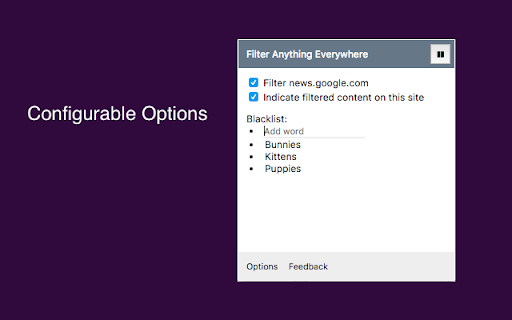
To get started, simply install the extension and click the icon next to the address bar to access the control panel. Fine-tune your settings to enjoy a clutter-free, personalized online journey. Embrace a cleaner, more personalized browsing experience – try Filter Anything Everywhere today!

---

Feel free to submit issues and pull requests:
https://github.com/yeahpython/filter-anything-everywhere

---

History:
* 1.3.2
 - Improved language support, e.g. Cyrillic characters, Chinese, Korean, Japanese
 - Better support for emojis and special characters
 - Migration to Manifest V3
 - Start using TypeScript/Node/Rollup/Jest/Prettier
* 1.3.1
 - The code has been cleaned up a bit for upload to GitHub. The latest version of the extension includes the cleanup.
* 1.3.0
 - Fix for YouTube search results
 - Support for Chinese characters
 - Performance improvements
* 1.2.4
 - Fixes issue where entire YouTube page is hidden.
* 1.2.3
 - Wildcard matching is now supported. "*" matches any number of non-whitespace characters, and "?" matches exactly one non-whitespace character. Examples:
 - - "col*r" matches "color" and "colour".
 - - "gr?y" matches both "gray" and "grey", but not "gravy" since "?" can only match one character.
 - - "*?coin" matches "bitcoin" and "dogecoin" but not "coin", since "?" requires at least one character.
Technical
- Version
- 1.3.2
- Manifest
- V3
- Size
- 198KiB
- Min Chrome
- 88
- Languages
- 1
- Featured
- Yes
Metadata
- ID
- jmandnadineideoebcmaekgaccoagnki
- Developer ID
- ua749cacda0fbd88739dba0dfb3f8a50f
- Developer Email
- [email protected]
- Created
- Aug 27, 2017
- Last Updated (Store)
- Apr 15, 2023
- Last Scraped
- Jun 7, 2026
- Website
- —
- Privacy Policy
- —
Similar extensions
Alternatives to Filter Anything Everywhere, ranked by description similarity.

Filter Everything Online
Take control of what you see online. Hide spoilers, profanity, politics, and distractions by keyword, site, and schedule.
48
★ 5.0

News Guardian
Block news articles containing specified keywords.
17
★ 5.0

FilterTube
Restore peace of mind to your digital video experience.
1.0K
★ 4.5

UTubeFilter: Block Channels, Shorts & Watched
Block/hide search results and Shorts from channels you blacklist on YouTube.
30

unhook Yourself
Unhook Yourself - YouTube experience is in your control
29
★ 5.0

Feed Blocker
Block YouTube's feed and recommendations. Replace the feed with a synced to-do list. Schedule blocking or snooze anytime.
10
★ 5.0

Advanced Ad Blocker
Block ads, trackers, and unwanted content with advanced filtering capabilities
1.0K
★ 5.0

YouTube Detox — Block Shorts, Hide Recommendations & Stay Focused
A complete toolkit to help you use YouTube with purpose. Block Shorts, remove distractions, and stay focused on what truly matters.
5.0K
★ 4.6
Data sourced from the Chrome Web Store · last verified Jun 7, 2026.