
Open in PDF Viewer
Easily open desired links in a PDF viewer.
As of June 2026, Open in PDF Viewer has 100,000 users and a 3.22/5 rating from 136 reviews in the Productivity category.
Usersno change0%
100.0K
100,000
Ratingno change0%
3.22
136 reviews
Reviewsno change0%
136
Version
0.1.6
Manifest V3
History
2 snapshotsTracking since Apr 16, 2026.
View as table
| Date | Users | Rating | Reviews | Version |
|---|---|---|---|---|
| Apr 16, 2026 | 100.0K | 3.22 | 136 | 0.1.6 |
| Apr 26, 2026 | 100.0K | 3.22 | 136 | 0.1.6 |
| Now | 100.0K | 3.22 | 136 | 0.1.6 |
Permissions & access
- Permissions
- storagedownloadscontextMenusnotificationsnativeMessaging
- Host access
- None declared
Screenshots

About
Open in PDF Viewer is a simple and lite addon that allows you to easily open desired PDF links in a chosen PDF viewer.

Note 1: after installing the addon, you need to connect it with native applications (i.e. adobe acrobat reader) on your machine. To make this connection, a separate patch is provided in GitHub. Please download and install this patch from: https://github.com/alexmarcoo/open-in-native-client/releases

Follow the instructions in the above GitHub page to download and install the related patch to your system. After installing, the "Open in PDF Viewer" addon in your browser can communicate with PDF viewer on your machine (Window, Linux, or Mac).

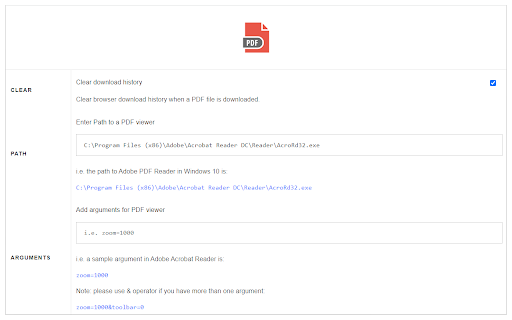
The default option for the PDF viewer is adobe acrobat reader. In windows 10, the default location for Adobe Acrobat is "C:\Program Files (x86)\Adobe\Acrobat Reader DC\Reader\AcroRd32.exe". If you have a different OS, or if you installed Adobe Acrobat in a different folder, please adjust the field accordingly. You can change this from the options page.

There is also an input field in which you can add arguments for the viewer. For example, to open PDF as full-screen or without toolbar. Please note that, if you change the PDF viewer make sure to change the input arguments as well. Each PDF viewer has its arguments to operate. If you keep Adobe as the default PDF viewer, please visit this page (http://www.adobe.com/content/dam/Adobe/en/devnet/acrobat/pdfs/pdf_open_parameters.pdf) to get more info about input arguments.

To operate with this addon, please right-click on any link (a link to a PDF document) and then click on - Open and Download with PDF Viewer - item from the context menu. The PDF file will first be "downloaded" and then "opened" in a default PDF viewer (the one which is set on the options page). Please note that the PDF file will be downloaded in the "default" download folder on your machine.

Note 2: before using the addon, please open the option's page and make sure the path to the PDF viewer is correct based on your Operating System.

To report any bug, please fill the bug report form on the addon's homepage (https://mybrowseraddon.com/open-in-pdf.html).
Technical
- Version
- 0.1.6
- Manifest
- V3
- Size
- 19.0KiB
- Min Chrome
- 88
- Languages
- 1
- Featured
- No
Metadata
- ID
- ehndikigeekodlnbohjndjjiikphickb
- Developer ID
- u549bcf73afdd28fb220664bb740e9e45
- Developer Email
- [email protected]
- Created
- Aug 9, 2017
- Last Updated (Store)
- Feb 16, 2026
- Last Scraped
- Jun 5, 2026
- Website
- —
- Support URL
- https://mybrowseraddon.com/open-in-pdf.html
- Privacy Policy
- —
Similar extensions
Alternatives to Open in PDF Viewer, ranked by description similarity.

Open in IE™
Open links in IE (Internet Explorer)
10.0K
★ 2.8

Open in VLC™
Easily open desired links in the VLC (VideoLAN) media player!
10.0K
★ 3.5

Open With Download Manager
Open and download desired links with internet download manager.
90.0K
★ 3.6

PDFopen — PDF & Image Tools
Compress images, rename files, and access 30+ PDF tools instantly. Compress PDFs, convert, merge, protect — right from the toolbar.
6
★ 5.0

PDF Tools - Convert, Resize & Merge
Manipulate PDF documents via Ghostscript interpreter right in your browser!
454
★ 1.0
Docs Viewer
Easily view PDF and MS Office documents in your browser.
10.0K
★ 3.4

Batch PDF File Opener
Open multiple local PDF files from file paths. Works great with MS Edge for markup workflows.
18
Print Selection to PDF
Select a text and print it to PDF via mouse right-click.
6.0K
★ 1.8
Data sourced from the Chrome Web Store · last verified Jun 5, 2026.