
Open With Download Manager
Open and download desired links with internet download manager.
As of June 2026, Open With Download Manager has 90,000 users and a 3.61/5 rating from 324 reviews in the Productivity category.
Usersup 12.5 percent+12.5%
90.0K
90,000
Ratingdown 0.3 percent−0.3%
3.61
324 reviews
Reviewsup 0.3 percent+0.3%
324
Version
0.1.7
Manifest V3
90-day change · In the last 90 days this extension gained 10.0K users, 1 version update.
History
4 snapshotsTracking since Apr 1, 2026.
View as table
| Date | Users | Rating | Reviews | Version |
|---|---|---|---|---|
| Apr 1, 2026 | 80.0K | 3.62 | 323 | 0.1.6 |
| May 6, 2026 | 90.0K | 3.61 | 324 | 0.1.6 |
| May 9, 2026 | 90.0K | 3.61 | 324 | 0.1.7 |
| Jun 16, 2026 | 90.0K | 3.61 | 325 | 0.1.7 |
| Now | 90.0K | 3.61 | 324 | 0.1.7 |
Permissions & access
- Permissions
- storagecontextMenusnotificationsnativeMessaging
- Host access
- None declared
Screenshots
About
Open With Download Manager is a browser extension that enables you to open and download a desired item with the Internet Download Manager application.

Important note: Open With Download Manager extension does NOT belong or relate to IDM and has NO affiliations with Internet Download Manager or IDM at all. It is an unofficial extension that is developed and maintained independently by its author.

To operate with this addon you need a native-client patch to connect your browser with the native IDM application in your OS. Please read the following to get more info on how to install native-client and operate with this add-on.

1) after installing the add-on, you need to connect it with native applications (i.e. IDM) on your machine. If you do not have IDM, please head to (internetdownloadmanager.com/download.html) and install IDM on your machine. Once you have IDM, you need to make the connection between IDM and your browser.

2) to make this connection, a separate patch is provided on GitHub. Please download and install this patch from: https://github.com/alexmarcoo/open-in-native-client/releases

Follow the instruction in the above GitHub repo to download and install the related patch to your system. After installing, the "Open With Download Manager" add-on, your browser can communicate with IDM on your machine (i.e. Windows OS).

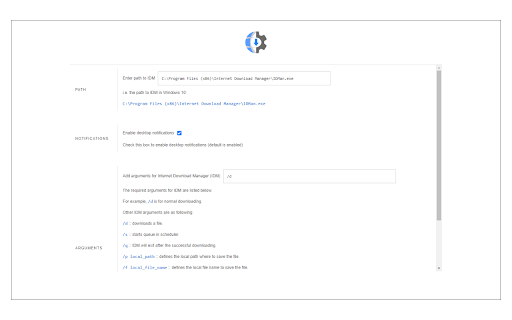
3) before using the add-on, please open the option's page and make sure the path to IDM is correct based on your operating system. For example, the path to IDM in Windows 10 is: C:\Program Files (x86)\Internet Download Manager\IDMan.exe
Next, please follow the below steps to open and download desired links in IDM.

a. Right-click on a download link and then click on the - Download With IDM - from the context menu.
b. IDM has several input arguments to enhance downloading desired files. The default argument for downloading is: /d. To get more info about other arguments please open the add-on option's page and read section arguments. Please note that you need to add parameters comma separated, for example, to automatically download a file write: "/d,/n" in the designated area.
c. you can set the IDM path in your machine from the options page.

To report any bug, please fill out the bug report form on the add-on's homepage (https://mybrowseraddon.com/open-with-dm.html).
Technical
- Version
- 0.1.7
- Manifest
- V3
- Size
- 25.28KiB
- Min Chrome
- 88
- Languages
- 1
- Featured
- No
Metadata
- ID
- epgilldoipfbdlneomlmegekaoonchcj
- Developer ID
- u8ee748809e2c00c56797f3ac30a2a227
- Developer Email
- [email protected]
- Created
- Mar 3, 2018
- Last Updated (Store)
- Apr 23, 2026
- Last Scraped
- Jun 16, 2026
- Website
- —
- Support URL
- https://mybrowseraddon.com/open-with-dm.html
- Privacy Policy
- —
Similar extensions
Alternatives to Open With Download Manager, ranked by description similarity.

Open in IE™
Open links in IE (Internet Explorer)
10.0K
★ 2.8

Open in PDF Viewer
Easily open desired links in a PDF viewer.
100.0K
★ 3.2

AB Download Manager Browser Integration
Download files with AB Download Manager app
200.0K
★ 4.6

Elite Download Manager
Easily manage all your downloads from toolbar popup!
1.0K
★ 4.2

Open in VLC™
Easily open desired links in the VLC (VideoLAN) media player!
10.0K
★ 3.5

Prime Download Manager Browser Integration
Download files with Prime Download Manager app
5

Internet Download Accelerator
Intercept downloads for Internet Download Accelerator, download a file or a group of files from the context menu.
50.0K
★ 3.3
Download Tools - Multi threaded
Multi-threaded download utility with aria2 engine for your browser!
1.0K
★ 1.0
Data sourced from the Chrome Web Store · last verified Jun 16, 2026.