
Batch PDF File Opener
Open multiple local PDF files from file paths. Works great with MS Edge for markup workflows.
As of June 2026, Batch PDF File Opener has 18 users in the Productivity category.
Usersdown 18.2 percent−18.2%
18
18
Ratingno change0%
—
— reviews
Reviewsno change0%
—
Version
1.3
Manifest V3
History
5 snapshotsTracking since Apr 19, 2026.
View as table
| Date | Users | Rating | Reviews | Version |
|---|---|---|---|---|
| Apr 19, 2026 | 22 | — | — | 1.3 |
| May 4, 2026 | 21 | — | — | 1.3 |
| May 13, 2026 | 20 | — | — | 1.3 |
| May 26, 2026 | 18 | — | — | 1.3 |
| Jun 7, 2026 | 24 | — | — | 1.3 |
| Now | 18 | — | — | 1.3 |
Permissions & access
- Permissions
- tabs
- Host access
- file:///*
Screenshots

About
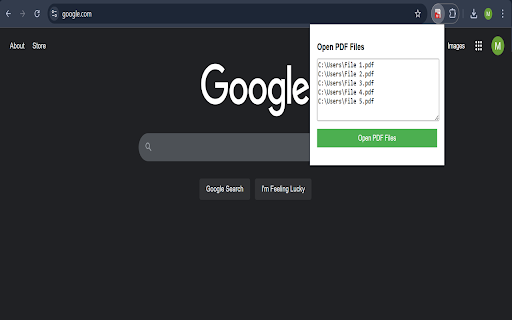
Important: Make sure you've enabled "Allow access to file URLs" in extension settings.

Simplify your PDF workflow with the PDF File Opener extension!
This powerful tool lets you quickly open multiple PDF files in Google Chrome directly from a list of local file paths. Here's how it works:

Enter Your PDF Paths: Copy and paste the file paths of the PDFs you want to open into the extension.
Open Instantly: The extension opens each PDF in a new Chrome tab, saving you time and effort.
Easy File Path Access: Use the Shift + Right-Click method on files to easily copy their file paths.
Why Install PDF File Opener?

Boost Productivity: Quickly access your PDF documents without manually navigating through your files.
User-Friendly: A clean and intuitive interface makes the process seamless.
Free and Secure: No data collection or unnecessary permissions required.
Get Started Now:
Download the PDF File Opener extension to streamline your PDF document access and simplify your daily tasks.

Like this extension? Buy me a coffee :) https://coff.ee/wackyh
Technical
- Version
- 1.3
- Manifest
- V3
- Size
- 15.26KiB
- Min Chrome
- 88
- Languages
- 1
- Featured
- No
Metadata
- ID
- fgdegmpekklncjmcmldienfjkhgdfmab
- Developer ID
- ufe96d79ecb2d50a103d963181bd5a9f0
- Developer Email
- [email protected]
- Created
- Nov 18, 2024
- Last Updated (Store)
- Jul 10, 2025
- Last Scraped
- Jun 7, 2026
- Website
- —
- Support URL
- —
- Privacy Policy
- https://github.com/mash95ca/Privacy-policy/issues/1
Similar extensions
Alternatives to Batch PDF File Opener, ranked by description similarity.

Open Local Files in Google Chrome™
Opening links to local files is prohibited in chrome, but this extension allows you to open them.
4.0K
★ 2.5

PDFopen — PDF & Image Tools
Compress images, rename files, and access 30+ PDF tools instantly. Compress PDFs, convert, merge, protect — right from the toolbar.
6
★ 5.0
PDF Link Extractor
Export all URLs and their related page numbers from PDF files with one click
1.0K
★ 3.0

iLovePDF 2 - Chrome Extension
iLovePDF2 is the only 100% free PDF toolkit to Edit, Merge, Split, Compress, and Convert your files.
30.0K
★ 4.2

PDF Converter
Convinent tool to convert DOCX to PDF right from new tab
1.0K

Multi URL Opener
Open multiple URLs at once and manage saved link groups
185

Multi URL Opener
A Chrome extension to open multiple URLs at once.
28

Combine PDF – Fast & Easy Tool
Quickly merge multiple PDF files into one: fast, secure, and keeps original quality without limits.
110
★ 5.0
Data sourced from the Chrome Web Store · last verified Jun 7, 2026.