
Fluxshot
Fluxshot is a Chrome extension designed to be integrated with Redmine to take screenshots and create issues.
As of June 2026, Fluxshot has 12 users and a 5.00/5 rating from 2 reviews in the Developer Tools category.
Usersdown 45.5 percent−45.5%
12
12
Ratingno change0%
5.00
2 reviews
Reviewsno change0%
2
Version
0.0.3
Manifest V3
History
3 snapshotsTracking since Apr 1, 2026.
View as table
| Date | Users | Rating | Reviews | Version |
|---|---|---|---|---|
| Apr 1, 2026 | 22 | 5.00 | 2 | 0.0.3 |
| May 3, 2026 | 19 | 5.00 | 2 | 0.0.3 |
| Jun 2, 2026 | 15 | 5.00 | 2 | 0.0.3 |
| Now | 12 | 5.00 | 2 | 0.0.3 |
Permissions & access
- Permissions
- activeTabtabs
- Host access
- None declared
Screenshots

About
Introducing Fluxshot: The Ultimate Chrome Extension for Effortless Issue Reporting and Feedback

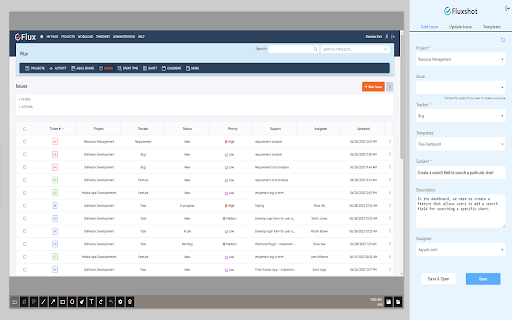
Fluxshot is a powerful Chrome extension that seamlessly integrates with Redmine, revolutionizing the way you capture screenshots and create issues right from your browser. With Fluxshot, you can effortlessly provide feedback, report bugs, and update existing issues without ever leaving your current web page.

Capture and Customize with Ease

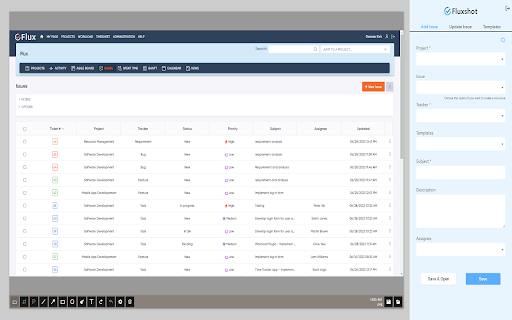
With Fluxshot, you have the flexibility to capture either the entire webpage or specific sections of it. Once captured, unleash your creativity by leveraging a range of annotation and editing tools. Whether you need to add descriptive text, highlight important areas, or utilize other editing features, Fluxshot provides a seamless experience for enhancing your screenshots.

Efficient Workflow with Templates

Say goodbye to repetitive tasks! Fluxshot empowers you to create customizable templates, allowing you to save time and streamline your issue creation process. By reusing templates, you can effortlessly fill in the necessary details when creating an issue, ensuring consistency and efficiency across your projects.

Setting up Fluxshot is a Breeze

Getting started with Fluxshot is quick and simple. Just head to the Chrome store and download the Fluxshot extension. Additionally, you'll need to install the Fluxshot plugin in Redmine which is offered by Redmineflux. To enable seamless integration, make sure to check the "Enable REST web service" option in your Redmine API settings. And for secure API authentication, don't forget to enable the REST API feature in Redmine Administration settings.

Fluxshot in Action

To access Fluxshot, navigate to your extensions toolbar and select Fluxshot from the list. If you're not already logged in, no worries! Simply log in using your Redmine URL and user ID/password to gain access to Fluxshot's powerful features. During the initial login, enter your credentials manually, and from then on, Fluxshot will auto-fill them, securely encrypting your data for future use.

Once you're logged in, you'll be able to effortlessly capture screenshots of either the entire screen or specific sections. Leveraging the available editing tools, you can make changes, add relevant descriptions or required details, or utilize your pre-defined templates to streamline the process. After finalizing your changes, just hit the create button, and a new issue will be seamlessly generated based on the selected tracker type.

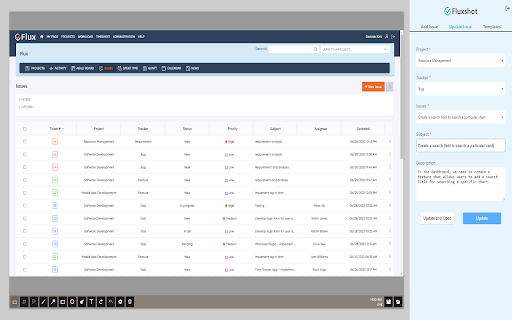
In addition to creating new issues, Fluxshot also enables you to update existing issues by effortlessly adding screenshots to them. This allows for efficient collaboration and ensures that all necessary information is readily available within your project management tool, Redmine.

Why Fluxshot is Your Go-To Extension

1. Capture screenshots of the entire webpage or specific sections effortlessly.
2. Enjoy multiple editing options to customize your screenshots to perfection.
3. Seamlessly update your project management tool, Redmine, directly from Fluxshot.
4. Swiftly update and enhance existing issues with ease.
5. Leverage the power of reusable templates for consistent and efficient issue creation.
Technical
- Version
- 0.0.3
- Manifest
- V3
- Size
- 18.42MiB
- Min Chrome
- 88
- Languages
- 1
- Featured
- No
Metadata
- ID
- egnejnlmmehfelnlkiklafagleifphbp
- Developer ID
- uda10cc646e73e50324b3a2b7fa35a312
- Developer Email
- [email protected]
- Created
- Dec 15, 2022
- Last Updated (Store)
- Jun 30, 2023
- Last Scraped
- Jun 2, 2026
- Website
- —
- Support URL
- —
- Privacy Policy
- —
Similar extensions
Alternatives to Fluxshot, ranked by description similarity.

BugShot
Capture visual bugs and report it to redmine.
34
★ 5.0

Snap2Bug - AI Bug Reporter
AI-powered bug report generator using Gemini API. Capture screenshots and generate professional bug reports instantly.
18

FramedShot: Screenshot Frames, Mockup & Editor
Polish screenshots and tab recordings with frames, annotations, redactions, mockups, and local export.
114
★ 5.0

ShotMyPage - Full Page Screen Capture
Chrome full page screenshot and screen capture extension with professional editing tools and project management
224
★ 5.0
Screenshot Pro : Full page screenshot
Complete Page Screenshot
1.0K
★ 4.8

QA Capture
Session logging & screenshots
32
★ 5.0

Capture - Instant bug reports
The fastest way to create bug reports from your website.
298
★ 5.0

Bug Reporter for Jira
Create bug reports with screenshots, templates, and AI assistance for Jira
26
Data sourced from the Chrome Web Store · last verified Jun 2, 2026.