
BugShot
Capture visual bugs and report it to redmine.
As of June 2026, BugShot has 34 users and a 5.00/5 rating from 6 reviews in the Developer Tools category.
Usersup 3.0 percent+3.0%
34
34
Ratingno change0%
5.00
6 reviews
Reviewsno change0%
6
Version
0.4.0
Manifest V3
History
2 snapshotsTracking since Apr 1, 2026.
View as table
| Date | Users | Rating | Reviews | Version |
|---|---|---|---|---|
| Apr 1, 2026 | 33 | 5.00 | 6 | 0.4.0 |
| Jun 2, 2026 | 37 | 5.00 | 6 | 0.4.0 |
| Now | 34 | 5.00 | 6 | 0.4.0 |
Permissions & access
- Permissions
- activeTabstoragenotifications
- Host access
- http://*/, https://*/
Screenshots


About
Website testing made easier: BugShot for Redmine makes reporting bugs straightforward and convenient. Thanks to a minimal workflow, BugShot for Redmine helps save valuable time when testing websites.

PREPARATION:
Just add BugShot for Redmine to your Chrome Extensions, and check "Enable REST web service" once in the Redmine settings under API.

THIS IS HOW IT WORKS:
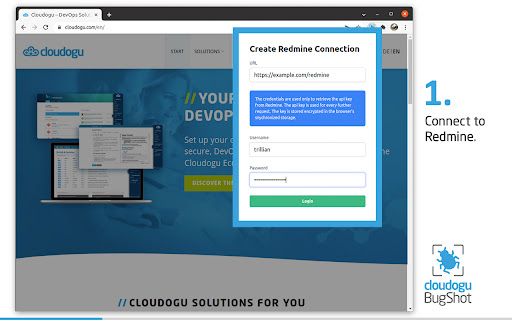
Enter the url of your Redmine and log in with your account. Username and password have to be entered only once, because BugShot reads the Api Key of the user from Redmine with this data and stores it encrypted. BugShot then uses the Api Key for further communication with Redmine.

Create a reference ticket with the parameters of the website to be tested and the default template is already created in Redmine for each error found. Of course, additional tickets can be created or existing tickets can be used as reference.

Detected bugs can now be captured using the BugShot button or shortcut (Windows/Linux Shift+Ctrl+S and Mac Shift+Command+S) and the generated screenshot can be commented directly using the paint and label function.

Now just fill in the subject and description of the error and submit it.

The created ticket can then be viewed in Redmine. Benefit: URL and browser resolution will no longer be forgotten in the future, because Bugshot automatically attaches this information to the ticket.


ABOUT CLOUDOGU

At Cloudogu we believe in good software development through innovation, open source, agility, DevOps and community.
Our team of approximately 50 members enjoy sharing their knowledge and new insights in our community, blog, training and consulting - Whether on-site in the heart of Brunswick, Germany or remotely. Our topics are DevOps, GitOps, Agile, Security and technologies like Kubernetes and Docker. It all comes together in our open source projects, the Cloudogu EcoSystem and SCM-Manager.
Technical
- Version
- 0.4.0
- Manifest
- V3
- Size
- 527KiB
- Min Chrome
- 88
- Languages
- 2
- Featured
- No
Metadata
- ID
- dpehgggbpmclbfgaapnllihhhbcllknb
- Developer ID
- u0e8a71bc44a6e4917cc30263a5add1a5
- Developer Email
- [email protected]
- Created
- Feb 18, 2022
- Last Updated (Store)
- Aug 4, 2022
- Last Scraped
- Jun 2, 2026
- Website
- cloudogu.com
- Support URL
- —
- Privacy Policy
- —
Similar extensions
Alternatives to BugShot, ranked by description similarity.

Fluxshot
Fluxshot is a Chrome extension designed to be integrated with Redmine to take screenshots and create issues.
12
★ 5.0

Bugbasher
QA Testing Tools
30
★ 5.0

QA Bug Logger
Log bugs with annotated screenshots to Google Sheets & Drive
10
★ 5.0

BugShot
BugShot is an easy-to-use tool to track the bugs on your projects.
85

Snap2Bug - AI Bug Reporter
AI-powered bug report generator using Gemini API. Capture screenshots and generate professional bug reports instantly.
18

Crosscheck
Report bugs in seconds on Crosscheck with consoles, networks, actions and instant replay.
296
★ 4.9

Data collector and crash reporting
Collect screenshot, cookies, storage and network for internal reports.
8

BetterBugs: Create precise bug reports with 1-click
One-click bug reports with all the context devs need
10.0K
★ 4.9
Data sourced from the Chrome Web Store · last verified Jun 2, 2026.