
Canva Dark Mode
Enable dark mode on Canva
As of May 2026, Canva Dark Mode has 2,000 users and a 3.90/5 rating from 10 reviews in the Workflow & Planning category.
Usersup 100.0 percent+100.0%
2.0K
2,000
Ratingup 3.2 percent+3.2%
3.90
10 reviews
Reviewsup 11.1 percent+11.1%
10
Version
1.0.2
Manifest V3
90-day change · In the last 90 days this extension gained 1.0K users.
History
2 snapshotsTracking since Apr 30, 2026.
View as table
| Date | Users | Rating | Reviews | Version |
|---|---|---|---|---|
| Apr 30, 2026 | 1.0K | 3.78 | 9 | 1.0.2 |
| May 27, 2026 | 1.0K | 3.90 | 10 | 1.0.2 |
| Now | 2.0K | 3.90 | 10 | 1.0.2 |
Permissions & access
- Permissions
- storagenotifications
- Host access
- <all_urls>
Screenshots
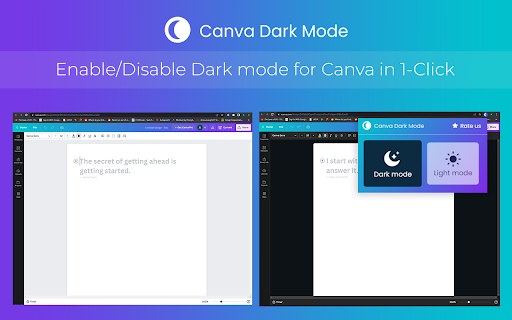
About
Immerse yourself in a visually appealing design environment with the Canva Dark Mode Chrome extension. This powerful tool transforms Canva's interface into a sleek, dark-themed layout, reducing eye strain and enhancing focus while working on your designs. Elevate your design experience and unleash your creativity with Canva Dark Mode.

Key Features:
>>Sleek Dark Theme: Enjoy a visually pleasing and elegant dark interface that reduces eye strain and enhances focus.
>>Improved Contrast: Experience enhanced contrast and readability for your design elements and text.
>>Eye-friendly Design: Minimize visual distractions and create a more immersive environment for your design work.
>>Seamless Integration: The extension seamlessly integrates into the Canva interface, providing a consistent dark mode experience.
>>Toggle On/Off: Easily switch between dark and light modes with a simple toggle button.

How to Use?
>>Install the extension from the Chrome Web Store.
>>Open Canva and log into your account.
>>Once installed, the extension will automatically enable dark mode on the Canva interface.
>>Enjoy the sleek and eye-friendly dark-themed design environment while working on your designs.
>>To switch back to the default light mode, simply click the toggle button provided by the extension.

Enhance your design experience with the Canva Dark Mode Chrome extension. Immerse yourself in a visually appealing and eye-friendly dark-themed interface, reducing strain and improving focus. Install the extension today and transform your Canva workflow.
Technical
- Version
- 1.0.2
- Manifest
- V3
- Size
- 334KiB
- Min Chrome
- 88
- Languages
- 1
- Featured
- Yes
Metadata
- ID
- onkahfiobjcdmilganimgeomfmibohlo
- Developer ID
- ua7103329515b82fabd5235a04137e752
- Developer Email
- [email protected]
- Created
- Jun 8, 2023
- Last Updated (Store)
- Jun 8, 2023
- Last Scraped
- May 27, 2026
- Website
- —
- Support URL
- —
- Privacy Policy
- —
Similar extensions
Alternatives to Canva Dark Mode, ranked by description similarity.
Dark Mode for Chrome
Click the icon to enable Dark Mode For Chrome. Dark theme for all website with a single move. Black theme for Chrome
8.0K
★ 4.3

Dark Mode Toggle
Toggle between dark mode and light mode with a single click.
2.0K
★ 3.4
Midnight Dark Mode - Chrome's Dark Theme
Enable dark mode on all sites. Customize theme and brightness. Dark reader - Chrome's dark skin.
6.0K
★ 4.5

Google Drive Dark Mode
Boost productivity and reduce eye strain with google drive dark mode pc. Enjoy the benefits of google docs dark mode on your PC
1.0K
★ 3.7

Night Mode For Chrome
Enable dark mode on chrome with night mode chrome extension
52

Dark Mode 2.0
Allows you to turn on dark mode for any website & enables night shift that changes the tint to help avoid strain on your eyes!
334
★ 4.8

Google Docs Dark Mode
Dark mode for Google Docs and Google Sheets. Reduce eye strain with customizable brightness, contrast, sepia, and built-in themes.
4.0K
★ 4.8
Gloom Dark Mode
Gloom Dark Mode: Effortlessly Enable Dark Mode on Every Website, Your Way
20.0K
★ 4.3
Data sourced from the Chrome Web Store · last verified May 27, 2026.