
Save Tabs
Save and restore all tabs from toolbar popup!
As of June 2026, Save Tabs has 7,000 users and a 2.83/5 rating from 6 reviews in the Productivity category.
Usersno change0%
7.0K
7,000
Ratingno change0%
2.83
6 reviews
Reviewsno change0%
6
Version
0.1.7
Manifest V3
History
1 snapshotsTracking since Apr 20, 2026.
View as table
| Date | Users | Rating | Reviews | Version |
|---|---|---|---|---|
| Apr 20, 2026 | 7.0K | 2.83 | 6 | 0.1.7 |
| Now | 7.0K | 2.83 | 6 | 0.1.7 |
Permissions & access
- Permissions
- tabsstorage
- Host access
- None declared
Screenshots
About
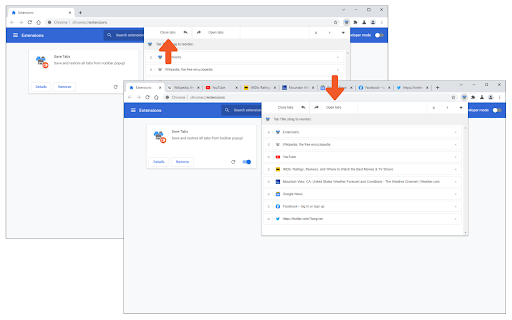
Save Tabs is an extension that helps you save and close all tabs with just one click from your browser's toolbar popup.

Simply open the toolbar popup and click on the - Close tabs - button on the top-left corner. To open all closed tabs please click on the - Open tabs - button on the top toolbar. Within the toolbar popup UI, you will also see the list of tabs. You can easily reorder the items in this list to your desired order (drag & drop). All open tabs will be adapted automatically to the new order. Besides, you can click on the close button in the toolbar popup to close a single tab (and remove it from the list). Once you make any changes in the toolbar popup UI, the exact change will appear for all open tabs in your browser; vice versa, once you make any change on the open tabs, the toolbar popup will be updated accordingly.

Note: The extension interface supports dark mode. To switch the interface theme to dark, please press the moon icon on the top-right toolbar.

To report bugs, please fill out the bug report form on the addon's homepage (https://mybrowseraddon.com/save-tabs.html).
Technical
- Version
- 0.1.7
- Manifest
- V3
- Size
- 62.03KiB
- Min Chrome
- 88
- Languages
- 1
- Featured
- Yes
Metadata
- ID
- efgdadcghookjdehffdbmoofpfcmgoaa
- Developer ID
- u549bcf73afdd28fb220664bb740e9e45
- Developer Email
- [email protected]
- Created
- Oct 25, 2017
- Last Updated (Store)
- Sep 7, 2025
- Last Scraped
- Jun 9, 2026
- Website
- —
- Support URL
- https://mybrowseraddon.com/save-tabs.html
- Privacy Policy
- —
Similar extensions
Alternatives to Save Tabs, ranked by description similarity.

Undo Closed Tabs Button
Easily undo closed tabs via your browser's toolbar popup!
30.0K
★ 4.4

Copy Tab
View, save, and update tab info, cookie, and localStorage via the toolbar popup.
169

Tab Manager
Easily organize all your open tabs in multiple windows from toolbar popup!
1.0K
★ 3.6

Card Style Tab Search
List and manage all open tabs in card style, efficiently
10

Close All Tabs
Close all open tabs. Optionally close pinned tabs and incognito mode tabs.
20.0K
★ 4.3

Copy Tabs
Copy tab URLs to clipboard
3

Close Tabs
Close tabs, save tabs to improve computer performance. Easy open tabs, find tabs, group tabs, backup tabs, manage tabs.
—

TidyTabs - Tab organizer
Enhanced productivity in the browser with quick navigation through your tabs, bookmarks and history.
—
Data sourced from the Chrome Web Store · last verified Jun 9, 2026.