
Close All Tabs
Close all open tabs. Optionally close pinned tabs and incognito mode tabs.
As of June 2026, Close All Tabs has 20,000 users and a 4.30/5 rating from 54 reviews in the Productivity category.
Usersno change0%
20.0K
20,000
Ratingdown 1.4 percent−1.4%
4.30
54 reviews
Reviewsup 1.9 percent+1.9%
54
Version
1.2.0
Manifest V3
History
2 snapshotsTracking since May 3, 2026.
View as table
| Date | Users | Rating | Reviews | Version |
|---|---|---|---|---|
| May 3, 2026 | 20.0K | 4.36 | 53 | 1.2.0 |
| Jun 2, 2026 | 20.0K | 4.36 | 53 | 1.2.0 |
| Now | 20.0K | 4.30 | 54 | 1.2.0 |
Permissions & access
- Permissions
- contextMenusstorage
- Host access
- None declared
Screenshots



About
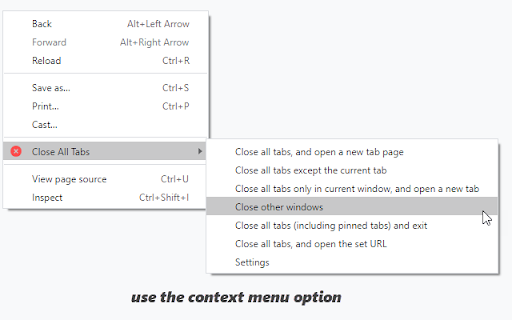
Use the toolbar button, keyboard command (alt + w) or the context menu options to quickly close open tabs. Several other options available.
Change the default setting for the toolbar button, and open a particular URL after closing all the tabs. Optionally close pinned tabs and incognito mode tabs.

Visit our homepage for detailed user guide: https://browsernative.com/close-all-tabs-extension/
Technical
- Version
- 1.2.0
- Manifest
- V3
- Size
- 16.92KiB
- Min Chrome
- 88
- Languages
- 1
- Featured
- Yes
Metadata
- ID
- jcokdfogijmigonkhckmhldgofjmfdak
- Developer ID
- uce8c71d584218f0da97a6564a3b62a18
- Developer Email
- [email protected]
- Created
- Aug 5, 2016
- Last Updated (Store)
- Jul 1, 2024
- Last Scraped
- Jun 2, 2026
- Website
- browsernative.com
- Privacy Policy
- https://browsernative.com/extensions-privacy-policy/
Similar extensions
Alternatives to Close All Tabs, ranked by description similarity.

Close other tabs | Close all tabs
Close other tabs | Close all tabs
30

Save Tabs
Save and restore all tabs from toolbar popup!
7.0K
★ 2.8

Close Tab Easily
Сlose tab with just one click
31
★ 5.0

Close all tabs
A Chrome extension to instantly close all open tabs. Simplify your online browsing and web management with one click.
40
★ 5.0

Easy Tabs
Close or Go to your tabs easily.
7
★ 4.7

Copy Page URL & Close Tab
Copies page URL to clipboard and closes tab.
34

Close Tabs
Close tabs, save tabs to improve computer performance. Easy open tabs, find tabs, group tabs, backup tabs, manage tabs.
—

Tabcloser
Easily manage having too many tabs.
7
★ 5.0
Data sourced from the Chrome Web Store · last verified Jun 2, 2026.