
Adobe Acrobat: PDF edit, convert, sign tools
Do more in Google Chrome with Adobe Acrobat PDF tools. View, fill, comment, sign, and try convert and compress tools.
As of June 2026, Adobe Acrobat: PDF edit, convert, sign tools has 327,000,000 users and a 4.40/5 rating from 61,670 reviews in the Workflow & Planning category.
Usersdown 1.5 percent−1.5%
327.0M
327,000,000
Ratingno change0%
4.40
61.7K reviews
Reviewsup 1.1 percent+1.1%
61.7K
Version
26.6.1.0
Manifest V3
90-day change · In the last 90 days this extension lost 5.0M users, 6 version updates, changed permissions.
History
25 snapshotsTracking since Apr 2, 2026.
View as table
| Date | Users | Rating | Reviews | Version |
|---|---|---|---|---|
| Apr 2, 2026 | 332.0M | 4.40 | 61.0K | 26.3.2.0 |
| Apr 4, 2026 | 336.0M | 4.40 | 61.0K | 26.3.2.0 |
| Apr 7, 2026 | 331.0M | 4.40 | 61.0K | 26.3.2.0 |
| Apr 14, 2026 | 322.0M | 4.40 | 61.0K | 26.3.2.0 |
| Apr 19, 2026 | 335.0M | 4.40 | 61.0K | 26.4.1.0 |
| Apr 22, 2026 | 337.0M | 4.40 | 61.0K | 26.4.1.0 |
| Apr 25, 2026 | 338.0M | 4.40 | 61.0K | 26.4.1.0 |
| Apr 28, 2026 | 336.0M | 4.40 | 61.0K | 26.4.1.0 |
| May 1, 2026 | 335.0M | 4.40 | 61.0K | 26.4.1.0 |
| May 5, 2026 | 335.0M | 4.40 | 61.0K | 26.4.2.0 |
| May 7, 2026 | 332.0M | 4.40 | 61.0K | 26.4.2.0 |
| May 10, 2026 | 333.0M | 4.40 | 61.0K | 26.4.2.1 |
| May 12, 2026 | 333.0M | 4.40 | 61.0K | 26.4.2.1 |
| May 14, 2026 | 333.0M | 4.40 | 61.0K | 26.4.2.1 |
| May 16, 2026 | 336.0M | 4.40 | 61.0K | 26.5.1.0 |
| May 19, 2026 | 333.0M | 4.40 | 61.0K | 26.5.1.0 |
| May 24, 2026 | 334.0M | 4.40 | 61.0K | 26.5.1.0 |
| May 27, 2026 | 331.0M | 4.40 | 61.0K | 26.5.1.0 |
| May 30, 2026 | 330.0M | 4.40 | 61.0K | 26.5.1.0 |
| Jun 2, 2026 | 325.0M | 4.40 | 61.0K | 26.5.2.0 |
| Jun 5, 2026 | 324.0M | 4.40 | 61.0K | 26.5.2.0 |
| Jun 7, 2026 | 329.0M | 4.40 | 61.0K | 26.5.2.1 |
| Jun 10, 2026 | 327.0M | 4.40 | 61.3K | 26.5.2.2 |
| Jun 13, 2026 | 330.0M | 4.40 | 61.4K | 26.5.2.3 |
| Jun 19, 2026 | 329.0M | 4.40 | 61.5K | 26.6.1.0 |
| Now | 327.0M | 4.40 | 61.7K | 26.6.1.0 |
Changelog
- Apr 14, 2026permissions
contextMenus, tabs, downloads, nativeMessaging, webRequest, webNavigation, storage, scripting, alarms, offscreen, cookies, sidePanel, fileSystem
contextMenus, tabs, downloads, nativeMessaging, webRequest, webNavigation, storage, scripting, alarms, offscreen, cookies, sidePanel, declarativeNetRequest, fileSystem
Permissions & access
- Permissions
- contextMenustabsdownloadsnativeMessagingwebRequestwebNavigationstoragescriptingalarmsoffscreencookiessidePaneldeclarativeNetRequestfileSystem
- Host access
- <all_urls>
Screenshots


About
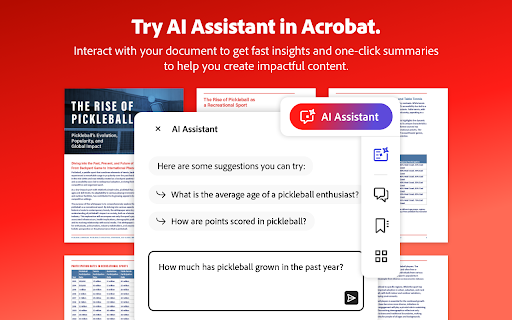
Adobe Acrobat is the industry-leading PDF solution, used by millions of people. Use Acrobat PDF tools right in Google Chrome to get the best PDF viewing experience and get more done while browsing. You can add comments to PDFs, including sticky notes, text, and highlights—all for free.

If you need more advanced Acrobat features, you can try tools to export to and from PDF, create a PDF, merge PDF documents, organize a PDF, reduce PDF size, and more. Working with PDFs online has never been so easy.

HOW TO USE THE ACROBAT CHROME EXTENSION
1. Install the Acrobat extension for Chrome.
2. Pin the extension for quick access.
3. Open any PDF in your browser.
4. Select an Acrobat tool.

VIEW, DOWNLOAD, PRINT, and STORE PDFs
• Get the best PDF viewing experience with the Acrobat PDF reader.
• Download or print with a quick click.
• Sign in to store your files online for fast access to PDF files from anywhere.

EDIT PDFs WITH COMMENTS FOR FREE
• Add PDF notes, text, and comments, including sticky notes and highlights.
• Write on PDF documents by adding text or drawings using PDF editor features.

FILL AND SIGN FORMS FOR FREE
• Open a PDF in Adobe Acrobat Reader to fill and sign forms on your desktop.
• Easily complete PDF forms with the Acrobat form filler feature.
• E-sign documents with your signature or initials.

TRY TOOLS TO BE MORE PRODUCTIVE IN CHROME
Try premium tools for even more PDF power.
• Use our PDF converter tool to convert PDFs to and from Microsoft Word, Excel, and PowerPoint, as well as JPG and other file formats.
• Create a PDF from a document or image, including converting JPG to PDF.
• Combine files into a single PDF file or split a PDF.
• Organize your PDF. Delete, rotate, or reorder PDF pages.
• Compress a PDF to reduce its file size.
• Send documents to others to e-sign online fast.
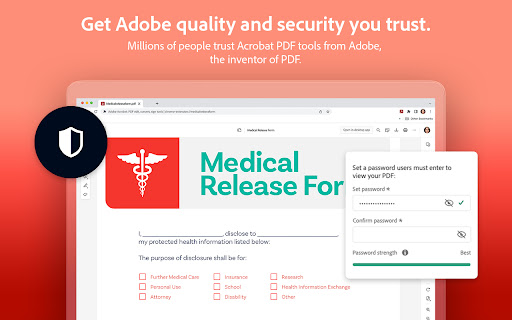
• Protect a PDF document by adding a password.
You can also sign up for a free trial at https://www.adobe.com/tryacrobat.

WHAT’s NEW:
• Edit your PDFs in Acrobat Chrome Viewer
• Fill and Sign forms for free
• Support for opening local PDF files in extension

Terms & Conditions: Your use of this application is governed by the Adobe General Terms of Use (http://www.adobe.com/go/terms_en) and the Adobe Privacy Policy (http://www.adobe.com/go/privacy_policy_en) and any successor versions thereto.
Technical
- Version
- 26.6.1.0
- Manifest
- V3
- Size
- 5.19MiB
- Min Chrome
- 107.0
- Languages
- 28
- Featured
- Yes
Metadata
- ID
- efaidnbmnnnibpcajpcglclefindmkaj
- Developer ID
- u4aa1399b20671957d839ff11569693bf
- Developer Email
- [email protected]
- Created
- Nov 25, 2014
- Last Updated (Store)
- Jun 11, 2026
- Last Scraped
- Jun 19, 2026
- Website
- https://www.adobe.com/
- Privacy Policy
- https://www.adobe.com/privacy/policy.html
Similar extensions
Alternatives to Adobe Acrobat: PDF edit, convert, sign tools, ranked by description similarity.

PDF Editor for Chrome:Edit, Fill, Sign, Print
Edit, e-sign, print or fax PDFs directly from search engine results and webpages with the pdfFiller extension.
200.0K
★ 2.3

PDF Viewer
Display any PDF files in the Chrome browser with HTML5. Online editor, viewer and PDF converter tool.
100.0K
★ 4.7

Soda PDF Viewer: Edit, Convert, Compress PDF files
Edit and read any PDF files in Chrome. Soda PDF is the ultimate online PDF editor and viewer for any device!
700.0K
★ 3.7
Xodo | PDF Editor, Converter & Merger
Free PDF tool to edit, convert, compress, merge, combine, crop, and redact PDF files.
40.0K
★ 3.8

DeftPDF
Free PDF Software to Edit, Convert, Sign & More. Integrated with Gmail
30.0K
★ 3.3

My PDF Club
An easy and simple tool which helps you convert PDF to word, excel, powerpoint, jpg, txt, or convert these formats to PDF
9

CleanMyPDF - AI PDF Text Extractor
Extract and clean text from PDFs with AI-powered formatting preservation. Premium OCR and export features available.
51

Drawboard PDF: Annotate, merge, split, convert
Powerful PDF tools for every job. Mark up, edit and collaborate on PDFs. Fill, sign, convert and measure seamlessly in your browser.
2.0K
★ 5.0
Data sourced from the Chrome Web Store · last verified Jun 19, 2026.