
Drawboard PDF: Annotate, merge, split, convert
Powerful PDF tools for every job. Mark up, edit and collaborate on PDFs. Fill, sign, convert and measure seamlessly in your browser.
As of June 2026, Drawboard PDF: Annotate, merge, split, convert has 2,000 users and a 5.00/5 rating from 9 reviews in the Workflow & Planning category.
Usersno change0%
2.0K
2,000
Ratingno change0%
5.00
9 reviews
Reviewsup 12.5 percent+12.5%
9
Version
1.2.0
Manifest V3
History
3 snapshotsTracking since May 5, 2026.
View as table
| Date | Users | Rating | Reviews | Version |
|---|---|---|---|---|
| May 5, 2026 | 2.0K | 5.00 | 8 | 1.2.0 |
| May 15, 2026 | 3.0K | 5.00 | 8 | 1.2.0 |
| May 28, 2026 | 4.0K | 5.00 | 8 | 1.2.0 |
| Now | 2.0K | 5.00 | 9 | 1.2.0 |
Permissions & access
- Permissions
- scriptingtabsstorage
- Host access
- file://*, http://*/*, https://*/*
Screenshots


About
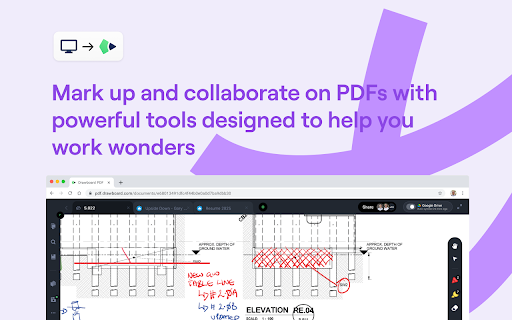
Mark up and collaborate on any PDF with ease with Drawboard PDF.

Millions of engineers, architects, lawyers, students and educators are using Drawboard PDF for fast and collaborative PDF markup. Our powerful PDF tools are helping streamline workflows and reduce the world’s reliance on paper.

**Installing the Google Chrome Extension enables you to:**

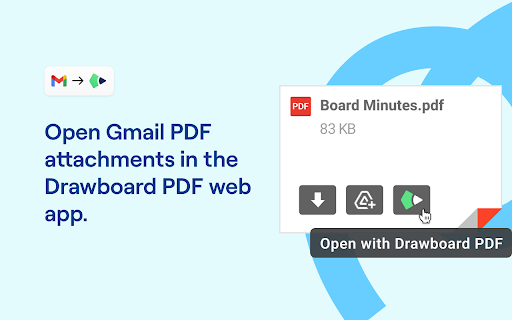
1. Attach Drawboard PDF cloud files to emails directly from the compose window in Gmail.
2. Open PDF email attachments in Drawboard PDF instantly.
3. Open PDFs from the web directly in Drawboard PDF, granting you instant access to a suite of PDF tools.

With Drawboard PDF you can:

- Annotate PDFs
- Collaborate on PDF files in real-time
- Sign documents
- Convert images to PDF
- Review documents with highlighters, text underline, strikethroughs and more
- Insert notes, text, shapes, lines and images
- Use bookmarks to create easy navigation within documents
- Utilize AI tools to summarize, rephrase, translate text and more!

With advanced tools you can:

- Merge, split and reorganize PDFs
- Measure elements on your page
- Add hyperlinks and audio notes to PDFs
- Insert callouts
- Apply various line styles and line endings
- Save and store annotations for use at any time
- Use grid & line overlays and templates as well as your own custom templates
- See a detailed Annotation history and conduct construction takeoffs
- Use OCR to make image text selectable and searchable
- Redact text or sections of PDFs

And more.

Available on Windows, iOS, macOS, Android and in your web browser.
Technical
- Version
- 1.2.0
- Manifest
- V3
- Size
- 63.82KiB
- Min Chrome
- 88
- Languages
- 1
- Featured
- No
Metadata
- ID
- bmninhlkpnllbioeiflnedibkeifpmkm
- Developer ID
- ue0ccd9342f8b787fb3d078e8f4a9ca93
- Developer Email
- [email protected]
- Created
- Jun 14, 2024
- Last Updated (Store)
- Aug 15, 2025
- Last Scraped
- Jun 9, 2026
- Website
- drawboard.com
- Support URL
- https://support.drawboard.com
- Privacy Policy
- https://www.drawboard.com/privacy
Similar extensions
Alternatives to Drawboard PDF: Annotate, merge, split, convert, ranked by description similarity.

DMAS - Draw, Mark and Share
Smart web annotations extension. Make marks, highlight important and draw directly on web pages. Share and collaborate with others.
31
★ 5.0

The Blackboard - Lightning-Fast Real-time Collaborative Drawing tool
Lightning-fast, real-time collaborative drawing tool for seamless creativity and teamwork.
554
★ 5.0

Collaborative Whiteboard
Free online whiteboard for real-time collaboration, lets you easily sketch diagrams that have a hand-drawn feel to them.
10.0K
★ 3.8

Adobe Acrobat: PDF edit, convert, sign tools
Do more in Google Chrome with Adobe Acrobat PDF tools. View, fill, comment, sign, and try convert and compress tools.
327.0M
★ 4.4

Recherche
Seamlessly annotate websites and pdf documents & share them with others.
3

DeftPDF
Free PDF Software to Edit, Convert, Sign & More. Integrated with Gmail
30.0K
★ 3.3

DocHub - Sign PDF from Gmail
Sign and edit PDF documents
200.0K
★ 4.4

Page Marker for Google Chrome™
Draw and add text to any web page screenshot. Make notes easily
6.0K
★ 3.7
Data sourced from the Chrome Web Store · last verified Jun 9, 2026.