Xodo | PDF Editor, Converter & Merger
Free PDF tool to edit, convert, compress, merge, combine, crop, and redact PDF files.
As of May 2026, Xodo | PDF Editor, Converter & Merger has 40,000 users and a 3.82/5 rating from 33 reviews in the Workflow & Planning category.
Usersup 33.3 percent+33.3%
40.0K
40,000
Ratingup 1.1 percent+1.1%
3.82
33 reviews
Reviewsup 3.1 percent+3.1%
33
Version
1.8
Manifest V3
90-day change · In the last 90 days this extension gained 10.0K users.
History
2 snapshotsTracking since Apr 24, 2026.
View as table
| Date | Users | Rating | Reviews | Version |
|---|---|---|---|---|
| Apr 24, 2026 | 30.0K | 3.78 | 32 | 1.8 |
| May 20, 2026 | 30.0K | 3.82 | 33 | 1.8 |
| Now | 40.0K | 3.82 | 33 | 1.8 |
Permissions & access
- Permissions
- None declared
- Host access
- None declared
Screenshots



About
Enjoy the better PDF experience by adding Xodo to your Chrome browser! Access PDF converter, PDF combiner, PDF filler, PDF editor, PDF merger and more to supercharge your productivity online.

Powerful PDF Converters and PDF tools to boost your productivity:

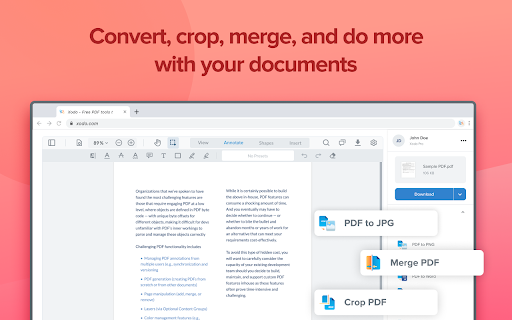
- Convert PDF to Word, PPT, Excel, PDF/A, HTML, JPG, JPEG and PNG
- Convert JPG, JPEG, PNG to PDF
- Convert Word, Excel, Powerpoint to PDF
- PDF Reader
- Edit PDF
- Merge PDF
- Compress PDF
- Crop and redact PDF
- Fill PDF
- Split PDF
- Rotate PDF pages
- Delete PDF pages
- Reduce PDF size
- Combine PDF files
- Sign a PDF

How to Use:
- Install Xodo extension
- Select an action from the top 5 tools
- Upload your file and use our online tools to edit, convert, compress, merge, combine, crop, and redact.
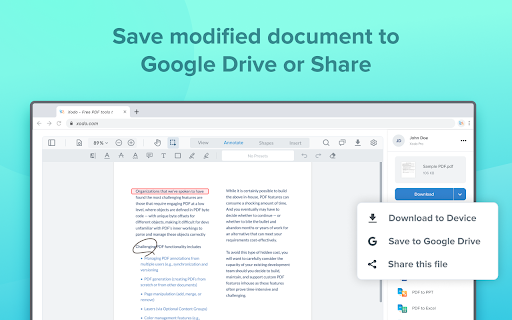
- Download your new file

With Xodo you can process various file types:
- PDF, PDF/A
- Office: Word, Excel, powerpoint (doc, docx,  xlsx, xlsm, ppt)
- Images: JPG, JPEG, PNG, GIF, TIFF
- HTML
- DICOM

NOTES:
To access the full list of document processing tools, visit https://xodo.com

By installing the Chrome extension, you agree to Xodo Terms of Use and Privacy Policy (https://xodo.com/legal)
Technical
- Version
- 1.8
- Manifest
- V3
- Size
- 22.8KiB
- Min Chrome
- 88
- Languages
- 1
- Featured
- Yes
Metadata
- ID
- lpkaodjnpmklkcjlchephbdfoaeliohm
- Developer ID
- u9f97c422bf553e976fc70d51a00da7c6
- Developer Email
- [email protected]
- Created
- Dec 9, 2021
- Last Updated (Store)
- Dec 18, 2024
- Last Scraped
- May 20, 2026
- Website
- —
- Support URL
- https://xodo.com/
- Privacy Policy
- https://xodo.com/privacy
Similar extensions
Alternatives to Xodo | PDF Editor, Converter & Merger, ranked by description similarity.

My PDF Club
An easy and simple tool which helps you convert PDF to word, excel, powerpoint, jpg, txt, or convert these formats to PDF
9
PDF4me - Edit, Merge, Compress & Convert PDF
Convert and Manage your documents quickly from your browser
2.0K
★ 4.9

DeftPDF
Free PDF Software to Edit, Convert, Sign & More. Integrated with Gmail
30.0K
★ 3.3

CocoDoc - PDF Editor, Filler & Converter
Easily edit, convert, split, and compress a PDF online.
3.0K
★ 3.3

PDF2DOCS
Get access to a free and fast PDF converter with a new tab page search.
10.0K
★ 4.0

Adobe Acrobat: PDF edit, convert, sign tools
Do more in Google Chrome with Adobe Acrobat PDF tools. View, fill, comment, sign, and try convert and compress tools.
327.0M
★ 4.4
Convert PDF to Word
Free PDF File Converter - Convert PDF to DOC/DOCS for Free.
5.0K
★ 3.4

EZ PDF
Enhance your PDF experience with our all-in-one Chrome extension for converting, splitting, merging, and securing PDFs.
102
Data sourced from the Chrome Web Store · last verified May 20, 2026.