
Chat Guard
Automatically hide and blur the ChatGPT sidebar menu with customizable toggles and hover activation.
As of June 2026, Chat Guard has 16 users and a 5.00/5 rating from 2 reviews in the Functionality & UI category.
Usersno change0%
16
16
Ratingno change0%
5.00
2 reviews
Reviewsno change0%
2
Version
2
Manifest V3
History
3 snapshotsTracking since Apr 1, 2026.
View as table
| Date | Users | Rating | Reviews | Version |
|---|---|---|---|---|
| Apr 1, 2026 | 16 | 5.00 | 2 | 2 |
| May 3, 2026 | 15 | 5.00 | 2 | 2 |
| Jun 2, 2026 | 13 | 5.00 | 2 | 2 |
| Now | 16 | 5.00 | 2 | 2 |
Permissions & access
- Permissions
- storagewindows
- Host access
- None declared
Screenshots


About
Chat Guard is a handy Chrome extension that enhances your experience on the ChatGPT platform by providing seamless control over the sidebar menu. With this extension, you can easily hide the sidebar menu and blur it for increased focus on your conversation.

Features:

* Hide Sidebar Menu: Automatically hides the sidebar menu, giving you a cleaner and more focused workspace. You can toggle this feature on or off based on your preference.

* Blur Sidebar Menu: Adds a blur effect to the sidebar menu to reduce distractions while still keeping it visible. This feature is also fully togglable.

* Mouse Hover Activation: Effortlessly access the sidebar menu by simply hovering over the left side of the screen. The menu will appear and the blur effect will be removed for easy interaction.

* Customizable: Enable or disable each feature independently to tailor the extension to your needs.

How to Use:

1. Install the Extension: Add Chat Guard to your Chrome browser from the Chrome Web Store.

2. Open the Extension: Click on the extension icon in your Chrome toolbar to open the settings.
Toggle Features: Use the provided switches to enable or disable hiding and blurring the sidebar menu.

3. Hover to Access: Hover your mouse over the left side of the screen to quickly access the sidebar menu when it's hidden or blurred.
Technical
- Version
- 2
- Manifest
- V3
- Size
- 484KiB
- Min Chrome
- 88
- Languages
- 1
- Featured
- No
Metadata
- ID
- ebknomjidfcndkodplldegdbcgjmhoao
- Developer ID
- u62e32a79f90390c07452c4918a3ed5c3
- Developer Email
- [email protected]
- Created
- Jul 24, 2024
- Last Updated (Store)
- Sep 23, 2024
- Last Scraped
- Jun 2, 2026
- Website
- —
- Support URL
- —
- Privacy Policy
- —
Similar extensions
Alternatives to Chat Guard, ranked by description similarity.

ChatGPT Sidebar - Hide Unnecessary Sections
Customize ChatGPT sidebar. Hide sections like GPTs, Projects, Codex, Atlas, Images, and Apps with one click.
82
★ 5.0

ChatGPTBuff - Enhance Your ChatGPT Web Experience
Customize interface and add utilities to ChatGPT Web
61
★ 5.0

YouTube No Chat
Automatically hides YouTube live chat by default
569
★ 5.0
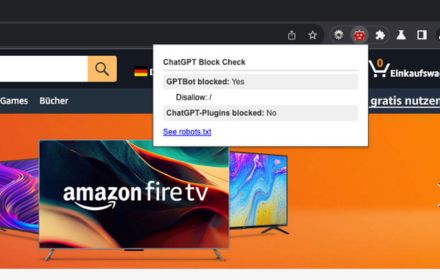
ChatGPT Block Checker
This extensions checks if a website blocked ChatGPT or ChatGPT Plugins for accessing their content.
148
★ 1.0

Focus Mode
Customize any web page for your needs
196
★ 4.0

GPTBuddy
Adds a sidebar with quick links to all questions in a GPT conversation thread. Works with ChatGPT, Claude, Gemini and Perplexity
27
★ 5.0

ChatGPT MultiTab
Chrome extension with React frontend
2

Google Chat Background Notifier
Keeps a configurable chat tab pinned on a single window at any time Chrome is running.
98
★ 3.5
Data sourced from the Chrome Web Store · last verified Jun 2, 2026.