
TP UX for IPSC Ontario
Simple UX enhancement for IPSC Ontario webpage, it only manipulate the UI. currently add search and filter feature for you to look…
As of June 2026, TP UX for IPSC Ontario has 18 users and a 5.00/5 rating from 2 reviews in the Workflow & Planning category.
Usersno change0%
18
18
Ratingno change0%
5.00
2 reviews
Reviewsno change0%
2
Version
1.0
Manifest V3
History
3 snapshotsTracking since Apr 1, 2026.
View as table
| Date | Users | Rating | Reviews | Version |
|---|---|---|---|---|
| Apr 1, 2026 | 18 | 5.00 | 2 | 1.0 |
| May 3, 2026 | 17 | 5.00 | 2 | 1.0 |
| Jun 2, 2026 | 20 | 5.00 | 2 | 1.0 |
| Now | 18 | 5.00 | 2 | 1.0 |
Permissions & access
- Permissions
- storage
- Host access
- None declared
Screenshots


About
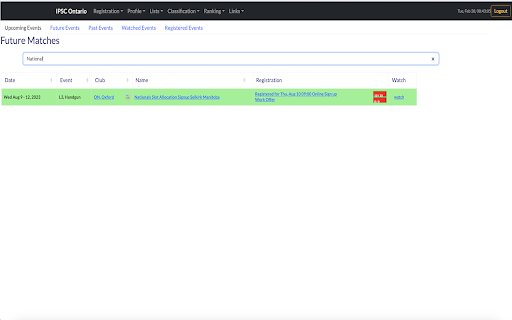
Simple UX enhancement for IPSC Ontario webpage, it only manipulate the UI.
currently add search and filter feature for you to look up matches easier.
Opensource code for you to check validlity and welcome contribution for future improvement as well.
https://github.com/kristophor/IPSC-Ontario-Chrome-Extension

Introducing the IPSC UX Chrome Extension, a tool designed to enhance your browsing experience on the IPSC Ontario website. This extension was developed to make your experience smoother and more user-friendly by providing a range of helpful features that improve your navigation, reduce distractions, and provide a more streamlined way to interact with the site.

With the IPSC UX Chrome Extension, you'll enjoy a cleaner and more efficient website interface that simplifies navigation and reduces clutter. The extension also optimizes page load times and helps you focus on the content that matters most, removing unnecessary elements that can distract from your browsing experience.

Features of the IPSC UX Chrome Extension include a customized Bootstrap 5.3 navbar that makes it easy to access different sections of the site, a search bar that allows you to quickly find what you're looking for, and a dropdown menu that provides quick access to important information. Additionally, the extension removes elements that are not needed, such as bullets and dropdown menus that cause conflicts with the Bootstrap 5.3 navbar.

Whether you're a new or frequent visitor to the IPSC Ontario website, the IPSC UX Chrome Extension is an indispensable tool that simplifies your browsing experience and makes it easier to access the information you need. Install the extension today and start enjoying a more streamlined, user-friendly website experience!
Technical
- Version
- 1.0
- Manifest
- V3
- Size
- 2.2MiB
- Min Chrome
- 88
- Languages
- 1
- Featured
- No
Metadata
- ID
- ebdepfacpnljdimjdbinpilpgkphkcjg
- Developer ID
- ufb074f894e0e29ccfa35028e406923b0
- Developer Email
- [email protected]
- Created
- Mar 1, 2023
- Last Updated (Store)
- Mar 1, 2023
- Last Scraped
- Jun 2, 2026
- Website
- —
- Privacy Policy
- —
Similar extensions
Alternatives to TP UX for IPSC Ontario, ranked by description similarity.

Advanced Search Quickly for Twitter
A Chrome extension for quickly searching Twitter.
140
★ 3.7

ChatGPT UI Settings
Chrome extensions for configuring and improving the usability of the ChatGPT user interface.
92
★ 5.0

Skills Highlighter For Linkedin And Indeed
Automatically highlights predefined Skills on linkedin/indeed job description.
47

WebEdit AI
Visually edit any website – hide, customize or add elements with AI assistance.
—

AISIS Prettify - Improved User Interface
An extension that aims to make AISIS easier to work with
589
★ 5.0

Extensions button
Opens Extensions tab in single click. Simple. Options available to change icon and add/remove context menu item
1.0K
★ 4.8

click
Click on frequently used hard-to-reach DOM elements fast without a single mouse click
59

blynk
Shows the trust rating of the website you are visiting.
13
Data sourced from the Chrome Web Store · last verified Jun 2, 2026.