SnackStats – Track Your Food Delivery Spending
It is your all-in-one Chrome extension to track and visualize spending patterns across Uber Eats, DoorDash, and SkipTheDishes.
As of June 2026, SnackStats – Track Your Food Delivery Spending has 111 users and a 5.00/5 rating from 1 reviews in the Shopping category.
Usersup 2.8 percent+2.8%
111
111
Ratingno change0%
5.00
1 reviews
Reviewsno change0%
1
Version
1.0.4
Manifest V3
History
3 snapshotsTracking since Apr 1, 2026.
View as table
| Date | Users | Rating | Reviews | Version |
|---|---|---|---|---|
| Apr 1, 2026 | 108 | 5.00 | 1 | 1.0.4 |
| May 3, 2026 | 118 | 5.00 | 1 | 1.0.4 |
| Jun 2, 2026 | 110 | 5.00 | 1 | 1.0.4 |
| Now | 111 | 5.00 | 1 | 1.0.4 |
Permissions & access
- Permissions
- activeTabscriptingtabsnotifications
- Host access
- *://*.ubereats.com/*, *://*.skipthedishes.com/*, *://*.doordash.com/*, *://snackstats-website.vercel.app/*
Screenshots
About
SnackStats is your go-to Chrome extension for uncovering and managing your food delivery habits. Whether you order from Uber Eats, DoorDash, or SkipTheDishes, SnackStats provides a comprehensive report detailing your spending patterns and favorite restaurants.

How to Use:

1. Log in: Make sure you're logged into your accounts on Uber Eats, DoorDash, and SkipTheDishes.
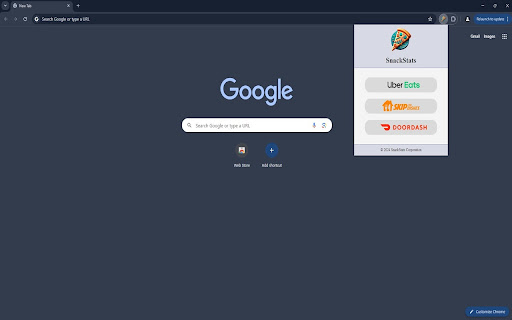
2. Click on SnackStats: Click the SnackStats extension icon located at the top of your browser.
3. Select an App: Choose the food delivery app (Uber Eats, DoorDash, or SkipTheDishes) whose stats you'd like to view.
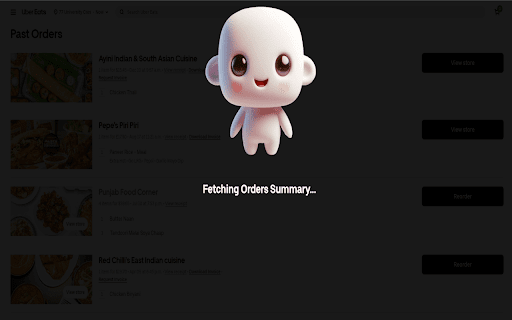
4. Relax and Wait: The extension will automatically open the app's order window and handle all scrolling to load your orders.
5. View the Report: Once the report is ready, a new tab will open with comprehensive insights into your order history.

Note:  If the extension does not function properly on the first attempt, please close the delivery tab and try running the extension again.

Features include:

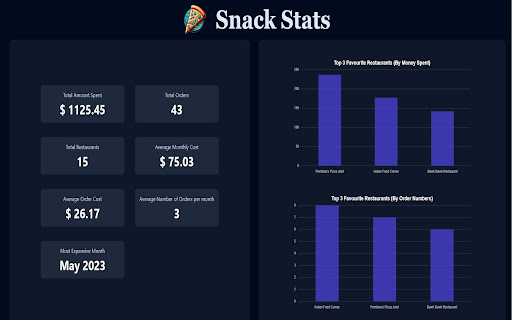
1. Total Spending Insights: Discover exactly how much you've spent across all apps and analyze trends over time.
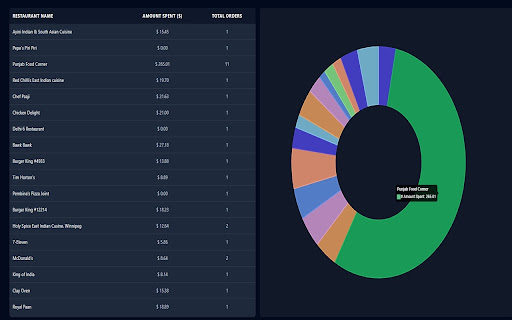
2. Favorite Restaurant Tracking: Identify your top restaurants by order frequency and spending.
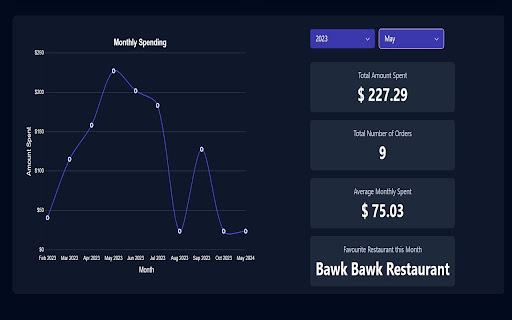
3. Annual & Monthly Breakdown: View annual and monthly stats to understand your eating habits and adjust as needed.
4. Favorite Restaurants by Month: See which restaurants were your favorites each month for more granular insights.
5. Pie, Bar, and Line Graphs: Visualize data with intuitive graphs and charts to make tracking simple and engaging.

Who can benefit from SnackStats?

1. Expense Managers: Users aiming to understand and control their delivery spending.
2. Data Enthusiasts: Explore your ordering trends with clear, detailed analytics.

Troubleshooting Tips:

1. Make sure your internet connection is stable and quick.
2. Restart Chrome if you've just installed the extension.
3. Close and reopen the app's order window if needed.


If you enjoy this extension, please leave a review in the comments and rate it!

With SnackStats, understanding your food journey is easier and more enjoyable than ever!
Technical
- Version
- 1.0.4
- Manifest
- V3
- Size
- 2.18MiB
- Min Chrome
- 88
- Languages
- 1
- Featured
- No
Metadata
- ID
- dpamdjimipnebihinoccnfehkohpeagh
- Developer ID
- u08998ee580494229d55371344b41a47c
- Developer Email
- [email protected]
- Created
- May 6, 2024
- Last Updated (Store)
- Jun 1, 2024
- Last Scraped
- Jun 2, 2026
- Website
- —
- Support URL
- —
- Privacy Policy
- —
Similar extensions
Alternatives to SnackStats – Track Your Food Delivery Spending, ranked by description similarity.

Zomato & Swiggy Spending Calc - Snackalytics
Analyse your orders on Swiggy and Zomato to get valuable metrics and insights on your eating and spending habits.
20.0K
★ 4.4

Eats Tracker
Detects and scrapes order data from Uber Eats Orders page.
601
★ 3.2

Spending Calculator for Swiggy™ and Zomato™
Zomato™ and Swiggy™ spending calculator to keep track of food expenses.
100.0K
★ 3.5

UberEats Stats
Shows Uber Eats spending insights
—

Carthole - Analyse spends on Blinkit, Instamart and Zepto
Track your spending on Zepto, Blinkit, and Swiggy Instamart with detailed analytics
329
★ 5.0
Swiggy Order Stats
An extension to analyze your online food order statistics through amazing visualizations. We currently support only Swiggy.
4.0K
★ 4.5

Relish Lunch Browser
Displays all meal options on Relish by ezCater with optional AI-powered nutritional analysis.
150
★ 5.0

Big Spender
Your Food Order Financial Companion
18
★ 5.0
Data sourced from the Chrome Web Store · last verified Jun 2, 2026.