
Spending Calculator for Swiggy™ and Zomato™
Zomato™ and Swiggy™ spending calculator to keep track of food expenses.
As of May 2026, Spending Calculator for Swiggy™ and Zomato™ has 100,000 users and a 3.50/5 rating from 244 reviews in the Shopping category.
Usersno change0%
100.0K
100,000
Ratingdown 0.3 percent−0.3%
3.50
244 reviews
Reviewsup 0.8 percent+0.8%
244
Version
1.7
Manifest V3
History
1 snapshotsTracking since May 19, 2026.
View as table
| Date | Users | Rating | Reviews | Version |
|---|---|---|---|---|
| May 19, 2026 | 100.0K | 3.51 | 242 | 1.7 |
| Now | 100.0K | 3.50 | 244 | 1.7 |
Permissions & access
- Permissions
- tabsstorageactiveTabnotifications
- Host access
- <all_urls>
Screenshots

About
In 2025, tracking your food expenses has never been easier! Track Food Expenses on Swiggy™ & Zomato™ Instantly!

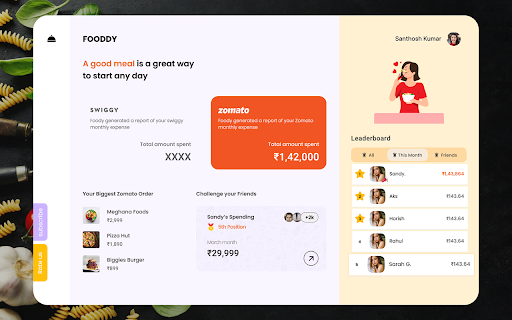
The Spending Calculator for Swiggy™ and Zomato™ is a handy Chrome extension for Swiggy expenses and food order tracker extension designed to help you monitor your food spending on India’s top food delivery platforms. Whether you’re looking to track food spending online, calculate your Swiggy™ expenses, or get insights into your total spending on Zomato™, this tool has got you covered. With just one click, you can calculate your expenditure, view year-wise data, and even uncover your top food orders. Perfect for those who want to budget food expenses and better understand their spending habits, this extension makes managing food expenses easy and transparent.


Key Features:

Calculate Total Spending: Instantly get a summary of all your orders and calculate Swiggy expenses or your total spending on Zomato.

Top Orders Insight: Displays the top 5 orders you’ve spent the most on using the Swiggy and Zomato expense calculator.

Year-wise Analysis: View spending trends by year to understand how your food habits evolve with this food expense tracker.

Real-Time Recalculation: Recalculate your spending total anytime for up-to-date information.


How to Use for Swiggy™:

Install & Pin: Add the Swiggy spending tracker extension and pin it to your Chrome browser.

Visit Swiggy™: Log in and navigate to the “My Orders” section.

Scroll: Scroll to load all orders or as many as you want.

Calculate: Click the extension icon and select “Find Total Spending” to use the Swiggy and Zomato expense calculator.


How to Use for Zomato™:

Install & Pin: Add the extension and pin it to Chrome.

Visit Zomato™: Log in and click “Find Total Spending” in the extension to use the Zomato spending calculator.

Wait a Moment: The calculation time depends on your order history volume.

This extension is a must-have for anyone looking to track food spending online, budget food expenses, or stay informed about their Swiggy™ and Zomato™ orders. Install now to take control of your spending habits.


FAQs:

1. What does the Spending Calculator for Swiggy™ & Zomato™ do?

This tool calculates your total spending on food orders made through Swiggy™ and Zomato™, offering insights into your expenses over time.

2. Does this extension work with other food delivery platforms?

Currently, it is designed specifically for Swiggy™ and Zomato™.

3. Is my spending data stored or shared?

No, all calculations are performed locally on your browser and are not stored or shared.

4. Does it work with the mobile versions of Swiggy™ and Zomato™?

No, this extension is compatible only with the desktop browser version.
Technical
- Version
- 1.7
- Manifest
- V3
- Size
- 1.07MiB
- Min Chrome
- 88
- Languages
- 1
- Featured
- No
Metadata
- ID
- dbbbhmnphepimpameepigkpjjnlpmjeg
- Developer ID
- u0369c279d5b5cf33efbdd37022cf26fb
- Developer Email
- [email protected]
- Created
- Sep 14, 2022
- Last Updated (Store)
- Jan 23, 2025
- Last Scraped
- May 19, 2026
- Website
- https://fooddy.in/
- Support URL
- —
Similar extensions
Alternatives to Spending Calculator for Swiggy™ and Zomato™, ranked by description similarity.

Zomato & Swiggy Spending Calc - Snackalytics
Analyse your orders on Swiggy and Zomato to get valuable metrics and insights on your eating and spending habits.
20.0K
★ 4.4

Carthole - Analyse spends on Blinkit, Instamart and Zepto
Track your spending on Zepto, Blinkit, and Swiggy Instamart with detailed analytics
329
★ 5.0

Eats Tracker
Detects and scrapes order data from Uber Eats Orders page.
601
★ 3.2
Swiggy Order Stats
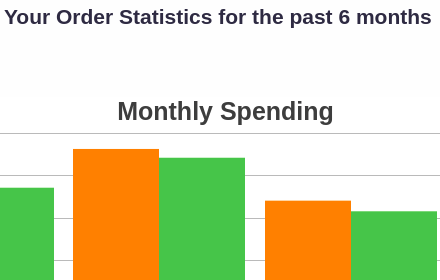
An extension to analyze your online food order statistics through amazing visualizations. We currently support only Swiggy.
4.0K
★ 4.5
SnackStats – Track Your Food Delivery Spending
It is your all-in-one Chrome extension to track and visualize spending patterns across Uber Eats, DoorDash, and SkipTheDishes.
111
★ 5.0

Foodpanda Spending Calculator
Track exactly how much you’ve spent on Foodpanda and see your top restaurants, items, and order stats
82
★ 5.0

Your last 1 year Myntra Wrap
Know your Myntra orders and much more for last year
540
★ 5.0

UberEats Stats
Shows Uber Eats spending insights
—
Data sourced from the Chrome Web Store · last verified May 19, 2026.