
Category Tabs for Google Keep™
Better organize your Google Keep notes
As of June 2026, Category Tabs for Google Keep™ has 70,000 users and a 3.94/5 rating from 376 reviews in the Workflow & Planning category.
Usersdown 12.5 percent−12.5%
70.0K
70,000
Ratingno change0%
3.94
376 reviews
Reviewsup 0.3 percent+0.3%
376
Version
20.14.1
Manifest V3
90-day change · In the last 90 days this extension lost 10.0K users, 1 version update.
History
7 snapshotsTracking since Apr 5, 2026.
View as table
| Date | Users | Rating | Reviews | Version |
|---|---|---|---|---|
| Apr 5, 2026 | 80.0K | 3.94 | 375 | 20.13.1 |
| Apr 16, 2026 | 70.0K | 3.94 | 375 | 20.13.1 |
| May 18, 2026 | 80.0K | 3.94 | 375 | 20.13.1 |
| Jun 1, 2026 | 80.0K | 3.94 | 375 | 20.14.1 |
| Jun 4, 2026 | 80.0K | 3.94 | 376 | 20.14.1 |
| Jun 6, 2026 | 80.0K | 3.94 | 375 | 20.14.1 |
| Jun 12, 2026 | 80.0K | 3.94 | 376 | 20.14.1 |
| Now | 70.0K | 3.94 | 376 | 20.14.1 |
Permissions & access
- Permissions
- menusscriptingstoragesidePanel
- Host access
- https://keep.google.com/*
Screenshots


About
Tired of wasting time looking look through and re-sorting all of your notes on Google Keep?

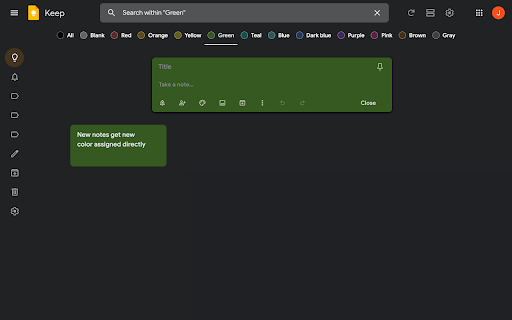
With Category Tabs for Google Keep™, you can now sort your new and existing notes by category. Each category represents one color. Adding a note to a category is very easy, just change the color of the note. When you want to view the notes you have sorted by color, simply click on the note color you wish to view. If you would like to view your you entire collection of notes/checklists, there is an “All” option next to the color options (this option is set by default).

Category Tabs for Google Keep™ seamlessly integrates into the page and the options to look at your notes/checklists in list view or gird view is still available. The ability to post a quick note/list/picture is still available as well and is still placed in the same spot as it usually is. This application supports all the colors offered by Google Keep.

You can access the settings by opening the menu in google keep, and hit "Customize Categories"
Technical
- Version
- 20.14.1
- Manifest
- V3
- Size
- 194KiB
- Min Chrome
- 88
- Languages
- 69
- Featured
- Yes
Metadata
- ID
- dlahcjmefibiedeecoegjilekaebchhl
- Developer ID
- u7dc0098f9a171a1590958cbb9d5a0783
- Developer Email
- [email protected]
- Created
- Aug 22, 2013
- Last Updated (Store)
- May 11, 2026
- Last Scraped
- Jun 12, 2026
- Website
- apps.jeurissen.co
- Privacy Policy
- https://apps.jeurissen.co/privacy-policy
Similar extensions
Alternatives to Category Tabs for Google Keep™, ranked by description similarity.

Tabs for Google Keep™
Customize Tabs by Color for Google Keep™
3.0K
★ 4.5

Customize Tabs for Google Keep™
Customize Tabs for Google Keep™
6.0K
★ 4.5

Auto Tab Groups
Automatically Set Your Tab Groups!
1.0K
★ 4.4
Web Auto Sorter
Automatically sorts and saves visited web pages links by their categories.
49
★ 5.0

TabGPT - Group/organize your tab with chatGPT
Keep your tabs organized effortlessly with TabGPT, it's free :
- Enter your own categories
- Click on 'classify my tabs'
226
★ 3.9

TabHue
Organize your browser tabs by categories with automatic color-coding. Upgrade to Pro for unlimited customization.
8
★ 5.0

DoTab: The Minimalist New Tab To-Do List
Remember everything, stay on track, and actually use your to-do list.
167
★ 5.0

Tabme — Tab & Bookmark Manager | Save, Organize & Sync Tabs
The easiest way to save, organize & sync your tabs.
10.0K
★ 4.5
Data sourced from the Chrome Web Store · last verified Jun 12, 2026.