
Auto Tab Groups
Automatically Set Your Tab Groups!
As of May 2026, Auto Tab Groups has 1,000 users and a 4.41/5 rating from 27 reviews in the Workflow & Planning category.
Usersno change0%
1.0K
1,000
Ratingdown 0.2 percent−0.2%
4.41
27 reviews
Reviewsup 3.8 percent+3.8%
27
Version
1.6
Manifest V3
History
2 snapshotsTracking since Apr 30, 2026.
View as table
| Date | Users | Rating | Reviews | Version |
|---|---|---|---|---|
| Apr 30, 2026 | 1.0K | 4.42 | 26 | 1.6 |
| May 27, 2026 | 1.0K | 4.42 | 26 | 1.6 |
| Now | 1.0K | 4.41 | 27 | 1.6 |
Permissions & access
- Permissions
- storagetabGroupstabs
- Host access
- None declared
Screenshots
About
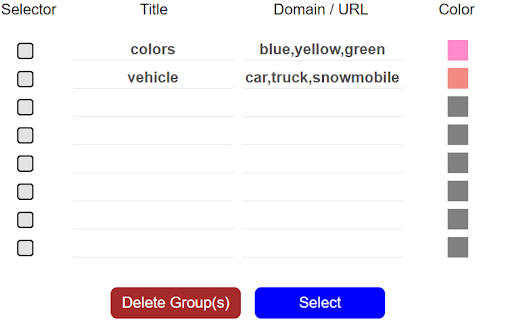
This extension allows you to set custom rules that then auto sort your tabs. IT does this using Google Tab Groups.  It lets you set up as many rules as you want.

To add a new rule click add group button and fill out the TITLE, Domain / URL and
COLOR fields. When you open the open extension the TITLE column will be the tab group name. The DOMAIN/ URL column will be the value searched in the website URL field that extension uses to sort the active tab. The COLOR column will be a box that when drop down is clicked allows the user to pick a color for the tab group. These preferences will be saved to users google profile when either the save button is clicked or delete button is confirmed  and work across multiple devices with extension under same profile.

In order to change or delete  a rule you must first check the checkbox for the row and click edit or delete.  If deleting values confirm the delete in delete window.  If editing values makes sure all fields in rows are checked are not blank, and that color box is not set to grey. Otherwise a warning message will display letting you know to set these fields.

The extension works as follows, say  you have the value Test1 in Name Column, test1 in URL column, and the box set to Blue. Any website URL you visit with test1 ex.(www.test1thisisatest.com) will be automatically sorted into a group named Test1.

You can also specify multiple terms to search with by separating them with commas. For instance, if you assign a group with TITLE column of Colors, and DOMAIN/ URL of blue, yellow, and green; any url you load with those search terms will go in the Tab Group Named Color.  The final column COLOR, is the color of this tab group that gets set.

By default the following keyboard shortcuts are enabled. You can use Ctrl+Shift+Y,  Ctrl+Shift+H, and Ctrl+Shift+U to close, open and toggle tab groups respectively. You can also change this by going to chrome://extensions/shortcuts as well.

There is a settings / options page you can get to by clicking the gear in the top right corner. Here you can enable a zoomed in view for larger font size and window for the popup window, change grouping from other windows behavior, and save and load your files from a local file on your computer.
Technical
- Version
- 1.6
- Manifest
- V3
- Size
- 81.35KiB
- Min Chrome
- 88
- Languages
- 1
- Featured
- Yes
Metadata
- ID
- nicjeeimgboiijpfcgfkbemiclbhfnio
- Developer ID
- uc250c6246e1c63a575216813e5fef3d1
- Developer Email
- [email protected]
- Created
- Nov 30, 2021
- Last Updated (Store)
- Jan 2, 2024
- Last Scraped
- May 27, 2026
- Website
- —
- Support URL
- —
- Privacy Policy
- —
Similar extensions
Alternatives to Auto Tab Groups, ranked by description similarity.

Advance Tab Groups
Auto tab group based on the url or regex
465
★ 4.3

Auto Group Tabs
Automatically group browser tabs by domain. Set custom domain rules and organize tabs into Chrome tab groups.
58
★ 1.0

Auto Tab Grouper
Automatically groups tabs by domain (supports wildcards, configurable via options/popup).
13

AutoTabGroup
Automatically add tabs to tab groups based on URL rules configured in the extension options
—
★ 5.0

Tab Group Helper
Allow quick grouping of tabs by their attributes like title or URL
351
★ 5.0

Tab Groupie
Groups your tabs by domain automatically.
25

Groupify
Group the tabs easily
5
★ 5.0

Tab Manager
Manage your tabs in groups
43
Data sourced from the Chrome Web Store · last verified May 27, 2026.