Web Auto Sorter
Automatically sorts and saves visited web pages links by their categories.
As of May 2026, Web Auto Sorter has 49 users and a 5.00/5 rating from 2 reviews in the Workflow & Planning category.
Usersup 8.9 percent+8.9%
49
49
Ratingno change0%
5.00
2 reviews
Reviewsno change0%
2
Version
1.0.2
Manifest V3
History
2 snapshotsTracking since Apr 25, 2026.
View as table
| Date | Users | Rating | Reviews | Version |
|---|---|---|---|---|
| Apr 25, 2026 | 45 | 5.00 | 2 | 1.0.2 |
| May 22, 2026 | 44 | 5.00 | 2 | 1.0.2 |
| Now | 49 | 5.00 | 2 | 1.0.2 |
Permissions & access
- Permissions
- storagescriptingtabs
- Host access
- http://*/*, https://*/*
Screenshots
About
Updates:
1.0.1 - Added functionality for handling multi-word category names effectively.
1.0.2 - Introduced an "edit" tab in the menu for editing, adding, or deleting category keywords. For quick access to the "edit" tab, a gear icon button has been added to the category button bar.

 Automatic Sorting of Web Pages is a Google Chrome extension that allows you to automatically sort your web pages by relevance and topic. With this extension, you no longer have to waste time manually organizing your bookmarks or searching through cluttered tabs. Extension analyzes the content of each page and assigns it to the appropriate category, making it easy for you to access the information you need quickly and efficiently.

Key features:
 * Customizable categories to suit your specific needs
 * Automatic categorization of web pages based on their content
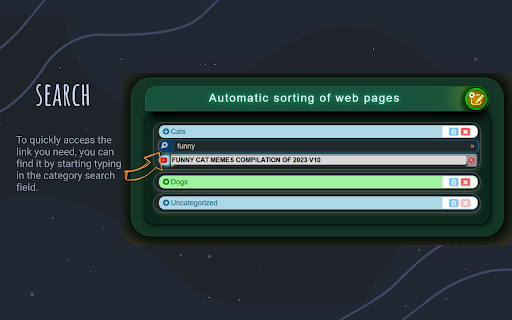
 * Searching inside categories
 * Simple and intuitive user interface

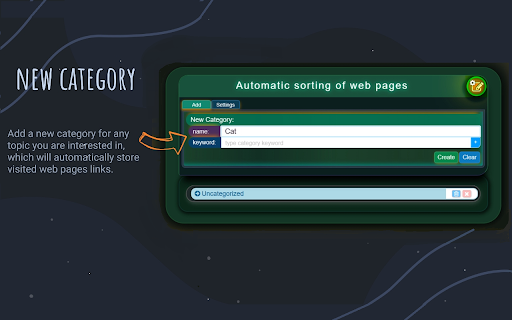
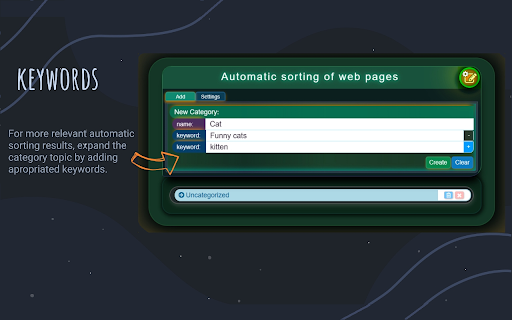
 Automatic Sorting of Web Pages provides the ability for users to create custom categories and add specific keywords to those categories. This means that you can tailor your web sorting experience to your unique needs and preferences.

 Within each category, you can also use a search field to quickly find specific links you need, thus reducing the number of links shown on the page.

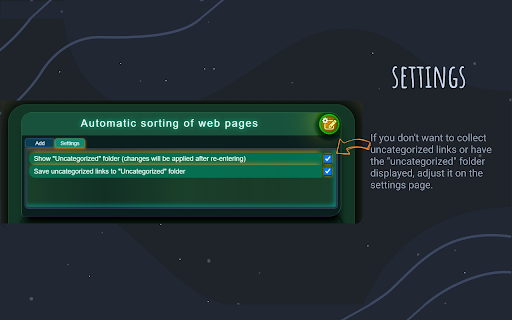
 Uncategorized links can be collected in the "uncategorized" folder, but if you don't want to collect them, you can select the appropriate option on the settings page.
 Also, if you don't want "uncategorized" folder to be displayed, you can choose whether or not to show it using the relevant option in the settings page.

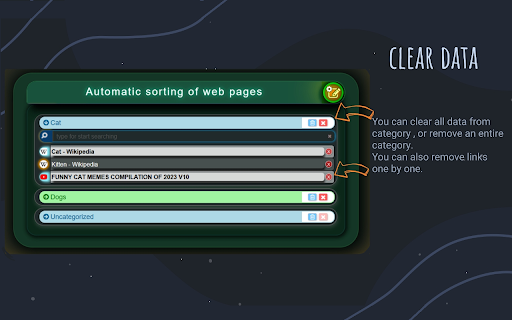
 In addition to sorting and searching for links, you can also delete unnecessary links, folders, or to clear folders without permanently deleting them.

 Automatic Sorting of Web Pages is the  solution for a streamline  searching of visited web pages, that provides added flexibility and convenience when managing your web content.Try it out and experience the benefits of automatic sorting.
Technical
- Version
- 1.0.2
- Manifest
- V3
- Size
- 28.29KiB
- Min Chrome
- 88
- Languages
- 1
- Featured
- Yes
Metadata
- ID
- fnnhckphilgigejoombgadgpjjhnfnao
- Developer ID
- u420ed022802de62b3f8de8a257f37ef9
- Developer Email
- [email protected]
- Created
- Mar 14, 2023
- Last Updated (Store)
- Apr 25, 2023
- Last Scraped
- May 22, 2026
- Website
- —
- Support URL
- —
- Privacy Policy
- —
Similar extensions
Alternatives to Web Auto Sorter, ranked by description similarity.

Tab Manager
Sort Tabs Alphabetically. Easily organize your open tabs in the browser window. Ideal for heavy tab users!
27
★ 5.0

Bookmark manager
Optimize your browsing with Bookmark Manager extension. Easily organize and manage bookmarks for a seamless browsing experience.
1.0K
★ 2.9

SuperSorter
Clean up your bookmark mess! Sort bookmarks automatically, delete duplicates, merge folders, etc.
80.0K
★ 3.5

Easy Bookmark Manager
Quick and easy bookmarks manager with categories, search and dark mode in Chrome side panel.
10

SortSites - Chrome Bookmarks Manager & Organizer
A personalized chrome bookmark manager and organiser
4

Smart Bookmark Organizer
Automatically categorize your bookmarks by keywords.
100
★ 4.1

AI Bookmark Copilot
Your intelligent assistant for managing, organizing, and finding your bookmarks using AI.
—
★ 4.3

Link Adder
This extension will send a link of current page to LinkAdder.com
12
★ 5.0
Data sourced from the Chrome Web Store · last verified May 22, 2026.