
SelAct
Select important text from the page, then apply Action!
As of May 2026, SelAct has 24 users in the Workflow & Planning category.
Usersdown 7.7 percent−7.7%
24
24
Ratingno change0%
—
— reviews
Reviewsno change0%
—
Version
0.5.8
Manifest V3
History
3 snapshotsTracking since Apr 1, 2026.
View as table
| Date | Users | Rating | Reviews | Version |
|---|---|---|---|---|
| Apr 1, 2026 | 26 | — | — | 0.5.8 |
| May 1, 2026 | 23 | — | — | 0.5.8 |
| May 30, 2026 | 27 | — | — | 0.5.8 |
| Now | 24 | — | — | 0.5.8 |
Permissions & access
- Permissions
- contextMenusstoragescripting
- Host access
- <all_urls>
Screenshots
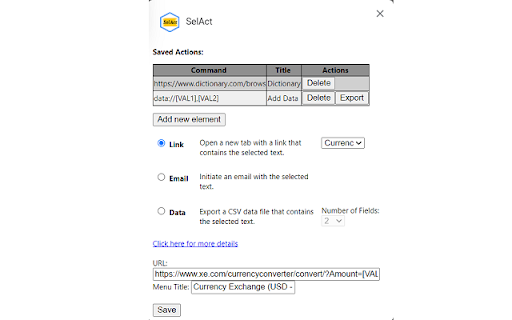


About
Use the context menu to select actions to apply to the selected text. Actions include search, exchange price, math equations, export data as csv, or pick from many other actions. Select text, right click, pick action and done!

The options page allows you to pick from predefined actions or create your own costume actions to increase your productivity. You can add costume URLs with replaceable values. Values are represented by placeholders such as: [VAL1], [VAL2], ... where [VAL1] is the first selected text, [VAL2] is the second selection, etc...
The extension will call the URL after replacing each [VALn] with selected texts.

Examples:
1- Use selected text to create a new event:
https://www.notely.tech/selactserv/events/create_event.php?text=[VAL1]

2- Use Google Translation service to translate the selected text [VAL1]:
https://translate.google.com/?sl=en&tl=es&text=[VAL1]&op=translate

2- Use your preferred email client to send an email using the first selection [VAL1] as the destination email address, [VAL2] as the email Subject and [VAL3] value as the email body:
mailto:[VAL1]?subject=[VAL2]&body=[VAL3]

3- Copy data and export as a file:
data://[VAL1],[VAL2],[VAL3]

4- Convert from Fahrenheit to Celsius:
fun://f_to_c([VAL1])

5- Apply math function to convert KG to LB:
math://[VAL1]*2.2046226218

6- Use pre-defined variables:
- [$page_title$] Use page title.
- [$page_url$] Use page URL.
- [$current_date_time$] Use current data and time.
Example:
mailto:[VAL1]?subject=[$page_url$]&body=[VAL2]

Changelog:

v0.5.8:
Remove unnecessary "Notifications" permission.

v0.5.7:
Fix a bug that changes the current tab for the "mailto" action. Now the current tab is preserved.

v0.5.6:
Allow the extension to work without reloading current pages after new upgrade/installation.

v0.5.5:
Improved selection code that avoids some failures.

v0.5.4:
Change notifications to appear inside the page.
Fix a bug related to identifying numbers.
Added Free Text link.

v0.5.1:
Added actions to support math equations.
Improved stability.

v0.5.0:
Fixed an issue that causes context menu options to disappear.
Added functions feature, which allows users to pick from a set of predefined functions.

v0.4.0:
Remove the limit on number of actions.
Allow selections in text fields.

v0.3.0:
Added multiple actions support (up to 3 ietms).

v0.2.0:
Added GUI to help the user to create actions with pre-existing examples.

v0.1.2:
Add export data capability.
Technical
- Version
- 0.5.8
- Manifest
- V3
- Size
- 26.73KiB
- Min Chrome
- 88
- Languages
- 1
- Featured
- Yes
Metadata
- ID
- dhjmekhbbnemhcpgfonhojhonidobcna
- Developer ID
- u31ec11d6f34945ac60e33c10b2eaa206
- Developer Email
- [email protected]
- Created
- Dec 9, 2022
- Last Updated (Store)
- Dec 10, 2023
- Last Scraped
- May 30, 2026
- Website
- —
- Support URL
- —
- Privacy Policy
- —
Similar extensions
Alternatives to SelAct, ranked by description similarity.

Text Tools
Collection of small & convenient TEXT tools.
322
★ 5.0

Tiny Text Replacer
Make some queries and run them all to replace characters of entered text.
23

QuickOWL
Quickly Open Web Links using custom contextmenu with selected text as input
166

Quick Translate
This extension provides quick translation of selected texts
30.0K
★ 3.7

Speech Recognition Anywhere
Use Voice Recognition to fill out forms and dictate email with speech to text. Control the Internet with custom voice commands!
30.0K
★ 3.8

ProKeys
Save time and effort in emails, etc. with ProKeys! Define snippets, do math in browser, auto complete braces, and much more.
70.0K
★ 4.4

Expandify - Text Expander & Snippet Manager
Smart text expansion tool. Type shortcuts to instantly create emails, code snippets & formatted text. Save time typing!
10

Edition Mode
Enable an edition mode to modify any text in a web page.
5
Data sourced from the Chrome Web Store · last verified May 30, 2026.