
ProKeys
Save time and effort in emails, etc. with ProKeys! Define snippets, do math in browser, auto complete braces, and much more.
As of May 2026, ProKeys has 70,000 users and a 4.38/5 rating from 221 reviews in the Workflow & Planning category.
Usersno change0%
70.0K
70,000
Ratingno change0%
4.38
221 reviews
Reviewsdown 0.5 percent−0.5%
221
Version
4.0.2
Manifest V3
History
1 snapshotsTracking since Apr 29, 2026.
View as table
| Date | Users | Rating | Reviews | Version |
|---|---|---|---|---|
| Apr 29, 2026 | 70.0K | 4.38 | 222 | 4.0.2 |
| Now | 70.0K | 4.38 | 221 | 4.0.2 |
Permissions & access
- Permissions
- tabsstoragecontextMenusclipboardReadoffscreenscripting
- Host access
- <all_urls>
Screenshots


About
Never waste a second on repetitive typing and the tedium of copy-paste again. Impress your boss and colleagues with a spike in your productivity!

This user-friendly text expander lets you save largish text expansions and associate them with short abbreviations. We support plain or styled text, local and sync browser storage, clipboard macros, date and time macros, dynamic value fields in expansions, dynamic math, omnibox support, and much more!

Your words-per-minute will skyrocket, your colleagues will swoon at your productivity, online drudgery of the corporate world won't touch you, and you'll never bother with the Herculean task of right-click, copy, go-somewhere-else, right-click...

For more info, visit the Help section inside the app, or watch the promo video on this page.

⋆Snippets⋆ - expand abbreviations
Define custom abbreviations, and expand them by simply pressing the hotkey (default: Shift+Space). It can be even a full-length email to your customer! Example: "brb" can expand to "Be right back!" Think of these as "canned responses".

⋆Placeholders⋆ - fields (inside snippets) which can be given dynamic values on using the snippet. Example: snippet "wishBday", which you can use to wish your friends Happy Birthday! Since the name of the friend keeps changing, so you can add a placeholder in the snippet body, as "%name%" (without quotes). It'll be auto-highlighted whenever you use the snippet and you can type your friend's name into it.

⋆Mathomania⋆ - do math without leaving your text editor, and without calculators. Simply type the math expression inside the `[[` and `]]` and press `=` to get the results. (watch the promo video for details) Parentheses and exponentiation is also supported.
Example: "[[ 15% * 600 =]]" gives "90" and "[[ (5+6) * 15^2 =]]" gives "2475".

⋆Omnibox support⋆ - use the keyword "pk" to directly expand snippets inside of the omnibox/address bar.

⋆Clipboard access⋆ - use [[%p]] anywhere in your snippet body, it is auto-replaced with the current clipboard data.

⋆Date/Time Macros⋆ - embed short symbols (inside a snippet body) which are auto-replaced their current date and time. Multiple date and time formats are supported.

⋆Date/Time Arithmetic⋆ - can be used to move forward or backward in time in the date and time macros. Supports both relative and independent evaluation of the symbols.

⋆Variables⋆ - quickly type date, time, browser version without having to leave your text editor or look at the clock!

⋆Auto-Insert⋆ - Quotes ('"') and braces - ( { [ -are auto-completed, and you can specify your custom insert-it-for-me symbols as well (like, inserting a '>' on typing of a '<') in the settings.

⋆Tab Key⋆ - can be used to insert 4 spaces, instead of its default function, thus speeding up your work.

Notes:
- All your data is stored on your PC (or synced across your Chrome sign-ins) and nothing is sent to any external servers! Check the source code if you wish to - https://github.com/GaurangTandon/ProKeys
- You can disable ProKeys for particular websites in the Settings.
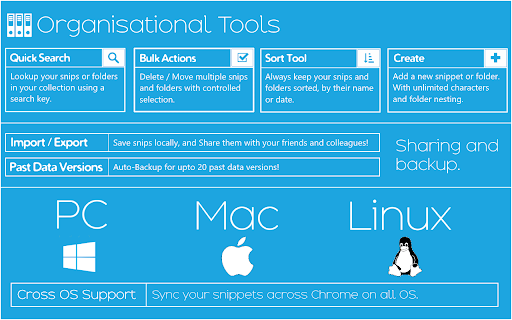
- You can take a backup of your data, restore it, and print it as well.
- You are sure of not losing your data as ProKeys stores (on your PC) past 20 revisions of your data.
- You can switch between Sync and Local storage.

Note that the following few web apps are known to be incompatible:
1. Facebook (only comments and profile posts)/Messenger/Quora - uses improper text editor.
2. Google Docs - as it is a full-fledged editor itself. (But Google Docs comments section works)

Contact me at [email protected] if you know of a dynamic web app that's missing from the list above, or to give feedback.

Also note that the input of type email and number do not support caret manipulation so ProKeys can't function there (and neither does it work in password fields, for obvious reasons).

ProKeys developed with ♥ by - Gaurang Tandon and Varun Singh
Technical
- Version
- 4.0.2
- Manifest
- V3
- Size
- 417KiB
- Min Chrome
- 120
- Languages
- 1
- Featured
- Yes
Metadata
- ID
- ekfnbpgmmeahnnlpjibofkobpdkifapn
- Developer ID
- u3064221d6d8dbe14330f34e06642dd01
- Developer Email
- [email protected]
- Created
- Jun 24, 2014
- Last Updated (Store)
- Jun 27, 2024
- Last Scraped
- May 26, 2026
- Website
- —
Similar extensions
Alternatives to ProKeys, ranked by description similarity.

CrosKeys by CrosExperts
Unlock your Chromebook's potential with a powerful keyboard launcher!
225
★ 5.0

Expandify - Text Expander & Snippet Manager
Smart text expansion tool. Type shortcuts to instantly create emails, code snippets & formatted text. Save time typing!
10

Snippet Manager PRO
Save and quickly insert frequently used text snippets
81
★ 5.0

SnippetSync-AI
Save snippets, expand text with shortcuts, sync across devices. Type faster, work smarter.
4

Prompt Locker Pro
Manage, organize, and quickly insert prompts.
10
★ 5.0

Makro - Text Expander: Free, Private, Encrypted
Free text expander with Smart Rewrite, encrypted cloud sync, and 25+ placeholders. Create shortcuts that expand instantly anywhere.
127
★ 5.0

AutoFlow: Text Expander & Snippets Autofill
Lightning-fast text snippets & autofill. Insert saved templates anywhere with one shortcut.
31

Typing Helper | Free Typing Shortcuts Assistant
Write and track text shortcuts anyplace, anywhere. Get 5 free shortcuts on us!
153
★ 5.0
Data sourced from the Chrome Web Store · last verified May 26, 2026.