
Text Tools
Collection of small & convenient TEXT tools.
As of June 2026, Text Tools has 322 users and a 5.00/5 rating from 1 reviews in the Workflow & Planning category.
Usersdown 3.0 percent−3.0%
322
322
Ratingno change0%
5.00
1 reviews
Reviewsno change0%
1
Version
0.1.7
Manifest V3
History
15 snapshotsTracking since Apr 1, 2026.
View as table
| Date | Users | Rating | Reviews | Version |
|---|---|---|---|---|
| Apr 1, 2026 | 332 | 5.00 | 1 | 0.1.7 |
| Apr 16, 2026 | 338 | 5.00 | 1 | 0.1.7 |
| Apr 22, 2026 | 323 | 5.00 | 1 | 0.1.7 |
| Apr 27, 2026 | 329 | 5.00 | 1 | 0.1.7 |
| May 2, 2026 | 330 | 5.00 | 1 | 0.1.7 |
| May 7, 2026 | 324 | 5.00 | 1 | 0.1.7 |
| May 11, 2026 | 326 | 5.00 | 1 | 0.1.7 |
| May 14, 2026 | 339 | 5.00 | 1 | 0.1.7 |
| May 19, 2026 | 329 | 5.00 | 1 | 0.1.7 |
| May 23, 2026 | 338 | 5.00 | 1 | 0.1.7 |
| May 28, 2026 | 327 | 5.00 | 1 | 0.1.7 |
| Jun 2, 2026 | 309 | 5.00 | 1 | 0.1.7 |
| Jun 6, 2026 | 318 | 5.00 | 1 | 0.1.7 |
| Jun 10, 2026 | 330 | 5.00 | 1 | 0.1.7 |
| Jun 22, 2026 | 320 | 5.00 | 1 | 0.1.7 |
| Now | 322 | 5.00 | 1 | 0.1.7 |
Permissions & access
- Permissions
- storage
- Host access
- None declared
Screenshots

About
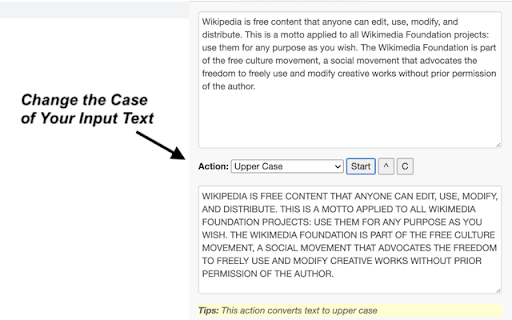
Sometimes you need to finish some simple tasks on text processing: change the case of free text, reverse a string, remove duplicate lines, or encode / hash text data. This extension can help you get them done easily.

Just paste what you want to process, and click on start button, then wait for the result to come out. It is fast and effective!

25 functions are available for now and more will be added to the extension in a regular basis.

- Lower Case: converts text to lowercase
- Upper Case: converts text to uppercase
- Title Case:  capitalizes first character of each word
- Count Characters: returns the number of characters in text
- Count Words: returns the number of words in text
- Count Lines: returns the number of lines in text
- Character Frequency: returns character frequency in descending order
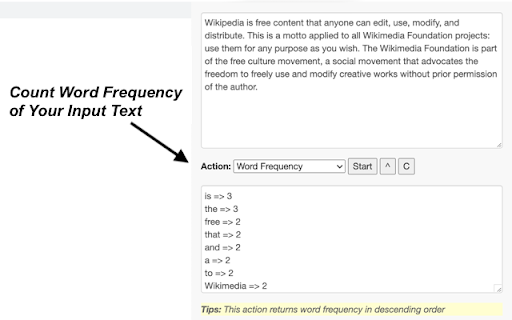
- Word Frequency: returns word frequency in descending order
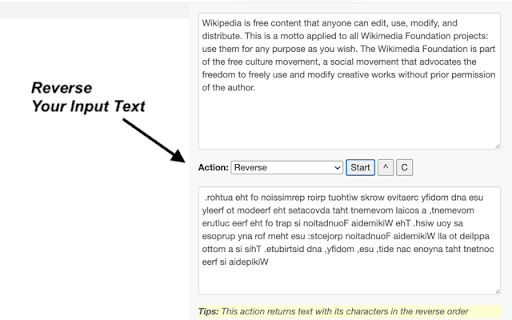
- Reverse: returns text with its characters in the reverse order
- Shuffle: returns text with its characters in a randomized order
- Trim Line Start: removes whitespace from the beginning of each line
- Trim Line End: removes whitespace from the end of each line
- Trim Line: removes whitespace from both ends of each line
- Add Line Number: counts lines and add the number to each line
- Remove Empty Lines: removes empty lines from text
- Remove Duplicate Lines: remove duplicates of any line from text
- Strip HTML: strips all html tags from text
- URL Encode: converts text to URL-encode format
- URL Decode': converts URL-encoded data to original text
- Base64 Encode: converts text to Base64-encode format
- Base64 Decode: converts Base64-encoded data to original text
- MD5 Hash: generates the MD5 hash of text
- SHA1 Hash: generates the SHA1 hash of text
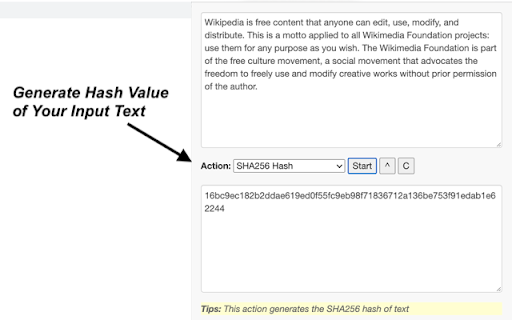
- SHA256 Hash: generates the SHA256 hash of text
- SHA512 Hash: generates the SHA512 hash of text

Enjoy the ease of use offered by our text tools! Additionally, we've provided links to other tool extensions we've developed, including JSON, XML and ChatGPT, for your convenience.

CHANGELOG
==========
Version 0.1.4 - 0.1.7
- Add new features
- Update the list of more tools
- Update google analytics

Version 0.1.3 - 2023-04-06
- Refine plugin title and description

Version 0.1.1 & 0.1.2 - 2022-09-01
- Update plugin features and summary

Version 0.1.0 - 2021-11-10
- Add 25 handy text tools
Technical
- Version
- 0.1.7
- Manifest
- V3
- Size
- 83.31KiB
- Min Chrome
- 88
- Languages
- 1
- Featured
- Yes
Metadata
- ID
- gldnpappladoiccncpcekahipkockdee
- Developer ID
- u946104ce77e1ee8064ecc6e47a99e833
- Developer Email
- [email protected]
- Created
- Nov 11, 2021
- Last Updated (Store)
- Mar 15, 2026
- Last Scraped
- Jun 22, 2026
- Website
- tools.cheerai.co
- Support URL
- https://tools.cheerai.co/contact-us/
- Privacy Policy
- https://tools.cheerai.co/privacy-policy/
Similar extensions
Alternatives to Text Tools, ranked by description similarity.

JSON Tools
Collection of small & convenient JSON tools.
1.0K
★ 4.5

XML Tools
Collection of small & convenient XML tools.
2.0K
★ 5.0

CSV Tools
Collection of small & convenient CSV tools.
198

Rephrase Tools
Write Confidently & Rephrase Effortlessly
68
★ 5.0

All-in-One Data Toolbox
Collection of handy Text/XML/JSON/CSV tools and more.
34

Change Case
Multiple methods to change text case.
80.0K
★ 4.5

SmartCase Pro
Smart Way to Format Your Words
6

AI ON THE GO
Get instant, personalized AI assistance on any website with AI ON THE GO, powered by ChatGPT. Streamline your workflow today!
104
Data sourced from the Chrome Web Store · last verified Jun 22, 2026.