
Super Snippets Dan
A powerful snippet manager with instant expansion and clipboard integration
As of May 2026, Super Snippets Dan has 10 users and a 5.00/5 rating from 2 reviews in the Accessibility category.
Usersdown 16.7 percent−16.7%
10
10
Ratingno change0%
5.00
2 reviews
Reviewsno change0%
2
Version
1.7
Manifest V3
History
3 snapshotsTracking since Apr 1, 2026.
View as table
| Date | Users | Rating | Reviews | Version |
|---|---|---|---|---|
| Apr 1, 2026 | 12 | 5.00 | 2 | 1.7 |
| Apr 21, 2026 | — | 5.00 | 2 | 1.7 |
| May 6, 2026 | 11 | 5.00 | 2 | 1.7 |
| Now | 10 | 5.00 | 2 | 1.7 |
Permissions & access
- Permissions
- storagecontextMenusscriptingclipboardWriteactiveTabtabsnotifications
- Host access
- <all_urls>, https://*.google.com/*, https://*.googleusercontent.com/*, https://*.wikipedia.org/*, https://*.wikimedia.org/*, https://translate.google.com/*, https://translate.googleapis.com/*
Screenshots


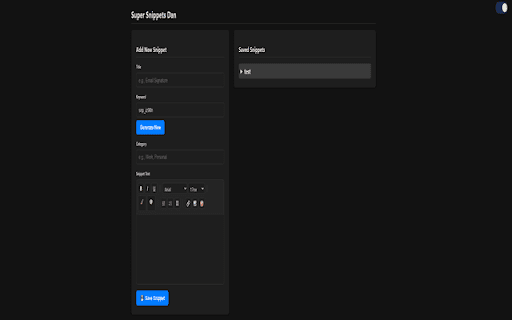
About
Super Snippets Dan is a powerful Chrome extension that transforms your text expansion and snippet management experience. Create, organize, and instantly insert formatted text snippets across any website with advanced features designed for productivity.
✨ Key Features
📝 Smart Text Expansion
Keyword-triggered expansion - Type your custom keyword and watch it transform into your full snippet
Real-time detection - Works instantly as you type in any text field
Universal compatibility - Functions across all websites and web applications
Format preservation - Maintains colors, bullets, numbering, bold, italic, and all text formatting
🎨 Rich Text Editor
Full formatting toolbar with bold, italic, underline, strikethrough
Color customization - Font color and highlight color tools
List creation - Bullet points and numbered lists
Format clearing - One-click removal of all formatting
Live preview - See your formatting as you create
📂 Intelligent Organization
Category system - Organize snippets into custom categories
Smart search - Find snippets instantly by title, keyword, content, or category
Collapsible categories - Clean, organized view with expandable sections
Quick access - Popup interface for fast snippet management
⚡ Multiple Insertion Methods
Keyword expansion - Type and expand automatically
Context menu - Right-click to insert snippets anywhere
Copy to clipboard - One-click copying with format preservation
Dashboard management - Full-featured editing interface
⏰ Timer & Alarm System
Customizable timer - Set countdown timers with custom messages
Repeat functionality - Set recurring alarms (every X minutes)
System notifications - Desktop alerts with custom messages
Background operation - Works even when dashboard is closed
Visual countdown - Real-time timer display
🎨 Beautiful Interface
Dark/Light themes - Automatic theme switching with custom logos
Animated elements - Dynamic Earth/Moon logos with floating animations
3D title effects - Eye-catching gradient animations
Responsive design - Works perfectly on all screen sizes
Modern UI - Clean, intuitive interface design
🔄 Advanced Management
Import/Export - Backup and restore your snippets
Bulk operations - Delete all snippets with one click
Duplicate prevention - Automatic keyword conflict detection
Cross-device sync - Chrome sync integration
Real-time updates - Instant synchronization across tabs
�� Technical Features
Chrome Extension Manifest V3 - Latest security standards
Storage sync - Automatic cloud backup
Permission optimization - Minimal required permissions
Performance optimized - Fast, lightweight operation
Error handling - Robust error recovery and user feedback
🎯 Use Cases
Email templates - Quick response snippets with formatting
Code snippets - Programming templates and boilerplate
Documentation - Frequently used text blocks
Customer support - Standard response templates
Note-taking - Quick formatted notes
Time management - Productivity timers and reminders
�� Unique Features
Format preservation - Unlike other extensions, maintains all text formatting
Smart search - Intelligent category-based search system
Timer integration - Built-in productivity timer with notifications
Animated interface - Engaging visual elements that adapt to theme
Universal compatibility - Works on any website without restrictions
�� Perfect For
Content creators - Quick formatted text insertion
Developers - Code snippet management
Customer service - Response template library
Students - Note-taking and study timers
Professionals - Email and document templates
Anyone who wants to save time with text expansion
This extension transforms how you work with text on the web, combining powerful snippet management with beautiful design and practical productivity tools. Whether you're a power user or just getting started, Super Snippets Dan provides everything you need for efficient text expansion and time management.
Technical
- Version
- 1.7
- Manifest
- V3
- Size
- 170KiB
- Min Chrome
- 88
- Languages
- 1
- Featured
- No
Metadata
- ID
- dgpnmagcdgiikkpgcnhmodcgbphoffpk
- Developer ID
- uc3082bb81cf8b50ffebad8390784bb56
- Developer Email
- [email protected]
- Created
- Jul 21, 2025
- Last Updated (Store)
- Sep 1, 2025
- Last Scraped
- May 31, 2026
- Website
- —
- Support URL
- —
- Privacy Policy
- —
Similar extensions
Alternatives to Super Snippets Dan, ranked by description similarity.

Super Clipboard Manager - Copy Paste History
Clipboard manager & copy paste history tool. Save, search, pin, tag & export text snippets. Free, private, works on every site.
1.0K
★ 4.5

Text Pro - Smart Text Processing Browser Extension
Smart text tools: Copy-Paste Enabler and UI/UX demo for text processing.
19

Smart Clipboard Manager
A professional clipboard manager with advanced features and modern UI
2

Ask Me AI
The power of AI on every web page.
30

Quick URL Copy
A simple and fast extension to copy URLs with various formatting options.
13

Click to Copy - Unified Content Grabbing
A focused tool to instantly capture any web content—text, links, or image files—using a single Alt+Click gesture.
3

Text Expander
Shorthand abbreviations expand to full text.
99
★ 3.5

Smart Clip - Clipboard History and Manager
Never lose copied text again.
Smart Clip is a fast, lightweight, and privacy-first clipboard history manager for Chrome.
It…
33
★ 5.0
Data sourced from the Chrome Web Store · last verified May 31, 2026.