
Ask Me AI
The power of AI on every web page.
As of June 2026, Ask Me AI has 30 users in the Accessibility category.
Usersup 57.9 percent+57.9%
30
30
Ratingno change0%
—
— reviews
Reviewsno change0%
—
Version
0.9
Manifest V3
History
5 snapshotsTracking since Apr 1, 2026.
View as table
| Date | Users | Rating | Reviews | Version |
|---|---|---|---|---|
| Apr 1, 2026 | 19 | — | — | 0.9 |
| Apr 21, 2026 | 20 | — | — | 0.9 |
| May 6, 2026 | 24 | — | — | 0.9 |
| May 18, 2026 | 28 | — | — | 0.9 |
| Jun 1, 2026 | 29 | — | — | 0.9 |
| Now | 30 | — | — | 0.9 |
Permissions & access
- Permissions
- tabsscriptingsidePanelstorageactiveTabttsunlimitedStorage
- Host access
- <all_urls>
Screenshots


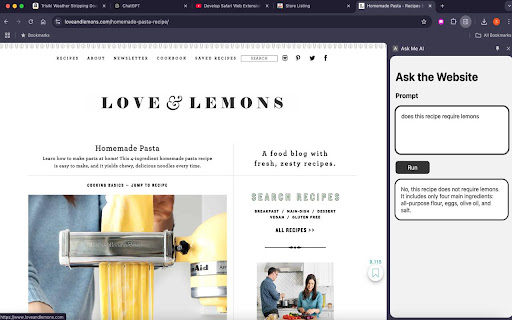
About
🌟 Introducing Your Ultimate Web Companion! 🌟
💡 Summarize Any Webpage & Ask Follow-Up Questions Instantly

🚀 Transform your browsing experience with this powerful Chrome extension! Whether you’re a student, professional, or avid reader, this tool saves you time by providing concise summaries of any webpage and letting you engage with the content like never before.

Why Choose This Extension?
🔎 Quick Page Summaries
No need to sift through endless text! Our smart algorithm condenses articles, blogs, research papers, and news into easy-to-read summaries, highlighting key points instantly.

💬 Ask Follow-Up Questions
Got questions about what you read? No problem! Our tool lets you ask intelligent follow-ups to clarify details, dive deeper, or simplify complex topics.

🌍 Works on Every Website
From news platforms to scientific journals, social media posts to e-commerce pages, this extension works seamlessly everywhere.

🌈 Perfect for All Audiences

Students: Get summaries of textbooks, articles, or research papers to save study time.
Professionals: Digest reports, presentations, and articles faster.
Casual Readers: Enjoy brief summaries of blogs, news, or trending stories.
Key Features
✔️ Real-Time Summarization: Lightning-fast summaries for any webpage you visit.
✔️ AI-Powered Q&A: Type in your questions about the content and get accurate answers in seconds.
✔️ Customizable Output: Adjust summary length and style to suit your needs—short and snappy or detailed and comprehensive.
✔️ Multilingual Support: Summarize and query content in multiple languages.
✔️ History & Bookmarking: Save summaries and questions for later reference.

How It Works
1️⃣ Install the Extension: Add the extension to Chrome with just one click.
2️⃣ Open a Webpage: Visit any site—be it news, blogs, research, or more.
3️⃣ Summarize Instantly: Click the extension icon to get a concise summary.
4️⃣ Ask Questions: Type in questions to dive deeper into the content.
5️⃣ Save or Share: Download summaries or share them with your peers.

Who Is This For?
🌟 Students & Researchers: Speed up learning and save valuable time on research.
🌟 Journalists & Writers: Quickly grasp the gist of articles and sources.
🌟 Professionals & Executives: Stay updated with reports, emails, and industry news.
🌟 Casual Browsers: Read more in less time—perfect for keeping up with the latest trends.

Why You’ll Love This Extension
✨ Time-Saving: Save hours of reading and research every day.
✨ Intuitive Design: Clean, user-friendly interface for everyone.
✨ AI at Your Fingertips: Advanced algorithms ensure accuracy and relevance.
✨ Privacy-Focused: We respect your privacy—no unnecessary data collection.

Frequently Asked Questions
Q: Does it work on all websites?
A: Yes! The extension is designed to work on most public web pages.

Q: Is it free to use?
A: The basic features are free. Premium options offer advanced tools and extra capabilities.

Q: Can it handle technical content?
A: Absolutely! It’s designed to simplify even the most complex subjects.

Keywords
🔑 Webpage summary, article summarizer, content analysis, AI question answering, intelligent summaries, fast reading, AI content assistant, multilingual summarizer, productivity tool, research assistant, online learning, Chrome extension for summaries.

📥 Download Now
Ready to boost your productivity and enhance your reading experience? Get the extension today and discover a smarter way to browse the web!

🔗 Add to Chrome | 📧 Support | 🌟 Rate Us
Technical
- Version
- 0.9
- Manifest
- V3
- Size
- 1.97MiB
- Min Chrome
- 88
- Languages
- 1
- Featured
- No
Metadata
- ID
- gklffjdeiibigmhhllbikpkgnganjcjj
- Developer ID
- ub1f61e7a2c812d26feacc491e5441e20
- Developer Email
- [email protected]
- Created
- Jan 9, 2025
- Last Updated (Store)
- May 22, 2025
- Last Scraped
- Jun 1, 2026
- Website
- —
- Support URL
- https://www.sendsmiles.biz/terms-of-service
- Privacy Policy
- https://www.sendsmiles.biz/privacy-policy
Similar extensions
Alternatives to Ask Me AI, ranked by description similarity.

Summarize it!
Too lazy to read the whole web page? Just summarize and explain it.
20
★ 5.0

QuickBite - Read, Learn & Save Faster
QuickBite refines and optimizes the content on the web page and helps you Read, Learn & Save Faster.
8
★ 5.0

Web2Audio
Convert any webpage into an AI-powered audio summary with premium text-to-speech voices
99
★ 5.0

Share by ChatGPT
A browser extension summarize web pages with ChatGPT for easy sharing on social media.
11

Chrome Reader Mode
Try Chrome Reader Mode – the easiest-to-use website reader. Enjoy comfortable reading with our eco-friendly reader mode.
4.0K
★ 4.7

Text Pro - Smart Text Processing Browser Extension
Smart text tools: Copy-Paste Enabler and UI/UX demo for text processing.
19

Explain It to Me - AI Text Simplifier
Transform complex text into clear explanations with AI - from beginner to expert level
22
★ 4.6

Super Snippets Dan
A powerful snippet manager with instant expansion and clipboard integration
10
★ 5.0
Data sourced from the Chrome Web Store · last verified Jun 1, 2026.